What should you consider when choosing?
First, map out all your wired connections, including the uplink to your router. Then choose the speed you need and decide whether you really need VLAN management or PoE.
| What to consider |
What should you check? |
Who is this important for? |
| Ports and speed |
Count your cluster devices and uplink, and note the Ethernet speed of each connected device. |
I want to connect my mini PCs and storage without misjudging the number of ports or the speed I need; around 36% of consumers prioritise ports and throughput. |
| VLAN management |
Decide whether you’ll set up VLANs and check which network ports support the connections you need. |
I want to be able to separate lab traffic and am happy to spend time configuring it; around 29% of consumers give VLAN management top priority. |
| Noise and size |
Compare the dimensions with the space available, check whether the switch has a fan and allow for the power supply. |
I’m placing the switch close to my workspace, so quiet operation and a suitable footprint matter a lot; around 21% of consumers share this priority. |
| PoE power |
Check which connected devices support PoE and how much power they need in total. |
I want to power compatible network devices through their Ethernet cables; around 14% of consumers prioritise this PoE requirement. |
Joybuy products for wired homelab connections
This selection includes gigabit and 2.5GbE switches, including models with PoE. Check that each model’s speed, management features and power options suit your cluster.
 No image available
TP-Link TL-SG105, 5-port metal gigabit switch
A good fit for a simple gigabit network expansion; remember that the router connection uses one of the five ports.
Five 10/100/1000 Mbps ports; the product name specifies a metal casing.
View at Joybuy
 No image available
TP-Link 5-port gigabit desktop PoE switch
A good fit if you want to power compatible network devices over PoE as well as connect them at gigabit speed.
The product name specifies five gigabit ports and PoE. Check your devices’ PoE requirements before choosing a model.
View at Joybuy
 No image available
TP-Link 8-port gigabit Easy Smart switch with 4 PoE ports
A good fit if you want to connect several gigabit devices and also use compatible PoE devices.
The product name specifies eight gigabit ports, Easy Smart and four PoE ports. Check that its management features and PoE capabilities meet your needs.
View at Joybuy
 No image available
Linksys unmanaged 5-port PoE switch, 2.5 Gb
A good fit for a wired network with compatible multi-gig devices and PoE equipment.
The product name specifies five ports, 2.5 Gb, unmanaged operation and PoE. Check which connected devices need PoE.
View at Joybuy
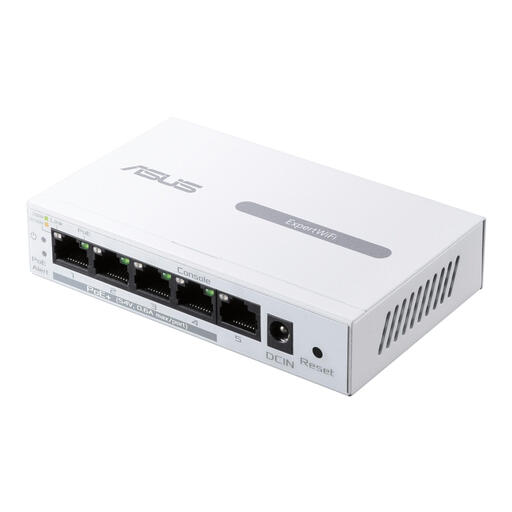 No image available
ASUS ExpertWiFi EBP15 managed gigabit Ethernet PoE, white
A good fit for a gigabit network where you want a managed switch with PoE.
The product name specifies managed gigabit Ethernet (10/100/1000), PoE and a white finish. Check which management features and PoE capabilities you need.
View at Joybuy
Frequently asked questions
Can I connect an unmanaged switch between my router and cluster devices?
Yes. Connect the power supply, plug one port into the router and connect your devices to the other ports. This follows Linksys’ installation instructions for unmanaged models. VLANs also require the switch and network equipment to be configured appropriately.
Can my existing network cable support 2.5GbE?
QNAP says that 2.5GbE is possible with existing Cat 5e cables for the QSW-1105-5T. Also check the network ports on your connected devices and the condition of your own cabling; QNAP’s information doesn’t measure your connection.
How can I make a switch work well on a small desk?
Keep ventilation openings clear and check the dimensions, fan and space needed for the power supply in advance. According to MikroTik, the CRS310-8G+2S+IN has one fan; TP-Link describes the TL-SG105 as fanless.
Do my statutory rights end when the manufacturer’s warranty expires?
No. For consumer purchases in the Netherlands, statutory guarantees are separate from manufacturer’s warranties. According to ACM ConsuWijzer, the expected lifespan depends on the product; if it develops a fault too soon under normal use, the seller is responsible for putting things right.
Which EU product rules might apply to a switch?
That depends on the rules that apply to the product. The European Commission cites rules on electromagnetic compatibility and restrictions on hazardous substances, among others. CE marking is only required for products covered by applicable harmonised EU rules; where it applies, the manufacturer declares that the product meets the requirements. CE marking is not an independent performance certification.


