
Vandaag of morgen in huis

Kwaliteit gegarandeerd

Welkomstaanbiedingen ontgrendelen: GRATIS bezorging | Tot 80% korting | Gratis 30 dagen JoyPlus-proefperiode
Download de app
A home-working desk needs to do more than look tidy in a product photo. It should fit your room, provide enough space for a monitor and keyboard, and remain stable during everyday use. For home workers, students, school pupils, gamers and small business owners, cable management and storage space are also important considerations.
The following pitfalls are common:
For a standard workspace with one monitor, a computer desk approximately 80 cm wide is often suitable. If you work with two screens, a laptop or lots of documents, you will need more surface area. Check the depth too. A worktop of around 50 cm is compact, while a larger surface allows more distance between your eyes and the screen.
A compact desk is useful for a student bedroom or small home office, but offers less room for peripherals. An L-shaped corner desk makes better use of a corner and can create several work zones.
A desk height of around 75 cm is standard, but the right choice depends on your chair and height. Check that your forearms can rest approximately horizontally while you type. Adjustable feet are useful on uneven floors and help reduce wobbling.
Pay attention to the material used for the frame. Steel can provide a solid base, while a chipboard tabletop is affordable and relatively lightweight. With a product made from E1 chipboard, E1 refers to a formaldehyde emission class. It is not a guarantee of a particular service life, so always follow the product information and care instructions.
A desk with drawers or a desk with storage helps prevent cables, papers and accessories from taking over the worktop. Do not just look at the number of drawers; consider their placement too. Four drawers on the wrong side could obstruct your walking route.
For a desktop computer, it is also important that the worktop and frame can support the combined weight of the monitor, PC and accessories. The load capacity of the compact writing desk below, for example, is listed as a maximum static load of 50 kg. This is a verifiable specification, but always distribute heavy equipment evenly.

Why it suits this profile: Measuring 80 x 50 x 76 cm, this compact writing desk takes up little space and is suitable for studying, writing or everyday computer use in a smaller room.
The exact dimensions and maximum static load of 50 kg are stated. This allows you to check in advance whether your monitor and accessories will fit.
Steel frame, adjustable feet and a well-organised worktop. The brown and black finish suits a simple home office.
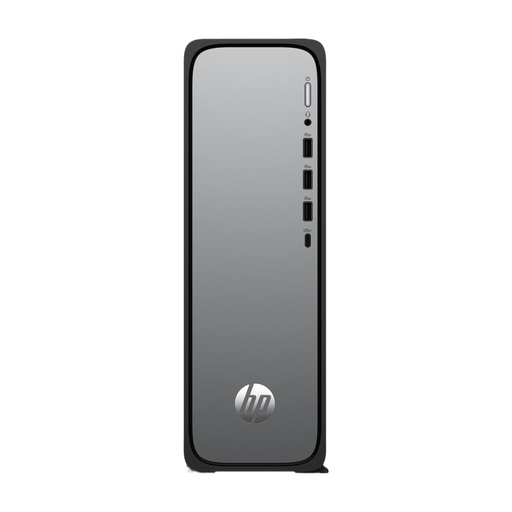
Why it suits this profile: This HP desktop PC is designed for everyday work, browsing the internet, media use and organising files without a large computer tower beside your desk.
According to the product specification, the case is 10 cm deep. However, check that your monitor and the necessary cables will fit. Also note that the charger is no longer included as standard.
512 GB PCIe Gen4 NVMe SSD, 8 GB DDR5 memory, Windows 11 Home and Wi-Fi 6. The PC also has HDMI, USB-A, USB-C and Gigabit Ethernet.

Why it suits this profile: Measuring 150 x 110 x 75 cm, the L-shaped design provides two worktops for multiple computers, laptops, documents or a separate study area.
According to the product description, the drawers can be fitted on either the left or right. This makes the layout more flexible than a desk with a fixed corner.
Two open shelves, four drawers, a metal frame and adjustable feet. The E1 chipboard and included assembly components are listed in the product specification.
Measure the available wall and legroom before buying. Leave space behind the desk for cables and ventilation. Do not place a slim computer directly against a wall if this would cover the ventilation openings. A compact model such as the HP can sit on or beside the desk, depending on how much legroom you need.
For everyday use, keep the following points in mind:
A desk with drawers is particularly practical when documents and accessories need to be kept out of sight. If you only use a laptop, a simple writing desk may be sufficient. If you use several devices, a computer desk or corner desk with a well-organised layout will be more suitable.
We have compiled a complete, up-to-date list of products that fully meet these strict selection criteria and the applicable European safety regulations.
For a laptop and one monitor, approximately 80 x 50 cm may be sufficient. For two screens, a desktop computer and documents, a larger worktop or corner desk is more practical. Also measure the available space behind and beside the desk.
Its service life depends on the materials, assembly, load and maintenance. A metal frame can provide stability, but the screws may need checking over time. Use the desk within its stated load capacity and avoid prolonged overloading.
Power consumption depends on processor load, monitor and usage time. The stated product specifications do not include a complete power consumption overview. If energy costs are a deciding factor for you, check the energy label or technical documentation. Switch the PC off or use sleep mode when you do not need it.
