
Vandaag of morgen in huis

Kwaliteit gegarandeerd

Welkomstaanbiedingen ontgrendelen: GRATIS bezorging | Tot 80% korting | Gratis 30 dagen JoyPlus-proefperiode
Download de app
A home security camera can help you keep an eye on your front door, garden, living room, nursery or garage. However, a model packed with features isn’t automatically right for your home. A camera might boast a high resolution, yet still deliver unclear footage in low light. What’s more, subscription costs and limited Wi-Fi compatibility may only become apparent after purchase.
So pay particular attention to these common pitfalls:
For general monitoring, 1080p can be sufficient. A 2K security camera offers more pixels and can therefore show finer detail. This advantage is particularly noticeable when the camera isn’t too far from the subject. A wide field of view prevents blind spots, but can make objects at the edges appear smaller.
When choosing a camera with night vision, consider the type of lighting:
A camera with motion detection can send a notification to your phone when movement is detected. Check whether the camera distinguishes between people, vehicles, pets and general movement. Otherwise, trees, shadows and passing headlights can cause unnecessary alerts.
Also check:
Features such as person detection or package detection are claims from the manufacturer’s product information. So treat them as available features of the model, not as guaranteed error-free recognition.
A Wi-Fi security camera connects to your home network. 2.4GHz often has greater range through walls, while 5GHz typically offers higher data speeds over shorter distances. Some models support both bands; others only work with one frequency.
When it comes to storage, there are three common options:
A wireless security camera usually runs on a battery or via a power adapter. An outdoor camera with a battery requires less cabling, but does need to be recharged periodically. With a doorbell camera, a stated battery life can vary depending on notifications, live views, temperature and Wi-Fi signal.

Why this fits the profile: This indoor camera is designed for basic monitoring in, for example, a hallway, living room or nursery. The app, motion alerts and local storage make the features straightforward for a first-time installation.
The product description mentions 1080p, night vision up to 9 metres, motion alerts and support for a microSD card up to 128GB. Do check whether the card needs to be purchased separately.
Pan-tilt range, two-way audio, night vision and local storage. The camera works indoors via Wi-Fi and supports Android and iOS.
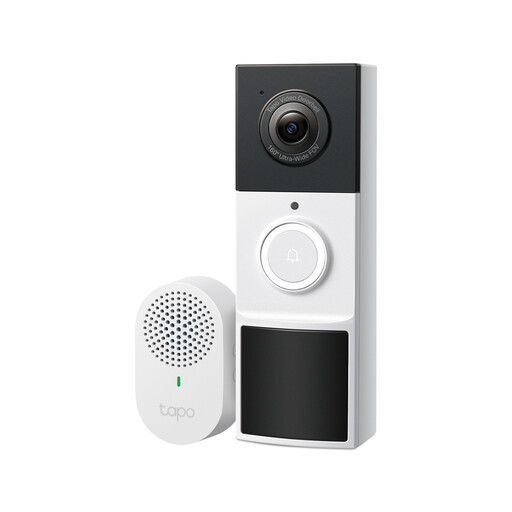
Why this fits the profile: This doorbell camera is aimed at homes where keeping an eye on visitors and packages is the priority. The 160° viewing angle and 2K resolution are well suited to use around the front door.
The product specifications list local storage via microSD up to 512GB alongside optional cloud storage. This means you can decide in advance how you want to save footage and check whether a subscription is required.
2K video, colour night vision with spotlight, two-way audio, PIR motion sensor and IP65 for outdoor use.
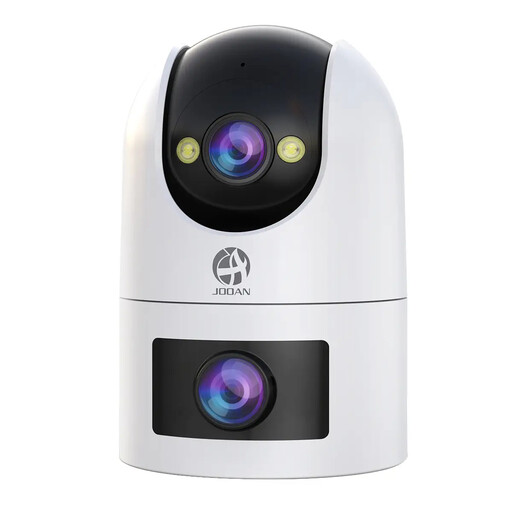
Why this fits the profile: This indoor or outdoor camera suits users who want to monitor multiple areas, such as a garden, driveway, pet space or children’s room.
The product description states support for 2.4GHz and 5GHz Wi-Fi, local recording up to 256GB and an app with multiple camera views. Check the range and desired storage duration in advance.
Dual lens, 360° view, two-way audio, motion and sound detection, colour night vision and IP66 water resistance according to the product specifications.
We’ve put together a full, up-to-date list of products that fully meet these strict selection criteria and comply with current European safety regulations.
Position your camera so that you film as little public space or your neighbours’ property as possible. Use privacy zones if the app offers that function. Inform housemates and visitors where appropriate, and don’t keep footage longer than necessary. Also check the mounting location, Wi-Fi coverage and power supply before you start drilling or sticking.
For an outdoor camera, a suitable IP rating, sturdy mounting and protection of cable connections are important. An IP65 or IP66 rating comes from the product specification; always check the installation instructions too. Tenants can opt for a model with adhesive mounting or a window camera, such as a model that, according to the product description, can be installed without drilling.
That depends on the model. An indoor camera with a power adapter and app is generally straightforward to set up. An outdoor camera or doorbell camera requires more attention to mounting height, weather protection and Wi-Fi range. Follow the manual and first check whether the camera works with your frequency band.
The storage time depends on resolution, recording mode and storage capacity. Motion clips take up less space than 24/7 recordings. A 128GB or 256GB microSD card can fill up more quickly with continuous recording than with alerts only. Also check whether old footage is automatically overwritten.
In addition to the purchase price, costs can arise for a microSD card, additional power accessories or cloud storage. Local storage can help keep recurring subscription costs down. With a wireless model, you also need to factor in charging or eventual battery replacement.
