
Home worker with a weak signal
Your downloads are slow or keep dropping out in your home office. You want to know whether a repeater placed somewhere with a usable router signal can extend coverage to that room.


If the Wi-Fi signal is weak mainly in your home office, and there’s a spot between the router and that room where the signal is still usable, a well-positioned repeater may help. If you have an Ethernet cable running to your home office, compare it with an access point connected via that cable. If several rooms have poor coverage, a compatible mesh system may be a good option. First check whether your internet connection itself is the bottleneck and whether the mesh feature you want works with your router.
Your downloads are slow or keep dropping out in your home office. You want to know whether a repeater placed somewhere with a usable router signal can extend coverage to that room.
You also want to improve coverage in other rooms and find out whether extending your existing network is a suitable option.
You can connect to your home office by cable and want to compare an access point connected via that cable with wireless repeating.
Start by finding a spot where the signal is still usable. Then decide whether wireless repeating, a cable or extending coverage to several rooms best suits your needs.
| What to consider | What should you check? | Who is this important for? |
|---|---|---|
| Coverage in your home office | Find a spot between the router and the room where the router signal is usable, then check download speeds in your home office. | If downloads are slow or keep dropping out mainly in my home office, I want to know whether the connection will improve there. Around 31% of consumers give top priority to coverage in one home office. |
| Several rooms and mesh | Check the exact router model, repeater version and supported mesh feature. | If other rooms also have poor coverage, I want an extension that works with my existing router. Around 25% of consumers prioritise coverage in several rooms and compatibility. |
| Wired connection | Check whether there’s a working Ethernet cable running to the room and whether the model supports access point mode. | If I already have a cable running to my home office, I want to use it rather than rely on a wireless connection back to the router. Around 19% of consumers choose mainly based on whether they can use an existing cable. |
| Security and maintenance | Check the security settings available, firmware support and compliance information for the version on offer. | If I add another device to my home network, I want to know how to set it up and keep it updated securely. Around 13% of consumers prioritise network security and maintenance. |
| Number of Wi-Fi points and power consumption | Match the number of devices to the rooms with poor coverage and compare their stated energy use. | If I mainly want to cover one home office, I don’t want to use more Wi-Fi points than necessary. Around 12% of consumers pay most attention to the number of devices needed and their power consumption. |
A repeater also needs a usable connection to the existing network. So a socket in the spot with the weakest signal isn’t necessarily a suitable location.
First find a spot between the router and your home office, then check the connection in the room.
If there’s no suitable spot for a wireless connection, a wired access point may be an alternative.
A mesh label doesn’t prove that a repeater offers the same mesh features with every router. The features supported may also depend on the hardware version.
Before buying, check the router model, repeater version and the mesh feature the manufacturer lists for that combination.
You may need a different router or a compatible Wi-Fi point to get the mesh feature you want.
A Wi-Fi standard or stated speed doesn’t tell you how fast downloads will be in your home. Placement and the connection to the router also play a part.
Compare the connection options and test the signal where you work.
TP-Link describes the RE705X as a Wi-Fi 6 repeater with a gigabit port and access point mode, suitable for a single area or compatible mesh expansion.
The FRITZ!Repeater 1200 AX is worth considering if you want to extend a FRITZ! network or are looking for a compact repeater with a LAN connection.
devolo describes the WiFi 6 Repeater 3000 as suitable for use as a repeater or access point.
The EAX15 is a compact Wi-Fi 6 mesh extender with an Ethernet port for extending an existing network.
This selection includes wireless repeaters, wired access points and a mesh system. For each model, check that the connection options and compatibility with your router suit your home office.
 No image available
A wireless repeater for extending an existing Wi-Fi network.
2.4 GHz; up to 300 Mbps; WPA-PSK and WPA2-PSK.
The stated maximum speed isn’t a measured download speed in your home office.
 No image available
A wired access point for providing Wi-Fi in a home office with an Ethernet connection.
Wi-Fi 6; one gigabit Ethernet port; PoE+; suitable for wall or ceiling mounting.
This setup requires a wired network connection to the device.
 No image available
A repeater for extending an existing network at home or in a small office.
Wi-Fi 6; dual-band on 2.4 and 5 GHz; gigabit Ethernet port.
 No image available
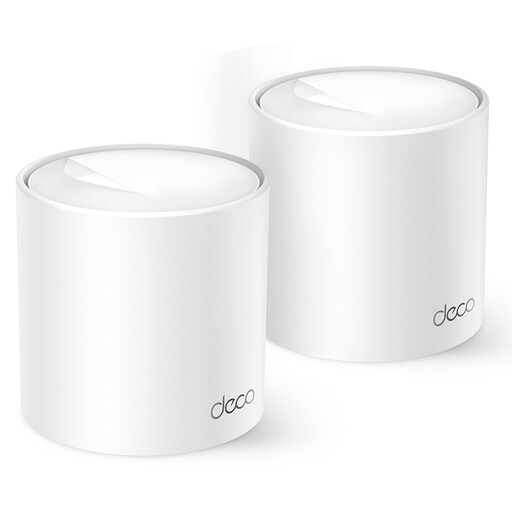
A mesh system for extending coverage to areas with a weak signal using several Wi-Fi points.
Wi-Fi 6; dual-band on 2.4 and 5 GHz; two nodes; two gigabit Ethernet ports.
The stated compatibility applies to other Deco models and doesn’t confirm that the system offers mesh features with any router.
 No image available
An access point or repeater for anyone with a wired connection or looking to repeat an existing Wi-Fi signal.
2.4 GHz up to 300 Mbit/s; 10/100 Mbit/s Ethernet port; passive PoE.
The passive PoE setup described requires a compatible PoE power supply. The stated maximum speed isn’t a measured download speed in your home office.
Place the repeater between the router and your home office, somewhere the router signal is still usable. A signal indicator or app can help you find the right spot. Then check the connection in your home office.
No, Wi-Fi 6 doesn’t automatically guarantee faster downloads in your home office. The receiving device also needs to support that Wi-Fi standard, and the standard alone can’t predict performance in your home.
If a product is faulty, you can contact the seller to ask for a solution. According to the Dutch government, when buying remotely from a business you’ll often also have a 14-day cooling-off period; the Netherlands doesn’t have a fixed statutory two-year guarantee period for all products.
According to the Dutch Authority for Digital Infrastructure, you don’t need a licence for normal home Wi-Fi use if you use the designated frequencies and follow the conditions of use. Equipment sold in the Netherlands must also meet the relevant European product requirements, including CE requirements.