
Listeners with a small desk
You want to hear music close to your workspace without giving up too much desk space. Check the size, power supply and connections of a compact set.


If you mainly listen at your computer, start with a compact desktop speaker set and check that the connection is compatible with your computer. Wi-Fi may be a better choice for music in several rooms, while a rechargeable Bluetooth model makes more sense if you move your speaker around often. Consider the space required, power supply and any installation needs: these vary by speaker type.
You want to hear music close to your workspace without giving up too much desk space. Check the size, power supply and connections of a compact set.
You want to use your computer as your main music source and perhaps switch between your computer and phone. Compare the USB, analogue and Bluetooth connections offered by the specific model.
You want to hear music further from your desk, play it in other rooms or take your speaker with you. Decide whether a home Wi-Fi set-up or a rechargeable Bluetooth model better suits where you listen.
Best for: listening at your desk, close to your monitor. Creative lists USB-C audio and Bluetooth for the Pebble V3; Logitech lists Bluetooth and a 3.5 mm input for the Z207.
Bear in mind: two separate speakers both need space. Also check that the connection and, for USB-C audio, the available power supply are suitable for your computer.
Best for: a workspace with room for two speakers and different types of audio source. Edifier lists Bluetooth, RCA/AUX, optical and coaxial connections for the R1280DB.
Bear in mind: the space available and the cable between the speakers. Having more connections does not automatically make a set more convenient for a small desk.
Best for: listening at home over Wi-Fi or extending your music to more rooms. Sonos lists both Wi-Fi and Bluetooth for the Era 100.
Bear in mind: the described Era 100 set-up requires Wi-Fi, the Sonos app and mains power. Sonos lists a separate line-in adapter for an analogue source.
Best for: taking your music beyond the home office. The JBL Flip 6 is a rechargeable example of this type.
Bear in mind: it still needs charging. JBL states a maximum play time of 12 hours; this is the manufacturer’s figure, not a guaranteed play time at every volume or in every situation.
| What to consider | What to check before buying | Who is this important for? |
|---|---|---|
| Desk space and placement | Check the dimensions and whether you have room for one or two speakers. | If I want to listen to music close to my monitor, I need a set that fits on my desk. Around 40% of consumers give desk space their top priority. |
| Connection to your music source | Compare your computer’s outputs with the speaker’s stated inputs. | If my computer is my main music source, I need a connection that actually works with both devices. Around 30% of consumers prioritise computer compatibility. |
| Music away from your workspace | Decide whether listening in several rooms matters to you and check the app, Wi-Fi and power requirements. | If I also want to hear music further from my desk, I look at what is needed to set this up. Around 20% of consumers prioritise listening in several rooms. |
| Moving and charging | Think about how often you will take the speaker with you, and treat the stated battery life as a maximum rather than a guaranteed duration. | If I want to use the speaker in different places, portability matters more to me than a fixed set-up. Around 10% of consumers put portability first. |
Bluetooth describes a wireless connection, but does not in itself tell you whether a speaker runs on a battery. Sonos describes a mains-powered set-up for the Era 100, while the JBL Flip 6 uses a battery.
Check the power supply and placement requirements for the exact model before you choose.
Connections vary by model. Sonos lists a separate line-in adapter for connecting an analogue source to the Era 100.
Compare your music source’s output with the inputs on the specific model. Check whether you need a suitable adapter for an analogue connection.
You may need a suitable adapter for an analogue source, so check this before finalising your set-up.
JBL’s stated maximum of 12 hours for the Flip 6 is a manufacturer’s figure, not a measurement for every use case.
Choose a battery-powered model for the freedom to take it with you, rather than basing your decision solely on the maximum play time.
The Pebble V3 is a compact 2.0 desktop speaker set with USB-C audio and Bluetooth.
The Z207 is a stereo set for computer use, with Bluetooth and a 3.5 mm analogue input.
The R1280DB is an active stereo set for a two-speaker set-up and different types of audio source.
The Era 100 is a home speaker with Wi-Fi, Bluetooth and the option to extend your system to other rooms.
The Flip 6 is a portable Bluetooth speaker for anyone who wants to take their music beyond the home office.
These Joybuy products are designed for listening to music at a computer or desk, and for portable listening over Bluetooth.
 No image available
A portable Bluetooth speaker for listening to music beyond your workspace.
Bluetooth 5.0; output power 16 W; IPX7 water resistance.
No image available
A portable Bluetooth speaker for listening in different places.
Bluetooth 5.4; IPX7 water resistance. Close the port cover before exposing it to water, and dry the port before charging.
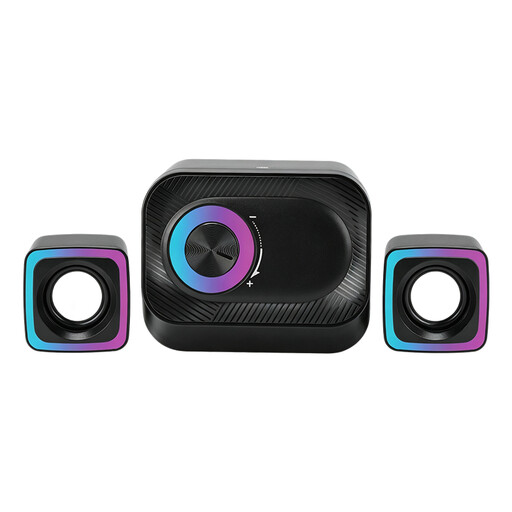 No image available
A wired set for listening to music at a PC workstation.
The description lists two satellite speakers and a main unit.
 No image available
A compact stereo set for listening to music at your desk.
Dimensions per speaker: approximately 72 × 73 × 65 mm; RGB lighting.
 No image available
A desktop set for playing music on a desk or shelf.
Dimensions per speaker: approximately 120 × 72 × 88 mm; coloured LED lighting.
That depends on the connections available on both devices. Logitech lists Bluetooth and a 3.5 mm input for the Z207; Creative also lists USB-C audio for the Pebble V3. Check which connections your computer supports and what power supply your chosen set-up requires.
Sonos describes a set-up using mains power, Wi-Fi and the Sonos app. For an analogue audio source, Sonos lists a separate line-in adapter.
When you buy online as a consumer from a business, you generally have a 14-day cooling-off period, according to the Dutch government. In the Netherlands, you are also entitled to a product that is fit for purpose; there is no fixed statutory warranty period of two years. If there is a fault, contact the seller.
Simply calling a room a ‘home office’ does not determine this. BumaStemra describes a licence for music played in a workplace and for business background music that others can hear. The information provided does not give a definitive answer about listening at home solely for personal use; if you use music for business and other people can hear it, check which terms apply.