Choose a desktop set if you mainly play music from your computer and have the space; choose a Wi-Fi speaker for control via your home network and an app, or a portable Bluetooth speaker if you move it between rooms. Before buying, check the connections, any cables or adapters you need, the space on your desk, and whether network or app set-up is required. Extra features alone don’t determine whether a speaker is suitable for quiet background music.
Who is this relevant to?
Someone with a permanent computer set-up
You play music from your computer and want to check in advance that the connections and controls are right for you. Logitech lists Bluetooth and a 3,5mm input for the Z207; Edifier lists several types of input for the R1280DB.
Someone who listens at home using a music app
You want to control music in a fixed spot at home, so you’re comparing Wi-Fi, Bluetooth and the set-up process for an app-controlled speaker. Sonos describes the Era 100 as having Wi-Fi and Bluetooth; check which set-up and app suit the way you’ll use it.
Someone who moves between workspaces
You want to take your background music with you to another room, so you’re looking for a portable option. JBL positions the Flip 7 as a portable Bluetooth speaker; if you choose a battery-powered model, remember that it will need charging.
What should you consider when choosing?
Desktop speakers
Suitable if: you mainly play music from your computer and have room for two speakers.
Bear in mind: a permanent set needs space and cables.
Wi-Fi speaker
Suitable if: you have a permanent spot, a mains socket and a suitable home network for control via an app or service.
Bear in mind: network and app set-up; Sonos says the Era 100 must first be set up over Wi-Fi.
Portable Bluetooth speaker
Suitable if: you want to use the speaker in other rooms too.
Bear in mind: charging; JBL quotes up to 16 hours for the Flip 7 with Playtime Boost, but this isn’t a fixed playtime for every setting.
| What to consider |
What should you check? |
Who should pay particular attention? |
| Connecting to your work computer |
Check which outputs your computer has and whether they’re compatible with the speaker; also consider the space and cables the set requires. |
If I play music from my work computer, I want to get started without unnecessary connection steps. Around 36% of consumers prioritise connecting to a computer. |
| Playing music over your home network |
Check that your preferred service and network are compatible, and find out what app set-up is needed. Sonos requires the Era 100 to be set up over Wi-Fi first. |
If I want to control music from an app in a fixed spot, I consider the network and set-up. Around 29% of consumers prioritise streaming at home. |
| Moving between workspaces |
Check the size, charging method and playback options. JBL’s quoted maximum playtime for the Flip 7 applies when using Playtime Boost. |
If I work in different places, I want to take my background music with me and am happy to charge the speaker as part of using it. Around 21% of consumers prioritise portability. |
| Controls and privacy |
Decide whether you want physical controls or app features. The Dutch Data Protection Authority advises checking the privacy statement and security of connected devices. |
If I mainly want simple controls or want to choose which connected features I use, that affects my decision. Around 14% of consumers prioritise controls or privacy. |
What to watch out for when buying
-
Assuming Bluetooth always works straight away
Sonos says the Era 100 must first be set up over Wi-Fi using the Sonos app before you can use it as a Bluetooth speaker.
Check the initial set-up steps for the exact model and make sure your home network is available.
-
Assuming a USB-C port is a direct 3,5mm input
Sonos says a separately sold adapter is needed for the Era 100’s 3,5mm line-in, so its USB-C connection isn’t itself a direct 3,5mm input.
Compare your audio source’s outputs with the speaker’s connections, and check which cable or adapter you need.
This model requires a separate Sonos adapter for an analogue 3,5mm connection.
-
Treating the quoted battery life as a fixed playtime
JBL quotes up to 16 hours for the Flip 7 with Playtime Boost. That figure doesn’t guarantee the playtime you’ll get with other settings.
Choose a battery-powered model for its portability and remember that it needs charging; don’t base your decision on the maximum quoted figure alone.
-
Thinking the manufacturer’s warranty is your only right
According to ACM ConsuWijzer, statutory rights exist alongside any warranty offered by the retailer or manufacturer.
Keep your proof of purchase and contact the retailer if a product develops a fault too soon under normal use.
Brands to compare
Logitech
Desktop speakers for a permanent computer set-up; the Z207 is a 2.0 set worth considering.
- Logitech lists Bluetooth, a 3,5mm input and controls on the speaker for the Z207.
- Check that your computer has the connection you need; these features alone don’t indicate how the speaker will sound in your listening space.
Edifier
Active bookshelf speakers for anyone with room for two speakers; the R1280DB has several inputs.
- Edifier lists RCA/AUX, Bluetooth, optical and coaxial connections for the R1280DB.
- The speakers are connected by a cable. Which input you can use depends on your audio source’s outputs; the connections aren’t independent sound measurements.
Sonos
A Wi-Fi-based home set-up, with the Era 100 as an option for a single permanent workspace.
- Sonos lists Wi-Fi and Bluetooth for the Era 100, and the option to add a second Era 100.
- Sonos requires you to set it up over Wi-Fi using the app first. A separately sold adapter is needed for a 3,5mm line-in.
JBL
Portable Bluetooth speakers; the Flip 7 suits anyone who wants to use their speaker outside the home office too.
- JBL describes the Flip 7 as portable and quotes up to 16 hours of playtime with Playtime Boost.
- The quoted battery life is the manufacturer’s figure for that mode, not a guaranteed playtime for background music at every setting.
Joybuy products
This selection includes wired desktop speakers, a portable Bluetooth speaker and a Wi-Fi speaker for a permanent spot. Compare the connections, set-up and charging requirements with your home office and audio source.
 No image available
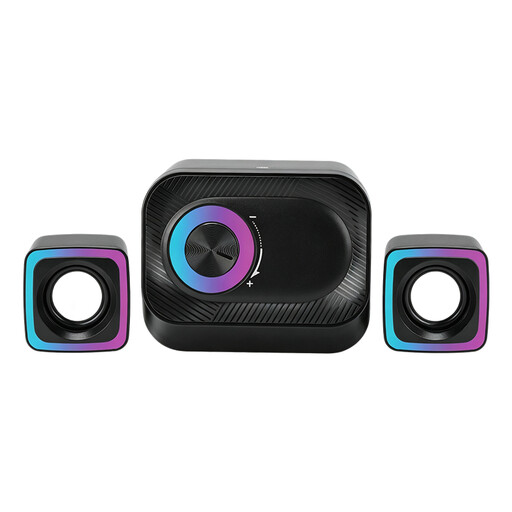
3-piece wired PC speaker system with volume control and RGB lighting
Suitable for playing music from a PC if you’re looking for a wired system with volume control.
The product information lists two satellite speakers and indoor use in dry rooms.
Joybuy
 No image available
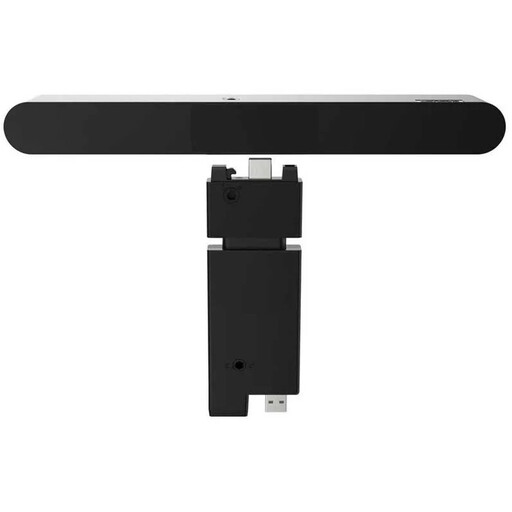
Lenovo ThinkVision MS30 (S) monitor soundbar
Suitable for audio and music from a monitor or desktop if you’re looking for a compact soundbar-style speaker.
The product information lists a wired connection, 2.0 channels and 4 W RMS.
Joybuy
 No image available
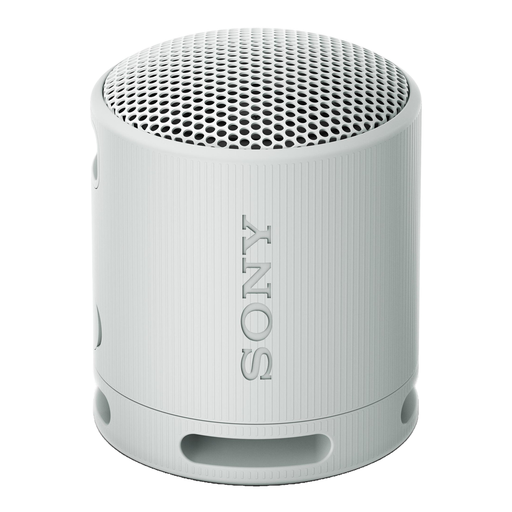
Sony SRS-XB100 portable Bluetooth speaker, light grey
Suitable for anyone who wants to take music between workspaces and doesn’t need a permanent mains connection in every spot.
The product name lists 16 hours of battery life; the product information mentions USB-C charging and a carrying strap. The battery needs charging when it runs out.
Joybuy
 No image available
Edifier ES300 Wi-Fi and Bluetooth speaker
Suitable for a permanent listening spot if you want to play music from a network source or connect an analogue or USB source.
The product name lists 60 W. The product information mentions Wi-Fi, Bluetooth, AirPlay 2, multi-room, USB and AUX; a battery is also listed.
Joybuy
 No image available
Edifier Hecate G1500 computer speakers
Suitable for a desk set-up if you’re looking for computer speakers with several ways to connect an audio source.
The product name lists RGB lighting and Bluetooth 5.3. The product information mentions USB and 3,5mm AUX inputs, plus volume controls on the speaker.
Joybuy
Frequently asked questions
Can you use the Sonos Era 100 as a Bluetooth speaker straight away?
No. Sonos says you must first set up the Era 100 on a Wi-Fi network using the Sonos app. You can then switch to Bluetooth.
Do you need an adapter to connect a computer with a 3,5mm output to the Era 100?
Yes, if you want to connect that source to the Era 100’s line-in. Sonos lists a separately sold Line-In Adapter or Combo Adapter for this.
How can you set up a connected speaker carefully?
Before buying, read the privacy statement and check the device’s security. After set-up, check which connected features and settings you want to use. This is advice from the Dutch Data Protection Authority, not a legal requirement for the buyer.
What are your rights if a speaker bought online isn’t suitable or breaks too soon?
For a standard online consumer purchase, ACM ConsuWijzer says you generally have a 14-day cooling-off period after delivery, with some exceptions. This is separate from your statutory rights: if a product doesn’t meet what you could reasonably expect under normal use, the retailer is responsible for providing an appropriate solution. In the Netherlands, there isn’t one fixed two-year warranty period for all speakers.


