What should you look for?
First choose the connection and listening setup that suit your workspace. Then assess the bass at the volume you actually listen at home.
| What to consider |
What should you check? |
Who should pay particular attention? |
| Bass and sound balance |
Compare reviews of the exact model at a normal listening volume. Don’t judge sound quality by wattage or a bass setting alone. |
If I listen to dance music, I want to know whether the bass is prominent enough at my volume without taking up unnecessary space. Around 31% of consumers name bass performance as their top purchase priority. |
| Playlist control |
Check that the model supports your music service, phone and Wi-Fi network, and find out what the initial setup involves. |
I want to start and control playlists easily, perhaps over Wi-Fi rather than having to connect a phone directly every time. Around 25% of consumers give streaming convenience top priority. |
| Connecting a computer |
Compare your computer’s audio outputs with the speaker’s inputs, and allow for an adapter if needed. |
For my workspace, I want a connection that really works with my computer, without a stereo pair getting in the way of my desk layout. Around 19% of consumers prioritise computer connectivity. |
| Moving and charging |
Decide how often you’ll take the speaker with you. If you’re considering a portable model, check how it charges and which accessories are included. |
I want to use the speaker away from my usual desk as well, so I need to factor in charging. Around 13% of consumers make portability their main consideration. |
| Peace at home and privacy |
Consider the volume where you plan to use the speaker. If it has smart features, check the privacy notice and settings. |
In a shared home, I want to be considerate of housemates or neighbours, or find out what data a smart feature may process. Around 12% of consumers prioritise peace at home or privacy. |
Joybuy products
This Joybuy selection includes a portable Bluetooth speaker, soundbars and compact PC stereo speakers. Check that the connections, placement and intended listening area suit your home office.
 No image available
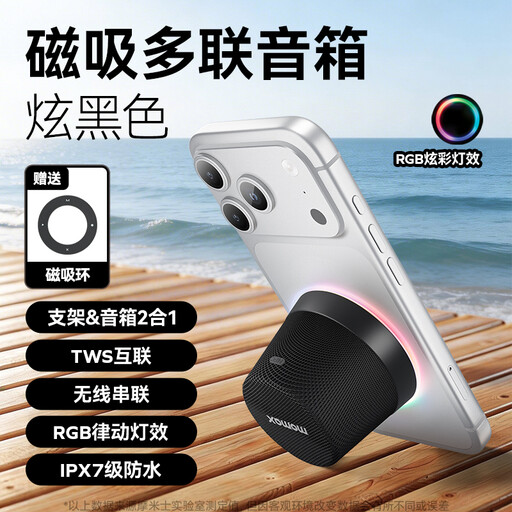
MOMAX 1-Vibe Mood Pro Magnetic portable Bluetooth speaker, black
A portable Bluetooth speaker to consider if you want to play playlists from your phone and use the speaker away from your usual workspace too.
The product name specifies Bluetooth and the colour black.
Joybuy
 No image available
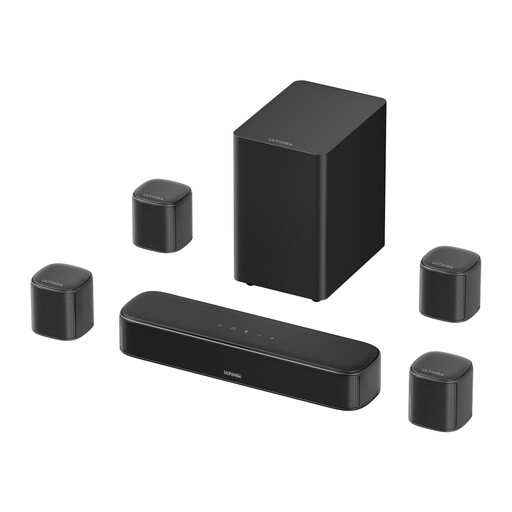
Ultimea Aura S4T 7.1-channel soundbar with four surround speakers
This setup may be worth considering if you have room for the soundbar and several speakers. Check that the connections work with your computer or other source.
The product name specifies a 5.25-inch subwoofer, app control, HDMI, OPT, AUX and 350 W.
The described setup needs space for several main and surround units.
Joybuy
 No image available
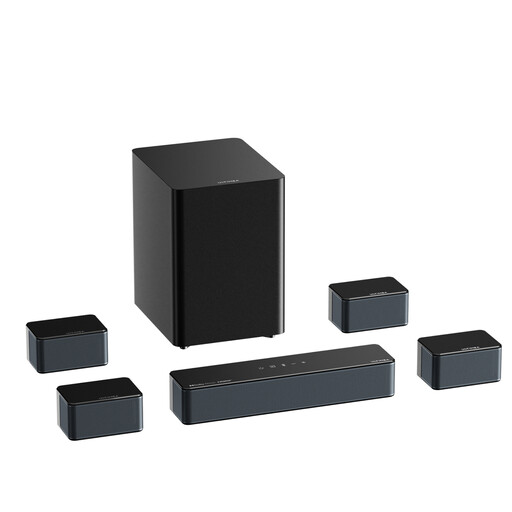
Ultimea Poseidon D80 Boom7.1 soundbar, 500 W, Bluetooth 5.3
Consider this setup only if you have room for the soundbar, subwoofer and surround units, and the listed connections suit your source.
The product name specifies a 7.1-channel setup, Bluetooth 5.3 and 500 W. The description also lists AUX.
The multiple speakers and subwoofer need space in your listening area.
Joybuy
 No image available
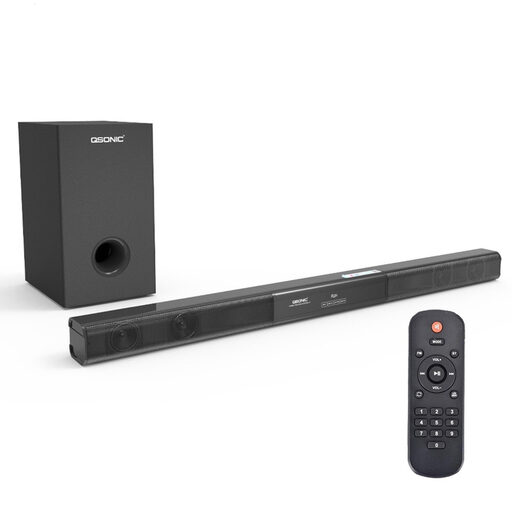
2.1 soundbar with subwoofer, Bluetooth 5.0
An option to look at if you want to use a Bluetooth source or a compatible wired input. Check your computer’s connection and make sure there’s room for the subwoofer.
The product name specifies Bluetooth 5.0 and a 5.25-inch subwoofer. The description lists AUX, coaxial and USB.
Joybuy
 No image available
Compact RGB gaming stereo speakers for PC and desk
The product name positions this set for PC and desk use. Check whether the listed connections and placement suit your computer and workspace.
The name specifies a compact stereo set with RGB lighting.
Joybuy
Frequently asked questions
Can I use the Sonos Era 100 as a Bluetooth speaker straight away, without Wi-Fi?
No. Sonos says you must first set up the Era 100 on a Wi-Fi network using an app. After that, you can use Bluetooth.
Should I think about privacy when choosing a smart speaker?
Yes, if you’re considering a connected speaker with smart features. The Dutch Data Protection Authority recommends checking the privacy notice and security before buying; data processing can vary between devices.
Can I play dance music at any volume at home?
Don’t assume there’s one permitted volume level that applies across the country. According to the Dutch Government, in many municipalities noise nuisance affecting neighbours may be covered by local regulations. Discuss any disturbance with your neighbours and check which rules apply to your home and municipality.
Do I have a cooling-off period if I buy a speaker online from a business?
For many distance purchases from a business, the Dutch Government says consumers have a 14-day cooling-off period. Check the terms of your specific purchase: exceptions apply, and different rules cover purchases from private sellers.
Does a two-year manufacturer’s warranty cover all my statutory rights in the Netherlands?
No. The Dutch Government states that there’s no fixed statutory warranty period in the Netherlands. What you can expect from a product depends, among other things, on the product and the sales information. A manufacturer’s or additional warranty is on top of your statutory rights.


