
Desk-based listener
Wants to listen to vocals and instruments from a computer and can check whether there’s room for a left and right speaker at their desk.


If you mainly listen at your computer and have space on either side of your desk, start with an active stereo pair that has the right connection for your computer. A single wireless speaker may suit a more compact setup or listening from a phone, but check the setup requirements and whether you need any adapters. Specifications and brand descriptions alone can’t predict how vocals will sound in your room.
Wants to listen to vocals and instruments from a computer and can check whether there’s room for a left and right speaker at their desk.
Switches between a computer, phone and existing player, for example. The available inputs and setup requirements will determine which arrangement is suitable.
Needs to weigh up the available space against two separate speakers, one wireless speaker or a 2.1 setup with a separate subwoofer.
Suitable for: a fixed listening position where you can place two speakers and want to play audio directly from a computer. Creative lists USB-C audio, aux and Bluetooth for the Pebble Pro; Audioengine lists USB audio, analogue inputs and Bluetooth for the A2+ Next Gen.
Bear in mind: you’ll need space for both speakers and the right connection. Check the full model and generation name, too.
Suitable for: a desk with room for larger cabinets and a need for multiple inputs. Edifier lists Bluetooth, analogue, optical and coaxial inputs for the R1280DBs.
Bear in mind: the listed dimensions for each cabinet are 146 × 234 × 196 mm. A subwoofer output is a connection option, not a subwoofer included in the box.
Suitable for: a setup where it’s more convenient to have one speaker, or if you also want to listen from a phone. Sonos says that two Era 100 speakers can be paired.
Bear in mind: the Era 100 must first be set up on Wi-Fi using the Sonos app before you can use Bluetooth. You’ll need a separate adapter for an external analogue source.
Suitable for: anyone specifically looking for a setup with a separate subwoofer and a source with a compatible 3.5mm output. Logitech lists this connection for the Z313.
Bear in mind: you’ll need extra space for the subwoofer and cables. The Z313’s product specifications don’t list a Bluetooth or Wi-Fi input.
| What to consider | What to look for | Who it matters most to |
|---|---|---|
| Vocals and stereo imaging | Check that you’re looking at two speakers and that they’ll fit on either side of your listening position. If possible, listen to familiar recordings at your usual volume. | If I want to hear vocals and instruments clearly at my regular desk, I need to know whether two speakers will fit in my workspace. Around 36% of consumers say vocals and stereo imaging are their main concern when buying. |
| Connection to your source | Compare the outputs on your computer or player with the speaker’s inputs. Check separately whether USB-C carries audio or is only for charging. | When I switch between a computer, phone and player, I need to know which input I can actually use. Around 29% of consumers say source compatibility is their top priority. |
| Space and controls | Measure the available space and allow for both cabinets, cables and accessible controls. Check the dimensions of the exact version. | With a small desk, I want to place speakers without making my workspace awkward to use. Around 21% of consumers put available space first. |
| Bass and expandability | Check whether a subwoofer is included or whether the device only has an output for a separate subwoofer. Also find out what extra components you’ll need to expand the setup. | If I want a subwoofer or might expand my setup later, I need to know in advance what’s included and what else I’ll need. Around 14% of consumers say bass or expandability is their main consideration. |
Creative says the Pebble Pro has USB-C audio. Sonos describes the Era 100’s USB-C port as being for use with a separate adapter, not as a direct USB audio input for a computer.
Check what the port is designed for on the exact model and compare it with your computer’s output.
You’ll need a separate line-in adapter to connect an external analogue source to the Era 100.
Edifier says the R1280DBs has a subwoofer output, while Logitech describes the Z313 as a 2.1 system with a subwoofer. These are different setups.
Check what’s included in the set you choose and measure the space for any additional cabinet, too.
A separate subwoofer takes up space and must be bought as an additional component.
A power rating or manufacturer description alone won’t tell you how voices will sound in your room. Consumentenbond assesses sound balance, distortion and dynamics as separate characteristics, among other things.
If possible, listen to familiar recordings at the volume you normally work at.
The models listed show a range of connections and setups. The features apply to the specific versions described and are not the result of a listening test.
According to Creative, the Pebble Pro MF1710 is a compact stereo pair with USB-C audio, aux and Bluetooth.
According to Edifier, the R1280DBs is an active bookshelf pair with Bluetooth, analogue, optical and coaxial inputs.
For the A2+ Next Gen, Audioengine lists USB audio, analogue inputs, Bluetooth and an output for expansion.
According to Sonos, the Era 100 is a wireless speaker that can be paired with a second Era 100.
According to Logitech, the Z313 is a wired 2.1 system with two satellite speakers, a subwoofer and a 3.5mm input.
This selection of Joybuy products includes wired PC setups, a soundbar, a wireless speaker and stereo speakers. Check which audio input on each model is suitable for your computer or other source.
 No image available
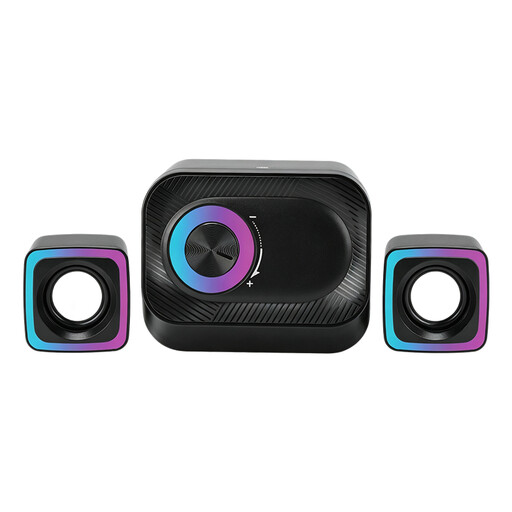
A wired set for PC audio at a fixed desk setup.
According to the product description, the set consists of two satellite speakers and a main unit. Volume control and RGB lighting are mentioned in the product name.
 No image available
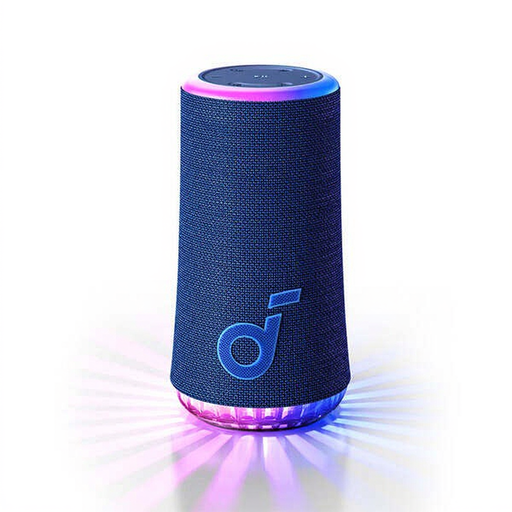
A portable Bluetooth speaker for anyone looking for a single speaker to place at home and play music wirelessly.
The product description lists Bluetooth for music streaming and USB-C for charging; USB-C is not described here as an audio input.
 No image available
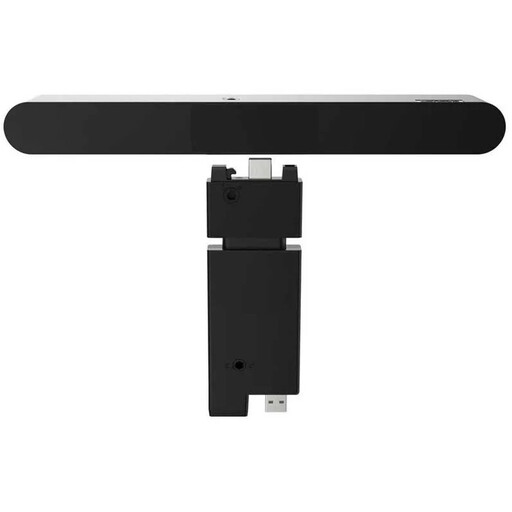
A wired soundbar for a desk setup with a monitor or desktop computer.
The description lists 2.0 channels and 4 W RMS. The listed dimensions are 256,4 mm wide and 34,5 mm deep.
 No image available
A stereo pair for computer use at a desk, with several connection options listed.
The product description lists Bluetooth 5.3, USB audio and a 3.5mm AUX input.
 No image available
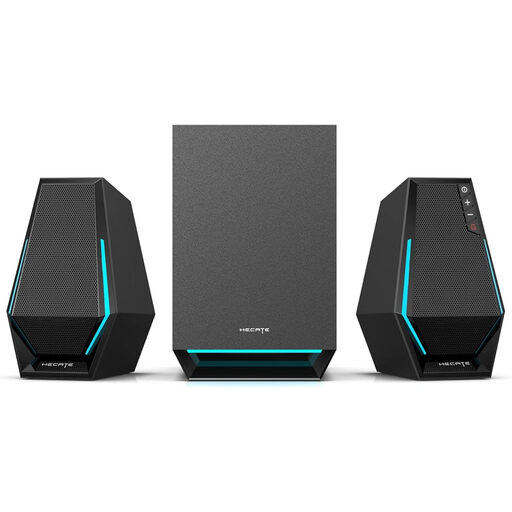
A 2.1 speaker set for anyone looking for a computer setup with a music mode.
The product description lists Bluetooth 5.1, a USB sound card and a 3.5mm AUX connection.
No. Sonos says the Era 100 must first be set up on Wi-Fi using the Sonos app. You can then use Bluetooth.
The Sonos manual doesn’t describe the USB-C port as a direct USB audio input for a computer. For an analogue computer output, Sonos specifies a separate adapter and a compatible audio cable.
Keep your proof of purchase and contact the seller. ACM ConsuWijzer explains that a product should do what you can reasonably expect when used normally. If it breaks down too soon, the seller must resolve the issue free of charge under the applicable terms. The statutory guarantee doesn’t simply have a fixed two-year period for every product.
The Dutch Authority for Digital Infrastructure states that electrical, electronic and radio equipment must meet the applicable European requirements and carry a CE mark. The mark or model name alone doesn’t prove that a specific item meets all the requirements. Since 1 August 2025, stricter rules have applied when placing wireless equipment on the market.