
Vandaag of morgen in huis

Kwaliteit gegarandeerd

Welkomstaanbiedingen ontgrendelen: GRATIS bezorging | Tot 80% korting | Gratis 30 dagen JoyPlus-proefperiode
Download de app
Choosing a desk for your home may seem straightforward at first. Yet many buyers fall into the same traps: a desktop that turns out to be too small for a monitor and laptop, a frame that wobbles when adjusted or storage that takes up more space than it saves. For home workers, students and gamers, it is therefore important to look beyond colour and shape.
In this buying guide, we compare the key features of home office desks. You’ll learn what to look for in a height-adjustable desk, an L-shaped desk with drawers and a compact computer desk. We’ll also discuss how to make efficient use of the space available.
A desk that is 120 cm wide may be suitable for a laptop, but can feel cramped once you add a monitor, keyboard, desk lamp and documents. So don’t just check the width; consider the depth too. For a permanent workstation, a depth of 60 to 70 cm is often more practical than a shallow desktop.
Also consider the space behind the desk. Cables, a monitor arm or a power strip need extra room. As a result, a desk that fits exactly between two walls may still be awkward to use.
With an electric sit-stand desk, the adjustment range matters more than simply having a motor. Check the minimum and maximum height, the maximum static load capacity and how the control panel works.
A desk with a memory function can store several height settings. This is useful when different people use the same desk or when you want to switch quickly between two settings. However, a memory function does not replace checking the clear space around the desktop. According to the product information for the JOYFURNOS models mentioned, you should not place the desk directly against a wall while adjusting it.
A desk with storage is only useful when the drawers and shelves suit what you actually use. Shallow drawers are suitable for pens and cables, while documents or larger accessories require more height.
With an L-shaped desk with drawers, the orientation is also important. A fixed layout can be inconvenient if the corner of your room is the other way round. A reversible design gives you more flexibility in this situation, but measure the available wall lengths beforehand.
Before buying, make a note of:
A desktop measuring 160 x 70 cm provides more workspace than a compact 120 x 60 cm model. A smaller desk may be a better fit for a student bedroom or home office with limited floor space.
Pay attention to the material used for the desktop and frame. The LANTINE corner desk listed uses E1 particle board and a metal frame. E1 is an emissions class for formaldehyde in board materials; always check the latest product information and documentation for your circumstances.
For electric desks, a steel frame, adjustable feet and a stated load capacity are relevant points to check. The JOYFURNOS desks in this selection state a maximum static load capacity of 70 kg. This figure refers to a stationary load and does not automatically indicate how stable a desk is while being adjusted. Distribute heavy equipment evenly across the desktop.
A home office desk is used every day. So check whether:
With electric models, keep liquids away from the electrical components. The product information for the models mentioned also states that overheating protection is provided during prolonged, uninterrupted adjustment. Follow the manufacturer’s instructions.

Why it suits this profile: Measuring 150 x 110 x 75 cm, it combines two work surfaces with drawers and shelves. This makes it suitable for students, home workers and anyone who wants to keep several devices in one place.
The reversible L-shape means you are not restricted to one fixed corner layout. Adjustable feet help you level the desk on an uneven floor.
Four drawers, two open shelves, two work surfaces and a metal frame. The assembly instructions state that the parts and tools are numbered.
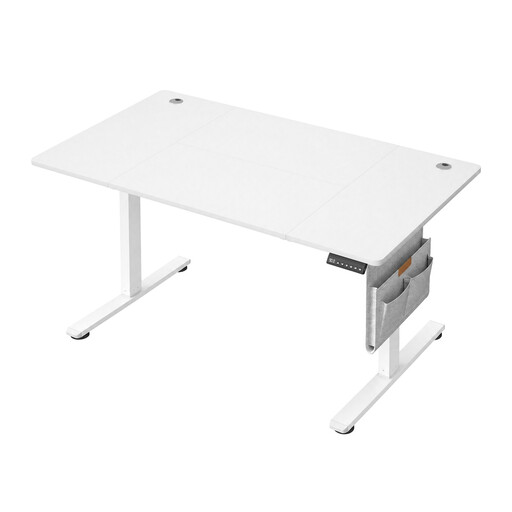
Why it suits this profile: This white desk offers a spacious desktop for a permanent home workstation and features electric height adjustment from 72 to 120 cm. The memory function is useful when you regularly switch between working positions.
The specifications state not only the motor, but also the adjustment range, load capacity and the instruction to keep obstacles clear around the desktop.
160 x 70 cm, four memory settings, USB-C connection, two cable management holes and a stated static load capacity of 70 kg.
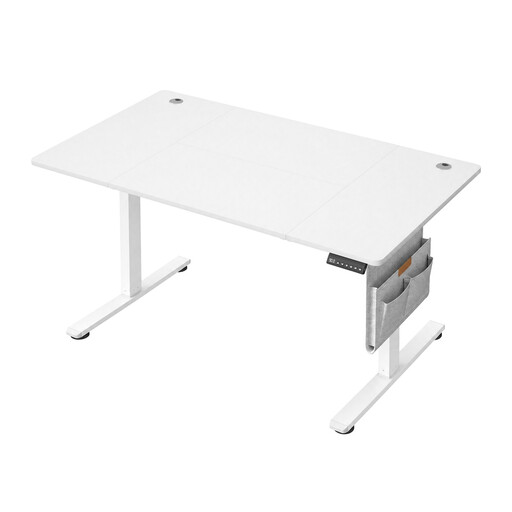
Why it suits this profile: With four memory heights, a 140.1 x 60.1 cm work surface and cable management holes, this model is designed for users who regularly switch between laptop work, gaming and other tasks.
The compact depth reduces the floor space required. The storage bag, hook and cable holes mean accessories do not have to remain solely on the desktop.
Four memory heights, steel frame, motorised adjustment, cable management and a stated range of 72 to 120 cm.
We’ve put together a complete, up-to-date list of products that fully meet these strict selection criteria and the applicable European safety regulations.
A computer desk with cable management holes keeps your peripherals organised. For a small room, a corner model can provide more desktop space without placing a completely freestanding table in the centre of the room. Choose a white desk if you want to keep the room feeling bright, but bear in mind that marks will be more visible and regular maintenance will be needed.
Vertical storage can also help save space outside the home office. A two-tier dish drying rack makes use of the height above the worktop and keeps plates, cups and cutlery separate. The MAXCOOK two-tier dish drying rack measures approximately 40 x 23.6 x 28.7 cm and has an integrated drip tray. During assembly, check that water can drain into the sink or a collection container. This is not a desk chair accessory, but it is a comparable space-saving solution for an organised household.
That depends on your equipment. For a laptop, 120 x 60 cm is often sufficient. If you use a monitor, keyboard and documents, a width of around 140 to 160 cm gives you more room to work. Always measure the available depth and the space needed for your chair.
Power consumption depends on the type of motor, how often it is used and its standby mode. Check the manufacturer’s information on energy consumption and use the memory function only when it is practical. Keep liquids away from the controls and motor components.
Its lifespan is affected by the materials, load, assembly and everyday use. Tighten the fixings securely after assembly, distribute heavy equipment across the desktop and follow the care instructions. With an electric desk, it is also sensible not to operate the mechanism continuously for longer than stated in the product information.
