
Vandaag of morgen in huis

Kwaliteit gegarandeerd

Welkomstaanbiedingen ontgrendelen: GRATIS bezorging | Tot 80% korting | Gratis 30 dagen JoyPlus-proefperiode
Download de app
A home office desk needs to do more than look good in a product photo. It must fit the available space, remain stable while you type and provide enough room for a monitor, laptop and accessories. A bedroom also has different requirements from a spacious home office or shared meeting room.
If you focus only on the price or appearance, you may encounter a number of predictable problems. Below, we outline the key considerations and a selection of desks suited to different uses.
A large desktop may seem practical, but without a sturdy base the desk can wobble. So check the frame material, the leg construction and whether adjustable feet are included. A desk with a metal frame often provides a solid structural foundation, but the frame’s thickness and shape remain important.
Also check the maximum static load. This indicates how much weight the desk can support according to the product information when it is not being moved. Allow for monitor arms, speakers, computers and other equipment.
A narrow desk may be suitable for a laptop, but it can quickly feel cramped with a monitor and keyboard. For a fully equipped workstation, 60 cm depth is a useful starting point; 70 or 80 cm provides more room for a screen, notes and peripherals.
A 160 x 80 cm desk is suitable if you use multiple screens or also want to use the surface as a meeting table. Measure the room, doorways and space for the chair in advance.
An electric sit-stand desk with a USB-C port and memory function sounds appealing, but it only adds value if you want to adjust the height regularly. Electrical components also require a dry environment and sufficient clearance around the moving desktop.
When checking an adjustable desk, consider:
Small models of around 80 x 50 cm fit well in a bedroom, student room or compact study. They provide space for a laptop or one monitor, but less room for documents and accessories.
A size of 120 x 60 cm offers a good middle ground. For a professional home workstation with two screens, 140 x 60 cm or 160 x 70 cm is more practical. If you need plenty of open workspace, choose 160 x 80 cm.
Use the following checklist before ordering:
MDF and chipboard are commonly used materials for an affordable modern desk. Check whether the product information mentions the finish, moisture resistance and recommended care. A metal frame can improve stability, while adjustable feet compensate for minor unevenness in the floor.
For maintenance, a soft, slightly damp cloth is generally sufficient. Avoid abrasive products and excessive water, particularly with desks featuring electric controls or integrated ports.
With a desk with a USB-C port, it is worth checking exactly what the port supports. The presence of USB-C does not automatically mean that every laptop or monitor will charge at the same speed. Check the product specifications and, if in doubt, use a suitable adapter.
A desk with a memory function can save preset heights. This is useful when several people use the same desk or when you frequently switch between sitting and standing. According to the product descriptions from the relevant brands, some models include a reminder function; treat this as a product feature, not a medical benefit.

Why it suits this profile: The compact size fits in a bedroom, student room or small home office. The desk is designed for work, study and everyday computer use.
The specifications mention adjustable feet, allowing you to compensate for minor unevenness in the floor. The maximum static load is 50 kg.
80 x 50 cm, steel frame, adjustable feet and clear assembly instructions.

Why it suits this profile: This spacious desktop is suitable for multiple screens, a printer and documents, or for use as a meeting table at home.
The product information mentions a powder-coated steel frame, additional supports and adjustable foot pads. Check the assembly and position the desk on a level surface.
160 x 80 x 75 cm, metal frame, additional cross supports and a stated maximum capacity of 400 kg.
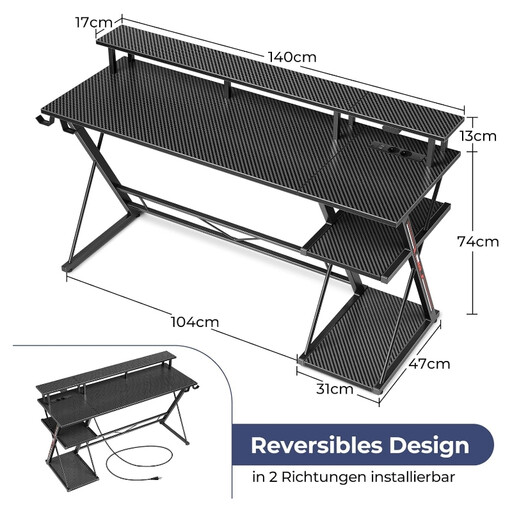
Why it suits this profile: This gaming desk combines a monitor stand, CPU stand, headphone hook and integrated lighting with connections for your equipment.
The features are clearly specified: two power sockets, two USB ports and an adjustable CPU stand. Keep liquids away from the electronic components.
Metal frame, monitor stand, CPU stand, app-controlled RGB lighting and built-in power and USB connections.

Why it suits this profile: A spacious workstation for users who want to work sitting and standing, with memory positions, cable management and a USB-C connection.
The adjustment range of 72–120 cm and stated load capacity of 70 kg are clearly specified. Leave space between the desk and wall while it is moving, and follow the safety instructions.
160 x 70 cm, electrically adjustable, memory function, USB-C port, cable grommets and steel frame.
We have put together a complete, up-to-date list of products that fully meet these strict selection criteria and the applicable European safety regulations.
For a laptop and one screen, 80 x 50 cm may be sufficient. For multiple screens, documents and accessories, 120 x 60 cm or larger is more practical. A 160 x 70 cm desk offers extra space without being as deep as a 160 x 80 cm desk.
An electric desk only uses electricity while adjusting and to a limited extent for operating the controls. Actual consumption depends on how often you adjust the height and the power used in standby mode. Check the product specifications and unplug the desk when it will not be used for an extended period, if the instructions allow this.
Its lifespan depends on the material, assembly, load and maintenance. A desk will generally remain stable for longer if you do not exceed the maximum load, check the fixings and protect the desktop from moisture and abrasive objects. With an electric model, the motor, cables and controls are also important components to use with care.
