
Vandaag of morgen in huis

Kwaliteit gegarandeerd

Welkomstaanbiedingen ontgrendelen: GRATIS bezorging | Tot 80% korting | Gratis 30 dagen JoyPlus-proefperiode
Download de app
A good desk is the foundation of any productive home office. But the search for the perfect model can feel like a maze of marketing jargon and shaky promises. Many desks look sleek online but turn out to be unstable, impractical, or simply a poor fit for your body and work style. Before you invest in a new home office desk, it's wise to know where the most common pitfalls lie.
Costly mistakes are often the result of clever marketing that distracts from the core essentials. Here are three areas where things frequently go wrong:
To avoid a bad buy, it's best to focus on a few objective specifications. These determine whether a desk is truly functional for your home office setup.
The dimensions of the desktop are crucial. A depth of 60 cm is often the minimum for a comfortable distance to your monitor. As for the width:
Have an unused corner in the room? An L-shaped desk can make efficient use of the space and offers a clear separation between computer work and writing, for example.
A static computer desk can be fine, but for those who work long hours, a height-adjustable desk is worth considering. An electric sit-stand desk offers the flexibility to change posture throughout the day. Pay attention to:
The stability of a desk largely depends on its frame. A steel frame is generally a sign of durability. Also, check the maximum weight capacity; 70 kg is a common and safe value for most setups.
Additionally, look for smart additions that make daily use easier, such as:
A tidy desk leads to a clearer mind. A compact mini PC, which you can mount behind your monitor, can also contribute to this by freeing up valuable space on your desktop.
Not everyone needs the same thing. Below are some popular choices, linked to specific user profiles.
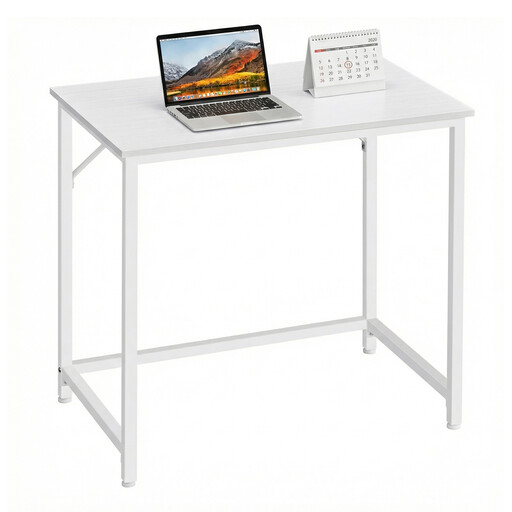
Why This Fits Their Persona: Ideal for a student room or a small corner in the living room. This desk provides a functional workspace without unnecessary extras and fits almost anywhere thanks to its compact size.
This desk avoids the pitfall of superfluous features. It focuses on the basics: a sturdy steel frame and a stable work surface, which minimises the risk of a wobbly desk.
Very compact size (80 x 50 cm) and simple assembly. The adjustable feet ensure stability, even on an uneven floor.

Why This Fits Their Persona: For the professional who works long hours from home and values a dynamic posture. The ability to switch between sitting and standing isn't a luxury, but a necessity.
This is a true height-adjustable desk (71–120 cm), not just a marketing claim. The memory functions and quiet motor tackle the pitfalls of impractical adjustability and noise pollution.
Electrically adjustable, with 4 memory presets, a built-in USB-C port and handy extras like a storage bag and hooks for cable management.
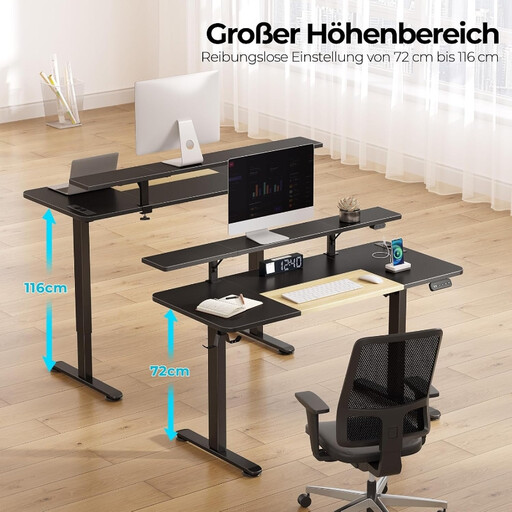
Why This Fits Their Persona: This gaming desk is designed for those with an extensive setup who value both functionality and atmosphere. The combination of ergonomics and built-in tech is perfect for long gaming or work sessions.
Tackles cable chaos head-on with built-in power outlets and USB ports. The monitor stand promotes better neck posture, sidestepping the "one-size-fits-all" pitfall of a flat desk.
Electrically height-adjustable, with an integrated power supply and atmospheric RGB lighting. According to the manufacturer, 60,000 colours can be set.
We have compiled a complete, up-to-date list of products that meet these selection criteria and comply with current regulations.
An electric desk is especially valuable if you spend long days at your computer. The ability to change posture can contribute to a more active workday. The price difference compared to a fixed desk has shrunk in recent years, making it a more accessible option for more people. When choosing, look for a quiet motor and memory presets for optimal ease of use.
Always measure the available space first. A computer desk of 120 x 60 cm is a common starting size. If you work with two screens, a width of 140 cm or more is recommended for a comfortable setup. An L-shaped desk can make very efficient use of a corner, but it does take up more total floor space.
A tidy workspace starts with choosing the right desk. Models with built-in cable trays, drawers, or hooks help keep the basics neat. To maximise desk space, you might also consider using a mini PC. These compact computers can often be mounted behind the monitor, leaving your desktop clear.
