
Vandaag of morgen in huis

Kwaliteit gegarandeerd

Welkomstaanbiedingen ontgrendelen: GRATIS bezorging | Tot 80% korting | Gratis 30 dagen JoyPlus-proefperiode
Download de app
Setting up a functional home office seems simple—until you try it. The market is flooded with desks that look great in photos but disappoint in practice. Many people fall into the same traps: buying a desk that starts wobbling after three months, is too small for their monitor, or is packed with "smart" features they never use.
Before you buy a new desk, it's wise to know what to look for. These are the most common problems you can avoid:
A great office setup starts with a solid foundation. By paying attention to a few core specifications, you can easily filter out the marketing fluff and choose a product that will last for years.
Focus on the specifications that truly matter. A desk is an investment in your productivity and comfort, so the fundamentals must be right.
A desk must be stable. Period. Therefore, always look at the frame material. A steel frame typically offers the necessary sturdiness, especially for an electric adjustable sit-stand desk. Another objective metric is the maximum static load capacity. A desk that can support at least 70 kg is generally robust enough for a standard setup with monitors, a laptop, and other accessories. A lower load capacity can be a sign of a less sturdy construction.
Measure your space and consider what you want to place on your desk. A standard size of 140 x 60 cm is often sufficient for a laptop and a single monitor. Do you work with two screens or need a lot of space for documents? Then consider a wider model of 160 x 80 cm or even 180 x 80 cm. A corner desk can be a smart solution to utilise an unused corner and create a large workspace. Also, pay attention to the worksurface material; panels that are scratch- and water-resistant will stay looking good for longer.
With a sit-stand desk, the motor is the heart of the product. A quiet motor ensures that your colleagues or housemates are not disturbed by the adjustments. Features like memory presets are not an unnecessary luxury; they help you switch between your favourite sitting and standing heights with the press of a button. For a tidy and minimalist home office, a mini PC can be a great solution. These compact computers, such as the MSI Cubi, take up hardly any space and can often be mounted behind the monitor, keeping your worksurface clear.
Not everyone has the same needs. Below are several options tailored to specific requirements and work styles.

Why This Fits Their Persona: Ideal for those who want to alternate between sitting and standing throughout the day. The 140x60 cm size is compact enough for most rooms yet offers ample space for an ergonomic setup.
The sturdy steel frame prevents instability. The 4 memory presets and the USB-C port are functional extras that genuinely enhance usability, rather than being useless gadgets.
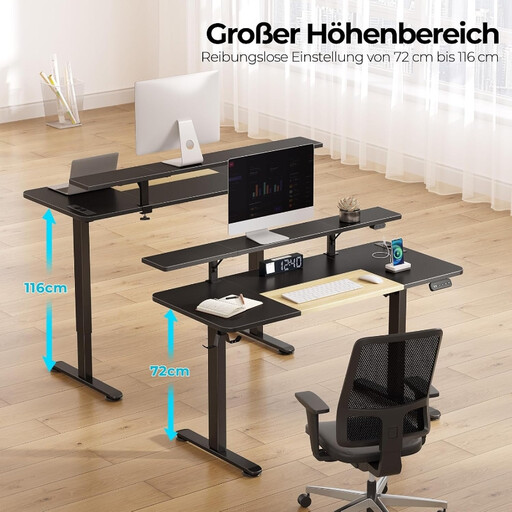
Electrically height-adjustable (71-120 cm) with a quiet motor. Includes convenient cable management solutions and a load capacity of 70 kg.
Why This Fits Their Persona: This is a `gaming desk` and workstation in one. Designed for those who use a lot of equipment and value atmosphere and functionality, with integrated power and lighting.
The integrated power hub with 2 outlets and 2 USB ports is a powerful addition, not a slow gimmick. The built-in monitor stand directly addresses an ergonomic pain point.
Electrically adjustable, RGB lighting with 60,000 colours, and a built-in power supply. Everything a power user needs in one package.

Why This Fits Their Persona: This `corner desk` is perfect for those who want to make optimal use of a room corner and need plenty of storage. It combines a large worksurface with integrated drawers and shelves.
This desk solves the 'sizing blunder' by offering a large surface area without dominating the entire room. The 4 drawers and 2 shelves provide serious storage, not just token extras.
Reversible L-shaped design (storage unit can be mounted on the left or right). Offers a combination of open and closed storage for a tidy desk.
We have compiled a complete, real-time list of products that fully satisfy these strict selection criteria and UK safety regulations.
This varies by model, but a good starting point is a maximum static load capacity of around 70 kg. This is typically sufficient for a setup with multiple monitors and other equipment. Models with a higher load capacity, such as 100 kg or more, offer extra sturdiness and are suitable for very heavy equipment. Always check the specifications of the specific product.
Yes, a corner desk can be very efficient in a smaller space. It utilises a corner that often remains empty and creates a sense of spaciousness because the furniture is not in the middle of a walkway. You get a large worksurface without the desk dominating the room.
The biggest advantage of a mini PC is the space it saves. Instead of a large computer tower under or on your desk, you have a small box that you can often mount behind your monitor with a VESA bracket. This creates a clean, minimalist look and keeps your worksurface and legroom free. The MSI Cubi N is a good example of this, offering enough power for most office tasks in a very compact form factor.
