
当日/次日达

品质保障

开启新人专享福利: 全场免邮 | 低至 2 折 | 免费试用 30 天 JoyPlus 会员
下载 Joybuy
A home office computer desk needs to do more than look neat in a product photo. People working from home, students and gamers often use their desk for hours at a time. Yet many people buy a desk that soon turns out to be too small, wobbles while typing or is difficult to position.
The main pitfalls are usually not in the design, but in details such as work surface depth, load capacity and construction. By checking these points in advance, you can avoid a poor purchase and choose a desk that suits your space and everyday needs.
A desk that is 80 cm wide may be suitable for a laptop, keyboard and a few accessories. However, 50 cm of depth can be limiting if you need space for a desktop monitor, laptop, printer and writing materials. So check more than just the width:
A large computer desk measuring, for example, 160 x 80 cm offers more space, but will not necessarily fit in a small bedroom or alcove.
A stated load capacity is generally a maximum static load. This does not mean that the desk is suitable for impacts, climbing or unevenly distributed weight. Distribute heavy equipment across the desktop as evenly as possible and follow the manufacturer's safety instructions.
A desk with a metal frame often provides a practical basis for stability, but the joints, legs and adjustable feet also matter. So pay attention to the entire construction, not just the frame material.
“Easy assembly” means little if the parts are not clearly labelled or the legs are fitted incorrectly. Before buying, check whether instructions are included and how much space you will need to assemble the desk. Do not tighten the screws fully during the initial assembly; this allows you to align the frame first.
For a standard work desk, a desktop height of around 75 to 76 cm is common. The correct height depends on your chair and height. When typing, your forearms should be able to rest approximately horizontally, without your shoulders being raised.
A bedroom desk or study desk measuring 80 x 50 cm is practical when space is limited. If you work with multiple screens, a wider desktop is generally preferable. Measure the available space and leave enough room to walk around the desk.
Chipboard is a commonly used material for desktops. Its quality depends partly on its thickness, finish and the support provided by the base. A steel frame can provide additional support. Also check that the legs are firmly connected to the desktop and that the desk can be adjusted to sit level on the floor.
With a desk with adjustable legs, you can correct small differences in floor height. This is useful on laminate, tiled or older floors, but it does not make a desk suitable for a steeply sloping or unstable surface.
Compare the stated load capacity with the weight of your equipment. A monitor arm, desktop computer, speakers and printer may together weigh more than expected. The three compact models below state a maximum static capacity of 50 kg. The LANTINE model states 400 kg; this is the capacity given in the product information. Do not use this value as a reason to overload the desk and always follow the supplied instructions.

Why it suits this profile: This compact desk is suitable for a laptop, a single screen or a simple study area. It measures 80 x 50 x 76 cm and weighs 7.6 kg.
The dimensions and maximum static load of 50 kg are clearly stated. Adjustable feet help keep the desktop stable on a floor that is not completely level.
Chipboard, steel frame, brown and black design, and product instructions with labelled parts for assembly.
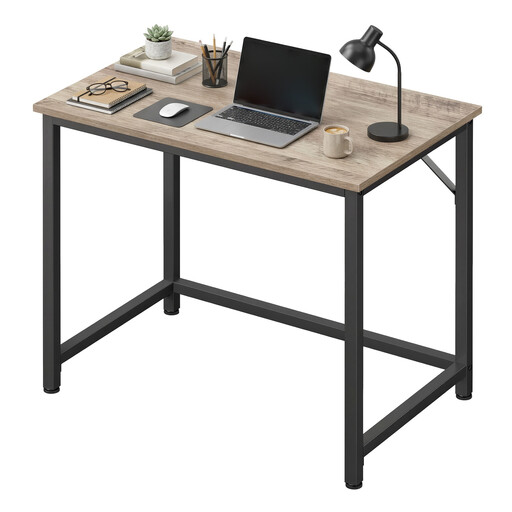
Why it suits this profile: The greige and black finish suits a modern desk in a study or bedroom. The height is 75.5 cm and the desktop measures 80 x 50 cm.
The product information lists a steel frame, reinforced construction, adjustable feet and a maximum static load of 50 kg.
Neutral colours, a steel frame and adjustable legs for positioning on a floor that is not completely level.

Why it suits this profile: Measuring 160 x 80 cm, this large computer desk provides room for multiple screens, a printer, writing or a spacious gaming setup.
According to the product information, the wider construction uses a powder-coated steel frame, two additional supports, a triangular connection and adjustable feet.
A 160 x 80 cm work surface, a 5 x 5 cm steel frame and a stated maximum capacity of 400 kg. Check the instructions for correct use.
We have compiled a complete, up-to-date list of products that fully meet these strict selection criteria and the applicable European safety regulations.
Use this quick checklist:
A black, white, brown or greige desk may serve the same basic function, but the colour does affect how large or bright a room appears. A minimalist desk without additional storage keeps the room looking calm, while a larger model offers more flexibility for work and relaxation.
For a laptop or one monitor, 80 x 50 cm may be sufficient. For two screens, a desktop computer and writing, a desktop approximately 120 to 160 cm wide is more practical. Always measure the available space first.
Assemble the frame carefully on a level surface and tighten all the connections evenly. Adjustable feet can correct small uneven areas. If the desk continues to wobble, check the legs, screws and connection between the desktop and frame.
Its lifespan depends on the material, assembly, load and usage. Use the desk within its stated capacity, protect the desktop from prolonged exposure to moisture and check over time that the screw connections are still tight. This helps prevent unnecessary wear.
