Start with enough ports for your nodes and the connection to your existing network. Then choose between straightforward gigabit, VLAN management or faster ports based on your devices. In a student bedroom, a fanless design and the position of the power supply may also matter. The specifications from TP-Link, NETGEAR and MikroTik show that speeds, connections and management features vary by model.
Which switch is right for you?
Simple cluster builder
You want to connect nodes by cable without configuring the switch, and you’re counting the connections, including the uplink. If you’re setting it up in a bedroom, consider fan noise too. TP-Link describes the TL-SG108 as an eight-port gigabit switch.
VLAN lab builder
You want to separate lab networks or inspect traffic on a port, and are happy to configure port and VLAN settings. TP-Link specifies VLAN support for the TL-SG108E, while MikroTik describes VLAN management through SwOS Lite for the CSS610-8G-2S+IN.
Faster local network
You’re looking for a faster connection between compatible nodes or storage, not just faster internet. TP-Link and NETGEAR list 2.5G options in their model specifications. Check that both ends of the connection support that speed.
What should you look for when choosing?
First, count the ports you need, including the uplink. Then decide whether you need management features, and check the speed, placement and any PoE requirements.
| Buying consideration |
What should you check? |
Who is this important for? |
| Ports for nodes and uplink |
Count all your devices and the connection to your existing network. Also check whether your uplink needs RJ45 or SFP+. |
I want to connect my nodes and existing network at the same time without running out of ports; around 31% of consumers prioritise having enough ports for nodes and an uplink. |
| VLANs and management |
Check that the exact model offers the VLAN and port features you want, and that they work with the rest of your network. |
If I want to separate lab networks or inspect ports, configuration and management matter to me; around 23% of consumers prioritise VLANs and management. |
| Speed between devices |
Check the network cards, switch ports and cabling for each connection. Faster ports only help if the whole path supports them. |
I want faster local traffic between compatible nodes or storage; around 23% of consumers prioritise local network speed. |
| Noise, placement and power |
Check whether the exact model is fanless, where the power supply will fit and whether any stated power rating is a maximum. |
If the switch is near where I sleep or work, I look for a practical place to put it and consider fan noise; around 15% of consumers prioritise comfort in their room. |
| Power over Ethernet |
Check whether you need PoE outputs, and compare your devices’ required standard and power with the switch specifications. |
I want to power a compatible access point or another device through the network cable; around 8% of consumers prioritise PoE. |
Common buying mistakes
-
Choosing a 2.5G switch for 1G devices only
A 2.5G port won’t make a device or uplink with a 1G network connection any faster.
Check the network port at both ends and the cabling for every important local connection.
-
Confusing PoE-in with PoE-out
Passive PoE-in, as specified for the MikroTik CSS610-8G-2S+IN, describes how the switch is powered. It doesn’t provide an output for powering an access point.
If you want to power a connected device over Ethernet, look specifically for PoE outputs, the supported standard and the total power budget.
-
Mistaking the manufacturer’s warranty for your full legal guarantee
A manufacturer’s warranty is in addition to your legal guarantee. ACM ConsuWijzer explains that the retailer is responsible for providing a solution if a product doesn’t do what you could reasonably expect it to.
Keep your proof of purchase and contact the retailer if a product is faulty.
Brands to consider
TP-Link
According to TP-Link Netherlands, the TL-SG108 is a gigabit option, the TL-SG108E adds management features, and the TL-SG108-M2 has eight 2.5G ports.
- TP-Link Netherlands specifies VLAN support for the TL-SG108E and a fanless design for the TL-SG108E and TL-SG108-M2.
- The TL-SG108-M2 is unmanaged; features of these models don’t automatically apply to other TP-Link switches.
MikroTik
MikroTik says the CSS610-8G-2S+IN combines eight gigabit Ethernet ports with two SFP+ ports and SwOS Lite management.
- MikroTik specifies passive cooling and VLAN configuration through SwOS Lite for this model.
- The eight RJ45 ports are 1G, and an SFP+ connection requires compatible equipment. Passive PoE-in is not PoE-out.
NETGEAR
NETGEAR describes the MS308E as a switch with eight 2.5G ports and a web interface.
- NETGEAR lists a fanless design and a five-year manufacturer’s warranty for the MS308E.
- Check which management features you need. A manufacturer’s warranty doesn’t replace your legal guarantee; ACM ConsuWijzer explains that it applies in addition to it.
Linksys
Linksys describes the LN2308 as an unmanaged switch with eight 2.5G ports for wired connections.
- Linksys specifies a fanless design for the LN2308.
- According to Linksys, the LN2308 has no PoE outputs; PoE models in the same product family are different products.
Ubiquiti
According to Ubiquiti, the UniFi Flex 2.5G is a managed switch with eight 2.5G RJ45 ports and a 10G combo uplink.
- Ubiquiti specifies VLAN support for this model.
- Check that the required UniFi Network version and your chosen power method are suitable for your lab.
Switches for wired home lab setups
This selection includes gigabit and 2.5G switches for wired home lab setups, with different management and PoE features. Before choosing, check the port layout and features of the exact model.
 Image unavailable
TP-Link 8-Port Gigabit Easy Smart Switch with 4-Port PoE
Suitable for a wired setup where you want to combine gigabit connections and PoE devices.
The product name lists eight gigabit ports and four PoE ports.
View at Joybuy
 Image unavailable
Linksys 5-Port Unmanaged PoE 2.5 GB Switch
This may suit you if you’re looking for an unmanaged switch for a setup where PoE and faster connections matter.
The product name lists five ports, PoE and 2.5 GB; check which ports provide PoE and which speeds your devices support.
View at Joybuy
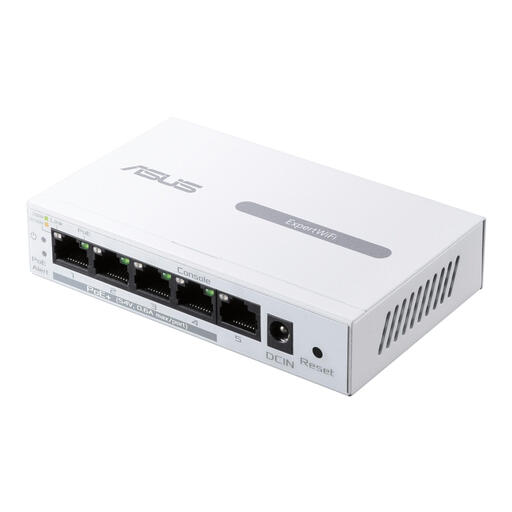 Image unavailable
ASUS ExpertWiFi EBP15 Managed Gigabit Ethernet PoE White
Suitable for a wired setup where you’re looking for a managed gigabit switch and PoE is important.
The product name lists gigabit Ethernet (10/100/1000) and PoE; check the port layout and PoE features for the devices you want to connect.
View at Joybuy
 Image unavailable
TP-Link TL-SG1008P Unmanaged Gigabit PoE Switch
This may suit you if you’re looking for an unmanaged gigabit switch and need PoE for connected devices.
The product name lists gigabit Ethernet and PoE; check the number of ports and the PoE specifications for your devices.
View at Joybuy
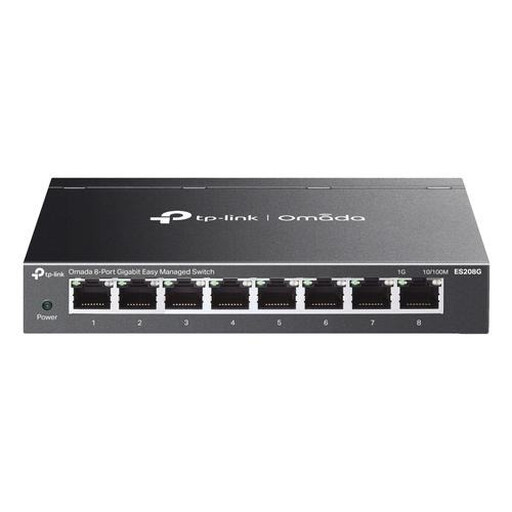 Image unavailable
TP-Link Omada ES208G Managed L2 Gigabit Ethernet Switch
Suitable for a home lab where you’re looking for a managed gigabit switch.
The product name lists Managed L2 and gigabit Ethernet (10/100/1000); check that its specific management features meet your VLAN and port requirements.
View at Joybuy
Frequently asked questions
Do I need a managed switch for a home lab?
Not if you only want to connect devices to the same existing network. If you want to configure VLANs or mirror traffic, choose a model that explicitly lists these features, such as the TP-Link TL-SG108E, according to TP-Link Netherlands.
How do I connect an unmanaged switch?
Connect the switch to the power supply, link it to your router or existing network with an Ethernet cable, then connect your devices. Linksys describes these steps for the LN2308. If you’re in student accommodation or at an educational institution, check the network administrator’s rules first.
What’s the difference between a manufacturer’s warranty and a legal guarantee?
A manufacturer’s warranty is in addition to your legal guarantee. ACM ConsuWijzer explains that if a product doesn’t do what you could reasonably expect it to, you can ask the retailer for a solution.
Does a network switch in the Netherlands need to carry the CE mark?
CE marking is required when the EU rules that apply to the specific product say it is. The manufacturer is responsible for compliance; a CE mark on its own is not an independent assessment of performance. Remember to consider the supplied power supply as part of the product too.


