Who is this relevant for?

Attendee with hearing needs

Before choosing anything, you want to know whether you can listen to the lecture privately in the classroom, or whether the venue has a listening system. Hoorwijzer describes hearing loops as venue-specific facilities. Ask what’s available in the room and whether it works with your hearing aid.

Hybrid attendee

You’re joining on a laptop and need a compatible connection, a microphone you can control, and a way to check whether questions from the room can also be heard online. Logitech, Trust and Jabra describe computer headsets with different connections and microphone controls.

主持er in the room

You’re speaking through a computer but also want to hear people in the room and check how their questions are reaching remote attendees. HP Poly describes mono versions that leave one ear free; a personal headset microphone won’t pick up the whole room by itself.

What should you look for?

Room audio or a listening system

Choose this if: you’re attending in person and aren’t using a personal digital audio connection.

Bear in mind: how clearly you can hear depends on the room and the facilities available there; a standard computer headset won’t replace them.

Wired USB headset

Choose this if: you’re joining on a computer and the connection matches an available port.

Bear in mind: the cable limits your freedom to move, and the wearer’s microphone won’t pick up questions from the room by itself.

Mono headset for hybrid sessions

Choose this if: you’re speaking through a computer and want to keep one ear free to hear people in the room.

Bear in mind: check the exact mono version. Its microphone won’t replace a separate way to make other speakers audible online.

What to consider What should you look for? Who is this important for?
Listening connection Ask whether there’s an online audio channel or a listening system in the room. If there’s a hearing loop, check that it works with your hearing aid. If I’m in the classroom, I first want to know whether my headset can receive the lecture audio. Around 30% of consumers put the listening connection first.
Microphone and questions from the room Check the microphone position and mute control. Separately, ask how questions from other attendees are shared online. If I want to ask a question, I also want to know whether remote attendees can hear the responses from the room. Around 30% of consumers say being able to speak clearly is their main purchase concern.
Connection Check your device’s port and the full model version. Also make sure any required adapter is actually included. If I’m joining on a computer, I want a headset that fits the available port. Around 20% of consumers put connectivity first.
Fit and volume Choose between mono and stereo, check the fit and start at a low listening volume. I want to listen comfortably throughout the session without continually turning up the volume. Around 20% of consumers put wearing comfort and controlled listening first.

Common mistakes

  • Buying a computer headset to replace room audio

    A USB headset receives audio through a connected device. If the lecture isn’t being sent to that device, the headset won’t solve a problem with hearing clearly in the room.

    Before buying, ask what audio attendees can receive personally and what listening facilities are available at the venue.

  • Assuming your microphone will pick up every question in the room

    A personal microphone is directed towards the wearer. As a result, other speakers in the room may not be heard in the online conversation.

    Ask how the organiser captures questions from the room, and at a hybrid session, test whether someone sitting elsewhere can be heard clearly online.

  • Assuming the connection and fit from the product family

    Versions within a product range can differ in their USB connection and mono or stereo fit.

    Before buying, compare the full model code, connection and included accessories.

Relevant brands to consider

Logitech

The H390 is a wired computer headset for listening and speaking through a connected computer. Check whether the version on offer uses USB-A or USB-C.

  • For the USB-A version reviewed, Logitech lists a mute button, adjustable headband and 1.9 m cable.
  • It requires a computer connection, and the cable limits your freedom to move. These are manufacturer specifications, not measurements taken in a classroom.

Trust

The Ayda USB-ENC is designed for personal online use, with controls on the earcup and a boom microphone that can be muted.

  • Trust lists a USB connection, USB-C compatibility and microphone noise reduction for this model.
  • The effectiveness of its noise reduction in a classroom hasn’t been independently tested. Check that you’re looking at the USB-ENC version.

HP Poly

The Blackwire 3200 range includes mono and stereo versions for personal computer calls; the Blackwire 3220 USB-A is a stereo model.

  • HP specifies a wired USB-A connection, mute control and on-ear stereo for the Blackwire 3220 USB-A.
  • If you want to keep one ear free, look for a mono version. Features listed for the range won’t necessarily apply to every model.

Jabra

The Evolve2 30 SE is available in a range of mono, stereo and USB versions; the exact variant matters when making your choice.

  • Jabra documents the microphone’s position close to the mouth and lists several version codes.
  • Jabra’s comfort and call-quality claims aren’t based on independent measurements in a classroom. Check the full variant code and connection.

Products for personal audio

These Joybuy products are headphones and earphones for personal audio from a connected device. They don’t pick up room audio by themselves or replace a listening system at the venue.

JBL Tune 305C wired USB-C earphones, blue

JBL Tune 305C wired USB-C earphones, blue

An option for personal use when a compatible USB-C device is providing the lecture audio; the product information lists a built-in microphone for calls and three-button controls.

Wired USB-C connection. Check that your device sends the correct audio source through USB-C.

View at Joybuy

Sennheiser MOMENTUM 4 Wireless over-ear headphones, black

Sennheiser MOMENTUM 4 Wireless, black

May suit personal use through a connected device; the headphones don’t pick up sound from the room by themselves.

Wireless over-ear headphones with noise cancelling, four microphones and a stated battery life of 60 hours. Check that your device sends the desired audio source wirelessly.

View at Joybuy
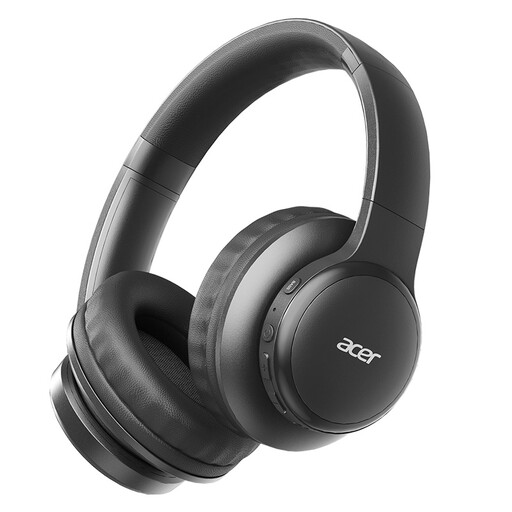
Acer OHR559 wireless headphones, foldable

Acer OHR559 wireless headphones

An option for personal audio through a connected device; the product information lists microphone technology for calls. They don’t replace a solution for room audio.

Bluetooth 5.3 and a foldable design are listed in the product name. Check that your device sends the desired audio source wirelessly.

View at Joybuy

Samsung Galaxy Buds4 Pro True Wireless in-ear earphones with active noise cancelling

Samsung Galaxy Buds4 Pro True Wireless

For personal audio through a connected device; these earphones don’t pick up the sound of a lecture in the room by themselves.

True Wireless in-ear earphones with Active Noise Cancelling. Check that your device sends the desired audio source wirelessly.

View at Joybuy
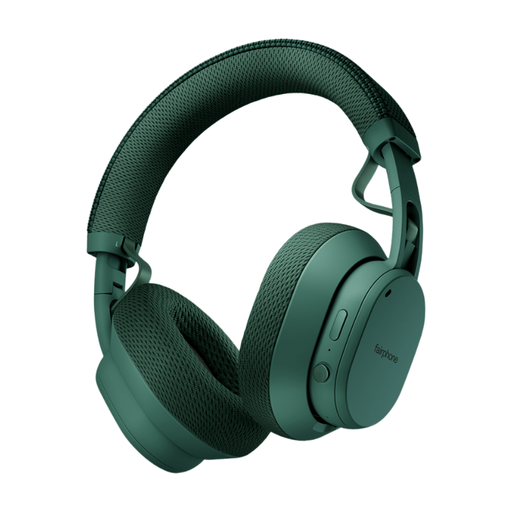
Fairphone Fairbuds XL 2025, green

Fairphone Fairbuds XL 2025, green

An option for personal listening through a connected device; the headphones don’t pick up room audio by themselves.

The product information lists Bluetooth 5.1 and breathable mesh fabric for the headband and ear cushions. Check that your device sends the desired audio source wirelessly.

View at Joybuy

Frequently asked questions

Will a standard USB headset work if I’m only in the classroom?

Only if a connected device is also receiving the lecture audio you want. Check the audio source first; a USB computer headset doesn’t pick up room audio by itself.

How do I set up a headset for a hybrid session?

Connect the version to a compatible port, select the intended microphone and speaker in your call software, and test that your voice and the lecture audio are coming through. Position a personal microphone boom close to your mouth, and separately check how questions from the room are being shared.

How can I listen without continually turning up the volume?

Start at a low volume, check the fit and take listening breaks. The WHO notes that both sound level and duration of exposure contribute to the risk of hearing damage. If speech in the room is hard to hear, also check what listening facilities are available.

Who should I contact about a fault after buying in the Netherlands?

For your statutory guarantee, contact the seller. According to the Dutch government, there’s no fixed statutory guarantee period in the Netherlands; a manufacturer’s guarantee doesn’t replace your right to a product that works as it should.

Can the organiser record a hybrid session without asking?

For formal education, the Dutch Data Protection Authority describes institutions’ obligations, including arrangements and information about recordings. Whether those education rules apply to this local history lecture or a particular recording depends on the organiser and how it’s run. Don’t assume you’ve given consent just because you’re using a headset.
