What should you look for?
Straight-on projection with a wide-viewing-angle screen
Choose this when: the projector can be placed directly in front of the screen, but the audience is spread out.
Bear in mind: the viewing angle of a particular screen tells you nothing about brightness or the legibility of small map labels.
Horizontal keystone correction
Choose this when: the projector has to be placed to one side of the screen’s centre line and you need to correct the image digitally.
Bear in mind: digital correction can make the image smaller and fine details appear less sharp, so test your own slides.
Short-throw projection or lens shift
Choose this when: there’s limited distance between the projector and the screen, or you need a specified lens-shift range to move the projector horizontally.
Bear in mind: a short throw distance doesn’t automatically mean the projector can be placed to one side of the centre line.
| Consideration |
What should you check? |
Which consumers is this important for? |
| Viewing from the side |
Check the viewing angle of the exact screen material and assess the slides from the seat furthest to the side. |
If I’m showing historical photos to visitors sitting at an angle to the screen, I want to know whether the image will still be clear from those seats. Around 33% of consumers put this first. |
| Room lighting |
Compare brightness with your preferred screen size and test it in the actual lighting; check the selected operating mode. |
If I can’t darken the room properly, I want to see in advance whether photos and maps will be legible at the chosen size. Around 27% of consumers prioritise legibility in the available lighting. |
| Position and distance |
Measure the distance to the screen and the required image width; check horizontal correction and lens shift separately. |
If the room layout means the projector can’t be placed on the centre line, I want to know what positions the model can accommodate. Around 20% of consumers focus mainly on the space available for setting up the projector. |
| Map details and connections |
Check the projector’s native resolution and inputs; test it with your own computer and slides. |
If place names are small and I need to connect my presentation computer, I want to check that the details and connection will work with my set-up. Around 20% of consumers prioritise these two points. |
According to Elite Screens, the stated 180° viewing angle and 1.1 gain apply to the specific CineWhite ISF screen material, not to every projection screen or a bare wall. Epson Support explains that digital image correction can make the visible image slightly smaller after correction. A stated viewing angle or correction angle is no substitute for testing with your own slides.
Projectors at Joybuy
The Joybuy projectors below are aimed at presentations where native 1080p and image adjustment features may be useful. Check the specifications listed for each model and test small map labels with your own slides.
 No image available
Ultimea Apollo P40 projector
The title mentions autofocus and automatic keystone correction for adjusting the image.
The product name lists 1080p, HDR10 and 700 ANSI lumens.
View at Joybuy
 No image available
Yaber L2 projector
The product name mentions a rotating gimbal for different set-ups; check that it will work with your screen position.
The title lists native 1080P and 520 ISO lumens.
View at Joybuy
 No image available
XGODY N7 Cine Smart projector
The product title mentions autofocus and automatic keystone correction; test a slide to see whether the details remain legible after adjustment.
The title lists native 1080P and 1000 ANSI lumens.
View at Joybuy
 No image available
XGODY Gimbal N6 Pro projector
The product name mentions autofocus and automatic keystone correction for adjusting the projection.
The title lists native 1080P and 700 ANSI lumens.
View at Joybuy
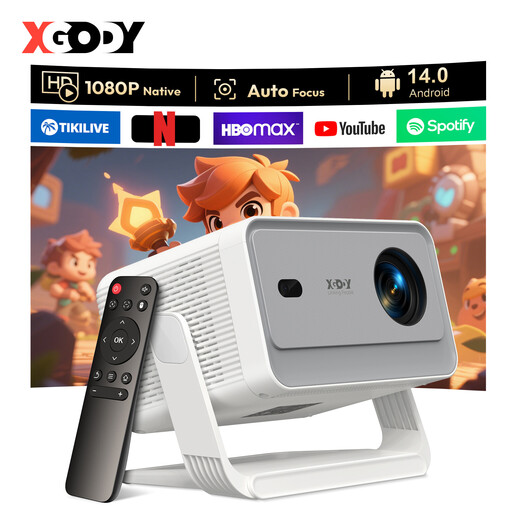 No image available
XGODY Gimbal A6 Pro projector
The product title mentions autofocus and automatic keystone correction; check the projector’s position and try your own presentation source.
The title lists native 1080P and 650 ANSI lumens.
View at Joybuy
Frequently asked questions
Does keystone correction help if visitors are sitting at an angle to the screen?
No. Keystone correction adjusts the shape of an image when the projector is projecting at an angle to the screen. For visitors sitting to the side, the viewing angle of the projection surface matters. Test the two situations separately.
How can I check the set-up before the presentation?
Measure the distance to the screen, connect your presentation computer and project a slide with the smallest map text. Check it from the seat furthest to the side. If possible, first position the projector directly in front of the screen, then test the digital correction you need.
How do I compare light sources and replacement parts?
For the exact model, check the type of light source, the stated lifespan for each operating mode and the availability of parts. Epson Netherlands lists a lamp life of 5.500 hours in normal mode and 12.000 hours in economy mode for the EB-FH52. These are manufacturer specifications, not a guarantee of lifespan in every set of usage conditions.
Which resolution matters for small place names on maps?
Check the projector’s native resolution and test your own slide at your preferred image size. A supported input signal isn’t the same as native resolution. For the ViewSonic PA700W, also check which version is being offered, as it appears with different resolution labels.
Do I still have rights in the Netherlands after the manufacturer’s warranty expires?
For a consumer purchase, your statutory guarantee may still apply for as long as the product should last under normal use. ACM ConsuWijzer explains that there’s no fixed general two-year limit; if there’s a fault, contact the seller.


