Who is this buying guide for?

Organisers presenting in a lit community venue

You want photographs and captions to remain visible while visitors can still see one another. Start with the room lighting, screen size and sightlines from the back row. Epson Netherlands lists viewing distance, room size and content as factors when choosing a screen.

People putting together slides with lots of detail

You show maps, scans and small captions. Compare the projector’s native resolution with your slides, and check how readable they are at the planned screen size. BenQ and Optoma describe models with different resolutions.

Volunteers presenting at different venues

You take the projector with you and set it up each time. Check the projection distance, connections and portability. Epson Europe describes the EB-1780W as a portable WXGA model.

What should you consider when choosing?

Bright standard projector

A good fit when: your club presents in a lit room and has enough distance from the screen. Epson lists WXGA, 4,000 lumens and two HDMI ports for the EB-W53. BenQ lists Full HD and 4,000 lumens for the MH733.

The trade-off: WXGA has fewer pixels than Full HD, which can matter for small captions. Brightness alone doesn’t tell you how readable your slides will be in your room.

Short-throw projector

A good fit when: a table or walkway makes a standard setup difficult. BenQ specifies WXGA and a 0.521 throw ratio for the LW830ST; Optoma lists Full HD and 0.496:1 for the ZH350ST.

The trade-off: Measure the distance and the image width you want. A short throw ratio won’t, by itself, solve problems caused by distracting ambient light or hard-to-read slides.

Portable projector

A good fit when: a volunteer needs to transport the projector between venues. Epson describes the EB-1780W as a portable WXGA model with 3,000 lumens, a carrying case, and wired and wireless connectivity options.

The trade-off: Portability may matter more than the highest stated brightness. Check the connection and readability in the room where you’ll be presenting.

What to consider What to look for when buying Who is this important for?
Visibility with the room lights on Assess the stated brightness for your intended image size, and check how much light falls on the screen. If I want to present in a room without fully darkening it, visibility from the back row is my main concern. Around 36% of consumers put room lighting first.
Readable detail Compare the native resolution, such as WXGA or Full HD, and view a sample slide at your planned screen size. If my slides include maps, scans and small captions, I want to know whether the details will remain readable on the big screen. Around 29% of consumers prioritise detail.
Suitable projection distance Measure the distance from the lens to the screen and compare it with the image width you need and the throw ratio. If there’s little room to set up the projector, I want to know in advance whether the image will fit within the available distance. Around 21% of consumers prioritise limited setup space.
Transport and connections Check the connections and any wireless options on the exact model, and test your source device in advance. If I need to take the projector between venues, I want to make sure it’s easy to transport and connect with our setup. Around 14% of consumers prioritise transport and connections.

Common buying mistakes

  • Choosing a projector on its lumen rating alone

    Room lighting, screen size and viewing distance all affect what visitors can see. A lumen rating on its own doesn’t predict readability.

    Plan your setup first, then view a representative slide in the lighting conditions you’ll typically use.

  • Confusing a high input resolution with the projector’s native resolution

    Connecting a Full HD laptop to a WXGA projector doesn’t give the projector Full HD resolution.

    If scans or small captions matter, compare the stated native resolution of the exact model you’re considering.

  • Buying a short-throw model without measuring the room

    Even a short throw ratio needs to suit the available distance and the image width you want.

    Measure the distance from the lens to the screen and compare it with the model’s throw ratio.

  • Assuming a purchase by an association has the same rights as a private purchase

    The Netherlands Authority for Consumers and Markets (ACM) distinguishes between consumer rules and purchases made mainly or exclusively for business purposes. The rules that apply can depend on who enters into the contract.

    Record who is making the purchase and check the terms that apply before you order.

Brands to compare

Epson

The EB-W53 and EB-1780W offer different features for club presentations. Epson lists WXGA for both models, with different brightness levels and portability features.

  • Epson lists 4,000 lumens and two HDMI ports for the EB-W53. Epson Europe lists 3,000 lumens and a portable design for the EB-1780W.
  • WXGA needs extra consideration if small captions are important. These are manufacturer specifications, not independent test results.

BenQ

The MH733 and LW830ST suit different room setups. BenQ describes the MH733 as Full HD and the LW830ST as a short-throw WXGA model.

  • The models offer different combinations of resolution and projection distance to compare with your own space.
  • BenQ’s product claims don’t prove that slides will be easy to see in every community venue. Assess your own setup.

Optoma

According to Optoma’s product specifications, the ZH350ST is a short-throw model with Full HD and a laser light source.

  • This combination may be worth considering if you have limited setup space and slides with lots of detail.
  • Check the projection distance and screen in your own room. A stated lifespan doesn’t guarantee trouble-free use.

Acer

Acer describes the X1328Wi as a WXGA projector for meeting rooms.

  • Acer lists up to 5,000 lumens and wireless projection options for this model.
  • Check which connection and any dongle are included with the version you choose. WXGA needs extra consideration for small captions.

Projectors on Joybuy

This Joybuy selection includes projectors to suit needs such as displaying slides with lots of detail, travelling between venues or working with a limited projection distance. Compare the product specifications with the room lighting, source device and available setup space.

XGIMI Vibe One Match Night EU Edition projector

XGIMI Vibe One Match Night EU Edition

A portable option if you want to take the projector between venues. Check that its connections suit your presentation source.

The product name lists Full HD 1080p, a built-in battery, Google TV, JBL audio and a projection screen with stand.

Joybuy

Optoma UZ38X 4K UHD Dual-Laser projector

Optoma UZ38X 4K UHD Dual-Laser Projector

An option to compare if slides with lots of detail are important. Check readability at your planned screen size too.

The product name lists 4K UHD, dual laser, 3.800 lumens, 1,3× zoom and a 15 W speaker.

Joybuy

XGIMI MoGo 4 Match Night EU Edition projector

XGIMI MoGo 4 Match Night EU Edition

A portable option to compare if you need to travel between meetings. Check that it connects to the source device your club uses.

The product name lists Full HD 1080p, a built-in battery, Google TV, Harman Kardon audio and an EA SPORTS FC 26 game code.

Joybuy
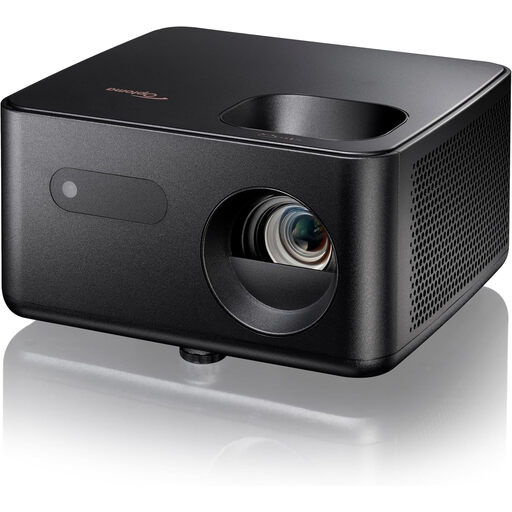
Optoma Photon Life PH31 projector

Optoma Photon Life PH31

Before buying, check which resolution, connections and setup will suit your club’s slides and presentation source.

Joybuy

Optoma Photon Go projector

Optoma Photon Go

An option to consider if there’s limited distance between the projector and screen. Measure the available space and the image width you want in advance.

Check the stated throw ratio and connections for the version you choose.

Joybuy

Frequently asked questions

How can you check whether the presentation is readable from the back of the room?

Before the event, project a representative slide with the smallest captions onto the planned screen. Check it from the back row with the room lighting set as it will be during the presentation. Epson lists viewing distance, room size and content as factors when choosing a screen. The maximum image diagonal doesn’t guarantee readability.

Can you display photographs directly from a USB stick?

It depends on the model and file format. BenQ lists a USB reader for the MH733 that supports JPEG and PDF, among other formats. Test the files you want to display in advance. Don’t assume that a USB port can play files on other models unless the specifications confirm it.

What should you check about maintenance and lifespan?

Check the light source type and the terms for the exact model. Epson lists a lamp for the EB-W53, while Optoma lists a laser light source for the ZH350ST. Stated operating hours don’t guarantee that repairs won’t be needed.

Do online purchases always come with a 14-day cooling-off period?

For eligible consumer purchases made at a distance, the ACM generally states that you have 14 days from delivery, with some exceptions. A purchase by an association doesn’t automatically fall under consumer rules just because it’s for a community event. Check who is legally making the purchase and which terms apply.

What safety and image rights should you check for a club presentation?

Check the safety information and applicable conformity marking for the exact electrical device. According to the NVWA, the legal framework can depend on the device and any radio module. For other people’s copyright-protected photographs, the Dutch Government lists the creator’s permission as the starting point for use and publication. Older images aren’t automatically copyright-free.
