
Vandaag of morgen in huis

Kwaliteit gegarandeerd

Welkomstaanbiedingen ontgrendelen: GRATIS bezorging | Tot 80% korting | Gratis 30 dagen JoyPlus-proefperiode
Download de app
A height-adjustable desk with USB-C combines two practical features: switching between sitting and standing, and connecting devices without needing an extra charger on your desktop. However, a USB-C port alone tells you little about how useful it will be. For example, the port may only charge devices, when what you really want is to connect a monitor, laptop or docking station.
Electric sit-stand desks also vary in size, load capacity, stability and controls. If you focus only on the price or appearance, you could end up with a desk that’s too small, doesn’t leave enough room for cables or won’t fit in the space available against your wall.
USB-C describes the shape of the connector, not necessarily what it can do. So check the product information:
The JOYFURNOS models are listed as having a USB-C port with fast charging. Exact charging performance may vary depending on the device connected. If your laptop needs a lot of power, always use its original adapter unless the desk port is specifically suitable for it.
An electric height-adjustable desk needs to do more than move: it also needs to suit your space. Check the stated height range, maximum static load and safety features. The JOYFURNOS product descriptions list a height range of 72 to 120 cm and a maximum static load of 70 kg.
According to the product descriptions, these desks have an obstacle-detection sensor and overheating protection. Some models are listed as needing an 18-minute rest period after around two minutes of continuous adjustment. This is especially relevant in an office where several people often adjust the desk one after another.
A 120x60 cm height-adjustable desk is relatively easy to fit into a bedroom, student room or compact home office. However, the depth is limited if you use a large screen, keyboard, laptop stand and desk lamp.
A 140x60 cm height-adjustable desk gives you extra width for two screens or work documents. For a gaming setup, large monitor arms or several devices, a 160x70 cm height-adjustable desk offers more room. Measure not only the space for the desktop, but also the clearance behind the desk for cables and movement.
Choose a desk that goes low enough for you to sit comfortably and high enough for you to work comfortably standing up. A desk with a memory function is useful if several people use it or if you regularly switch between two working heights. Check how many memory settings are available, as this varies by model.
A lock function on the control panel can be useful in a household with children or in a shared workspace. According to the product description, a reminder function can help you alternate between set working periods, but it is not a medical feature or a guarantee of better posture.
Check the maximum static load and add up the weight of all your equipment:
The JOYFURNOS desks in this selection are listed with a maximum static load of 70 kg. Position heavy equipment as evenly as possible. Adjust the feet properly if your floor isn’t completely level, and leave enough space between the desk and the wall when adjusting its height.
A desk with cable management helps stop cables from dangling around the legs or getting trapped. Look for cable grommets, organisers, hooks and a suitable place for the adapter. Also check that the cable is long enough when the desk is at its highest setting.
If you already have a table or a desk without a built-in USB-C connection, a desk power socket with USB-C could be a practical solution. According to the product information, the Neomounts DS22-840 series has three earthed Schuko sockets, two USB-C ports with 20W Power Delivery and one USB-A port with an 18W output. It attaches with a clamp and has a 1.4-metre power cable. Before use, check the total power requirements of your connected devices and follow the manufacturer’s instructions.

Why it suits this type of user: The compact desktop is ideal for a student room, bedroom or first home-working space where room is limited.
The dimensions and height range are clearly stated. Cable management, an organiser and hooks help keep loose cables and accessories in check.
120 x 60 cm, height of 72-120 cm, memory function, USB-C port and a stated static load of 70 kg.
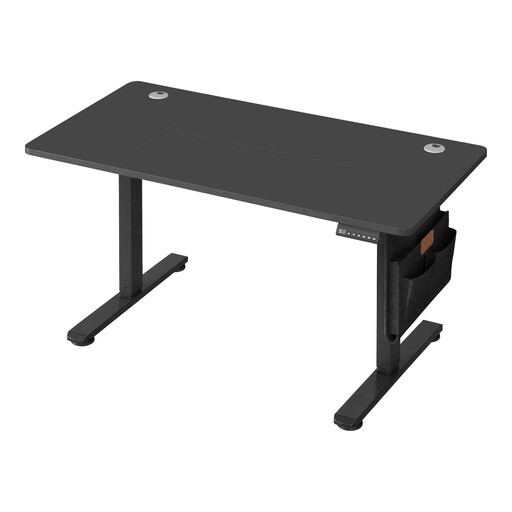
Why it suits this type of user: The extra width gives you more room for documents, a laptop and one or two screens, without needing to opt for a large desktop.
The product information lists two cable grommets, an organiser and a hook. According to the description, the controller has a lock function.
140 x 60 cm, height of 72-120 cm, memory function, USB-C port, adjustable feet and a stated load capacity of 70 kg.

Why it suits this type of user: The spacious desktop is suitable for an extensive work, study or gaming setup with several devices.
The 70 cm depth gives you more room for screens and a keyboard. Cable grommets and an organiser help keep connections tidy.
160 x 70 cm, height of 72-120 cm, memory function, USB-C connection, adjustable feet and a stated static load of 70 kg.
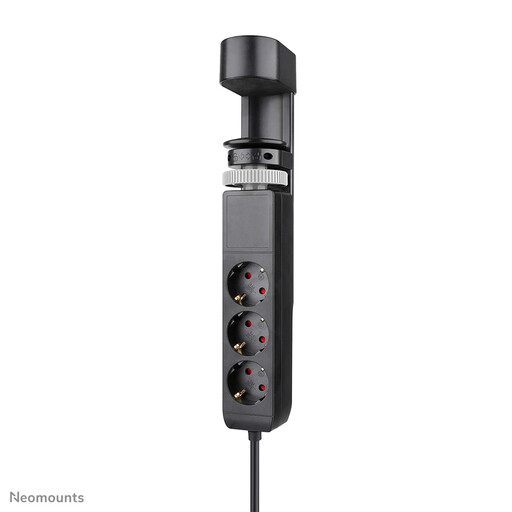
Why it suits this type of user: A handy choice if you already have a desk and simply want power and USB connections within easy reach.
The clamp attaches the desk power socket without needing to replace your desktop. The power cable is 1.4 metres long, so check in advance that it will suit your setup.
Three Schuko sockets, two USB-C ports with 20W Power Delivery according to the product information, one 18W USB-A port and a clamp attachment.
We’ve put together a complete, up-to-date list of products that meet these strict selection criteria and the applicable European safety regulations.
That depends on the port’s charging capacity and specifications. A USB-C connection with Power Delivery can supply more power than a standard USB connection, but always check that the power output is suitable for your laptop. The Neomounts desk power socket is listed with 20W Power Delivery, making it most suitable for compatible mobile devices and accessories.
Power consumption depends on the motor, how often you adjust the desk and its standby mode. The motor mainly uses electricity while moving. A desk with an energy-saving mode can reduce consumption when not in use, but actual consumption varies by model and usage. Unplug the desk if it won’t be used for an extended period, provided the manufacturer allows this.
Its lifespan depends on the quality of the frame, how often it is adjusted, the load and whether it is used correctly. Stay within the stated maximum load, keep liquids away from electrical components and make sure the desktop doesn’t hit a wall as it moves. Before ordering, also check the warranty, assembly instructions and availability of spare parts.
