
Vandaag of morgen in huis

Kwaliteit gegarandeerd

Welkomstaanbiedingen ontgrendelen: GRATIS bezorging | Tot 80% korting | Gratis 30 dagen JoyPlus-proefperiode
Download de app
A height-adjustable desk can make a fixed workspace more flexible. You can switch between sitting and standing without rearranging your entire office. However, an attractive product photo tells you little about everyday use. Particularly with an electric sit-stand desk, unsuitable dimensions, limited load capacity or unclear safety features can lead to a disappointing purchase.
A wide height range sounds useful, but the lowest and highest settings must suit your height and chair. Also check whether the desktop remains stable at the desired height. A desk that wobbles when fully raised is less practical for typing or working with a monitor.
The maximum load usually refers to the total weight placed on the desk. A monitor, laptop, docking station, speakers and desk lamp all add up. With a height-adjustable computer desk, depth is also important. A 60 cm-deep desktop offers different possibilities from a 70 cm-deep one, particularly when using a monitor stand or two screens.
A memory function, USB-C port or cable management can be useful, but check exactly what is included. For example, a USB-C port on a control panel is not automatically suitable for video output or charging a laptop. According to the JOYFURNOS product description, the USB-C port has a fast-charging function; check the listed specifications and your charger's compatibility before use.
For a permanent sit-stand workspace, a suitable range is more important than an impressive figure. Electric models are practical when you want to switch positions several times a day. An electric desk with memory function can store pre-set heights, so you do not have to adjust it from scratch each time.
A workstation that sits on an existing desk works differently. According to the product information, the Neomounts NS-WS300BLACK has continuous height adjustment from 11 to 50,5 cm and a gas spring mechanism. The Neomounts DS90-325BL1 has an adjustment range of 44 to 95 cm for the monitor arm and keyboard tray.
Compare the load capacity with your complete setup:
The JOYFURNOS desks in this selection specify a maximum static load of 70 kg. The Neomounts NS-WS050BLACK is a compact model with a load capacity of 8 kg and five height settings. This makes it more suitable as an additional workstation than as a complete desk.
A desk for working from home should provide enough space for your equipment and everyday essentials. A 160 × 70 cm desktop offers more room for two screens than a 120 × 60 cm model. When using a monitor arm, you should also check the VESA size and screen dimensions.
The Neomounts DS90-325BL1 is designed for screens measuring 17 to 32 inches, with VESA patterns of 75 × 75 mm or 100 × 100 mm. Its stated load capacity is 9 kg, or 6 kg for curved screens. Integrated cable management can help keep cables tidy, but with any adjustable construction, look out for cables that could become trapped or pulled tight.
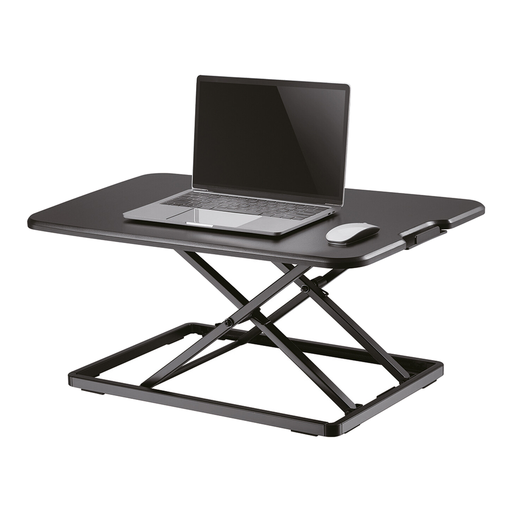
Why it suits this profile: This compact workstation fits on an existing desk and is ideal for anyone who wants to try working while standing without investing in a fully electric desk.
The product specifications state five fixed height settings and a maximum load of 8 kg. This makes the limits clearer than with a product featuring vague capacity information.
Steel frame, low profile, easy to move and a five-year warranty according to the product information.
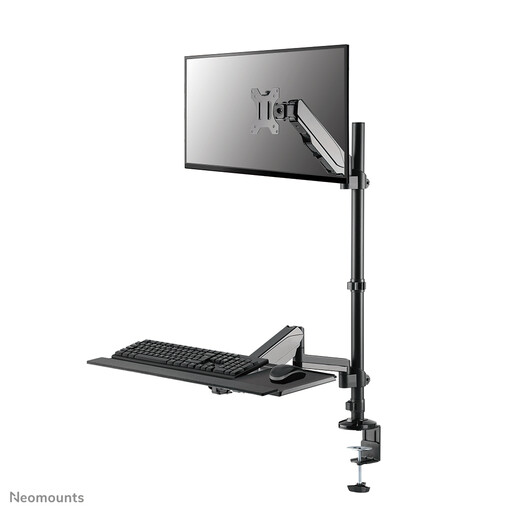
Why it suits this profile: This model is designed for users with a permanent monitor setup who want to create a precisely adjustable sit-stand workspace on an existing desk.
The screen size, VESA compatibility and maximum load are clearly stated. This makes it easier to check in advance whether your monitor is suitable.
Adjustment range of 44–95 cm, tilt and swivel function, keyboard tray and cable management.

Why it suits this profile: The spacious desktop is suitable for intensive home working, studying or a setup with multiple devices.
The dimensions, maximum static load of 70 kg and adjustment range of 72–120 cm can all be checked in advance. The safety instructions also require cables to move freely and sufficient clearance from obstacles.
160 × 70 cm desktop, memory function, USB-C port, cable grommets and adjustable feet.
We have compiled a complete, up-to-date list of products that fully meet these strict selection criteria and the applicable European safety regulations.
First place an electric desk on a level surface and leave sufficient space around it. Before adjusting the height, check that no cables are pulled tight and that there is nothing underneath the desktop. For the JOYFURNOS models, the product information specifies overheating protection: after more than two minutes of continuous adjustment, the instructions state that you must wait 18 minutes.
While seated, adjust the chair, desktop and monitor separately. Your forearms should rest comfortably on the desktop and the screen should be readable without leaning forwards. A monitor stand can help position a screen higher, but always check its stability and the total load.
Power consumption depends on the motor, how often you adjust the height and how long you use the desk. The motor usually only runs while the height is being changed. An energy-saving mode, as specified for some JOYFURNOS models, can limit consumption while idle. Check the technical specifications if energy consumption is a deciding factor for you.
There is no universal height. While seated, adjust the desk so that your shoulders remain relaxed and your elbows form roughly a right angle. When standing, your forearms should be approximately horizontal. Then adjust the monitor separately. A memory function makes it easier to select both positions again.
Its lifespan depends on assembly, load, frequency of use and maintenance. Do not exceed the stated load capacity, keep moving parts clear and follow the manufacturer's safety instructions. Also regularly check that the screws, cables and frame are still securely fastened. This helps limit unnecessary wear on your sit-stand workspace.
