
Vandaag of morgen in huis

Kwaliteit gegarandeerd

Welkomstaanbiedingen ontgrendelen: GRATIS bezorging | Tot 80% korting | Gratis 30 dagen JoyPlus-proefperiode
Download de app
A height-adjustable desk can be useful if you work from home, study or game and want to adjust your workspace regularly. However, an electric frame alone doesn’t tell you everything. A wobbly frame, a desktop that’s too small or an unclear maximum load capacity can make a desk less suitable than you expected.
So, pay particular attention to these three common pitfalls:
The points below can help you compare specifications without relying solely on product descriptions such as “ergonomic” or “sturdy”.
Always check the stated height range. For example, the models in this selection range from around 72 to 120 cm. Make sure the range suits your height, chair and way of working.
An electric desk is particularly practical if you often switch between sitting and standing. Also look out for:
A memory function saves your preferred settings, but it doesn’t replace good positioning. Don’t place the desktop directly against a wall if it could scrape against it when moving. On electric models, keep the plug, adapter and controls dry.
A 120 x 60 cm desk is suitable for a compact home-working space, student room or a single monitor and laptop. For two monitors, a large monitor arm, or extra space for writing and storage, 160 x 70 cm is more practical.
Don’t just look at the width. The depth determines how much room you have between the screen and the edge of the desk. Measure the following in advance:
If you’re looking for a computer desk, home office desk or gaming desk, remember to allow for peripherals too. A headphone hook, cable port or storage compartment can help keep the desktop tidy, but won’t necessarily give you more workspace.
Compare the maximum static load with the combined weight of your equipment. Add together your monitors, PC, speakers, lamp, books and other accessories. Leave some capacity in reserve, especially if you have a large screen or a heavy PC case.
Also be aware of the difference between:
If only the static load is stated, don’t treat that figure as a guarantee for every situation while the desk is moving. A steel frame and adjustable feet can help keep the desk stable, but the floor, assembly and distribution of weight still matter.
For electric desks, also check the safety information, the supplied adapter and the assembly instructions. European sellers must make mandatory product information and safety instructions available. A general marketing claim that a product is “safe” or “quiet” is no substitute for verifiable technical details.
The following models have been selected based on their stated dimensions, features, materials and load capacity. Claims about comfort, posture or healthy working come from the brands’ product descriptions and are not presented here as medical facts.

Why it suits this type of user: Its compact size fits a smaller home office, student room or study. The memory function and USB-C port are handy for everyday use where space is limited.
The product information states a height range of 72-120 cm, cable management and a maximum static load of 70 kg. Check that 120 x 60 cm gives you enough room for your equipment.
Electric height adjustment, memory function, USB-C port, cable management and three hooks, according to the product details.

Why it suits this type of user: The larger desktop gives you room for several screens, a laptop and writing materials. This makes it a good choice for professionals and home workers with a dedicated workspace.
The specifications list a steel frame, adjustable feet, two cable ports and a maximum static load of 70 kg. Spread heavy equipment across the desktop.
160 x 70 cm desktop, memory function, USB-C connection, cable ports and a lock function on the controls.
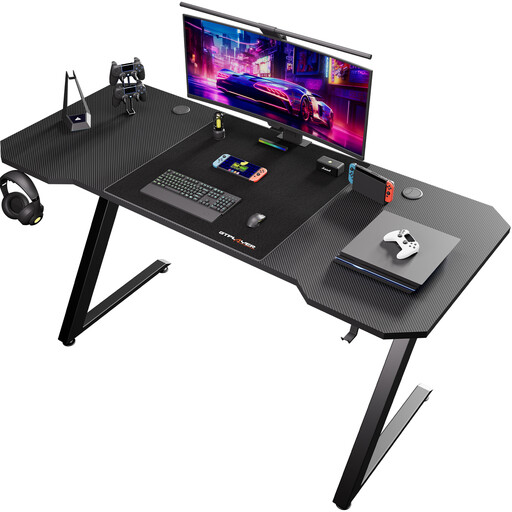
Why it suits this type of user: This is a fixed-height gaming desk for people who don’t need an electrically adjustable desk but want a compact desktop and somewhere to hang their headphones.
The fixed-height design means you don’t pay for motors or memory settings you won’t use. Check in advance that the fixed desk height works with your chair and monitor.
Compact 120 x 60 cm size, carbon-look surface and a headphone hook included, according to the product name and information.
An electric height-adjustable desk needs a little more attention than a standard computer desk. Distribute the weight evenly and make sure cables don’t become taut as the desktop rises. The product information for several models mentions overheating protection after prolonged, continuous adjustment. Follow the stated pause after activation and don’t force the controls.
A cable management system helps keep your workspace tidy, but check that the cables are long enough for both the lowest and highest positions. Only use the supplied or specified adapter, and keep electrical components away from liquids.
Set the desktop so that your shoulders stay relaxed and your forearms are roughly horizontal while typing. The right height depends on your height, chair and keyboard. Use the memory settings as a practical starting point, then adjust them manually.
Its lifespan depends on the motor, frame, assembly, load and frequency of use. Check the warranty terms, maximum load and instructions for overheating protection. A desk that regularly carries more than its stated capacity may wear out sooner.
Power consumption depends on the adapter, charging capacity and how you use the USB-C port. A USB-C connection is mainly an extra charging point, so check in advance that its output is suitable for your device. Disconnect accessories when you’re not using them if you want to reduce standby power consumption.
We’ve put together a full, up-to-date list of products that meet these strict selection criteria and the applicable European safety regulations.
