
Vandaag of morgen in huis

Kwaliteit gegarandeerd

Welkomstaanbiedingen ontgrendelen: GRATIS bezorging | Tot 80% korting | Gratis 30 dagen JoyPlus-proefperiode
Download de app
A height-adjustable desk can be useful for people working from home, students, gamers and office workers who want to change their working posture throughout the day. However, not every sit-stand desk is right for every room or set-up. A compact laptop workspace, for example, calls for different specifications from a desk holding two monitors, speakers and a gaming PC.
Marketing copy often focuses on a quiet motor, ergonomic design or high weight capacity. Always check the technical specifications, though. The following common pitfalls could lead to a purchase you regret.
A weight capacity of, say, 70 kg may sound generous, but this usually refers to the maximum static load. The weight of the desktop, monitor arms, monitors, laptop, lighting and accessories all count towards it. If you’re using a workstation on top of an existing desk, the workstation’s own weight capacity applies, not that of the desk underneath.
Position heavy equipment as close to the centre as possible, and don’t exceed the stated limit. The Neomounts NS-WS300BLACK has a maximum capacity of 15 kg, while the Neomounts NS-WS050BLACK has a maximum capacity of 8 kg.
A small desktop may look neat, but it can quickly feel cramped once you add a monitor, keyboard, mouse and documents. So don’t just measure the width: check the depth of the desktop too. A 120 x 60 cm desktop suits a typical home-working set-up, while 160 x 70 cm gives you more room for several accessories or larger monitors.
Also check that the cables can move freely as you adjust the desk. A cable that’s pulled tight or catches behind a wall could get damaged.
An electric adjustable desk is only practical if its lowest and highest settings work with your chair, height and set-up. The right height varies from person to person. When seated, your forearms should be roughly horizontal, and your screen should be positioned so you don’t have to look down for extended periods. Adjust the position in small increments, and check that armrests, cables and the monitor stand don’t hit any obstacles.
A manual gas-spring system works without a motor and can be adjusted quickly. According to its product description, the NS-WS300BLACK has stepless adjustment from 11 to 50,5 cm and a gas-spring mechanism. It sits on an existing desk and, according to the listing, requires no assembly.
An electric adjustable desk is especially handy if you switch between sitting and standing several times a day. Check the adjustment range, motor configuration, maximum load and any protection against overheating or collisions. On some models, the safety feature temporarily switches off after prolonged, continuous adjustment. Make sure there’s also enough clearance from the wall.
A complete desk replaces your existing table. It’s a good choice if you want to create a permanent ergonomic workspace. A sit-stand workstation, by contrast, sits on top of an existing desk. It saves space and is a good option for rented homes, student rooms or shared workspaces.
According to the product specifications, the NS-WS300BLACK has a 95 x 40 cm upper surface and a lower keyboard tray measuring 95 x 30 cm. It can hold two monitors or a monitor and a laptop, as long as the total weight stays within 15 kg.
If you’re using a monitor arm, check that your monitor is compatible with its size, weight and VESA mount. The Neomounts DS90-325BL1 is designed for screens from 17 to 32 inches and supports VESA 75 x 75 and 100 x 100 mm. Its maximum load is 9 kg; according to the product information, the limit for curved screens is 6 kg.
Also consider how much room the monitor needs to move. A monitor arm that tilts, rotates and swivels gives you more flexibility, but needs enough space from the wall.
A desk with a memory function makes it quicker to switch to your preferred sitting and standing heights. A desk with a USB-C port can also be handy for charging compatible devices. Check that the port can provide the power you need, though: a USB-C connection doesn’t automatically mean it can charge every laptop quickly.
Cable grommets, an organiser, hooks and adjustable feet may seem like small details, but they can make a difference every day. They can’t replace careful measuring, but they help keep your ergonomic workspace tidy.
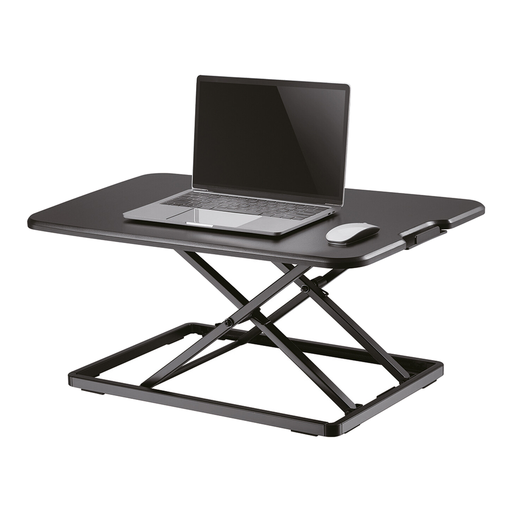
Why it suits this user: This compact workstation is designed to sit on an existing desk and has a lightweight design that’s easy to move.
The maximum load of 8 kg and five fixed height settings make the limits clear. Check beforehand that your monitor and accessories are within this limit.
Steel frame, five height settings and a lightweight design. The product description states that it comes with a 5-year warranty.

Why it suits this user: The spacious desktop is ideal for a fully equipped home-working set-up with several devices and accessories.
The dimensions, maximum static load of 70 kg and adjustment range of 72 to 120 cm are clearly stated. Keep clear of the wall while adjusting the desk.
Memory function, USB-C port, cable grommets, organiser and hook. The listing also mentions adjustable feet and a lock function on the controls.
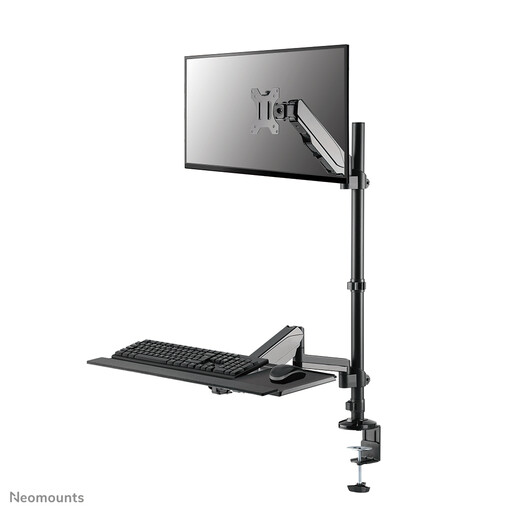
Why it suits this user: This model is a good fit if you use a monitor between 17 and 32 inches and need precise screen adjustment.
The VESA sizes, screen sizes and load limits are specified. For a curved screen, check the lower limit of 6 kg.
Height range of 44 to 95 cm, gas springs for the monitor arm and keyboard tray, plus tilt, rotation and swivel adjustment.
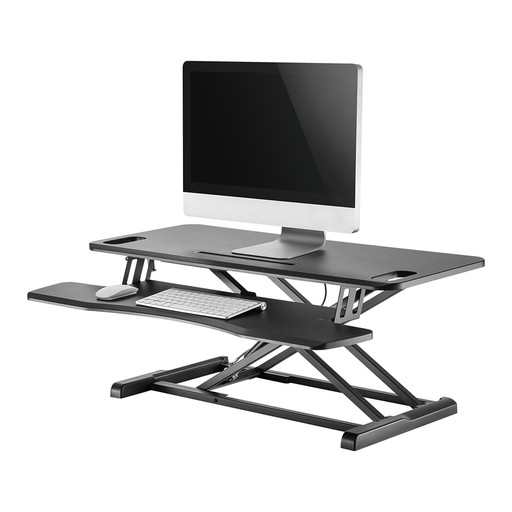
Why it suits this user: This workstation uses an existing table and, according to the product description, is ready to use straight out of the box.
The product lists separate measurements for the screen surface and keyboard tray, so you can check in advance whether your set-up will fit.
95 x 40 cm work surface, 95 x 30 cm keyboard tray, stepless height adjustment from 11 to 50,5 cm and a maximum load of 15 kg.
We’ve put together a complete, up-to-date list of products that meet these strict selection criteria and the current European safety regulations.
Start in the seated position. Adjust the height so your shoulders stay relaxed and your forearms are roughly horizontal. Then position the screen so you can look straight ahead. Next, try the standing height and check that cables, monitor arms and accessories can move freely.
Its lifespan depends on how often you use it, the load it carries, how it’s assembled and how well it’s maintained. Don’t exceed the maximum load, keep liquids away from electrical components and follow the instructions for the overheating protection. Check the screws, cables and adjustable feet from time to time.
Most of the electricity is used while the desk is being adjusted; the motor doesn’t run continuously. A desk with an energy-saving function can reduce standby consumption, but the exact amount varies by model. Check the adapter and product specifications for details.
