
Vandaag of morgen in huis

Kwaliteit gegarandeerd

Welkomstaanbiedingen ontgrendelen: GRATIS bezorging | Tot 80% korting | Gratis 30 dagen JoyPlus-proefperiode
Download de app
An height-adjustable desk can be useful if you want to alternate between sitting and standing during the working day. However, not every model is right for a home office, student room or gaming set-up. A desk may look stable in the product photos, but in practice it might not leave enough legroom, the cables could get in the way or the motor might not be suited to frequent use.
So don’t just look at the price or descriptions such as “ergonomic desk”. Pay particular attention to the dimensions, height range, load capacity and features you’ll actually use.
A compact 120 x 60 cm desk is suitable for a laptop, one monitor and a few accessories. If you put two screens, speakers, a printer or a large gaming PC on the desktop, space can quickly become tight.
A 140 x 60 cm desk gives you more workspace without taking up too much floor space. For multiple monitors, writing and peripherals, a 160 x 70 cm desk is more practical. Also measure the space behind the desk beforehand, so the desktop and cables don’t hit the wall when you adjust the height.
Marketing copy often mentions a quiet motor or stable frame, but doesn’t always say how much weight the desk can support. So check the maximum static load capacity and the material used for the frame.
According to the product information, the models in this selection have a steel frame and a maximum static load of 70 kg. This is the total weight of items such as monitors, a laptop, a lamp and other belongings. A high load capacity doesn’t automatically mean that every desk will be completely wobble-free in all conditions. The floor, assembly and distribution of the weight still matter.
A desk with a memory function can save your preferred heights, but check how many settings are available and whether the control panel can be locked. A desk with a USB-C port is handy for charging compatible devices, but always check the charging function and the power output supplied. Don’t use an adapter with too high a voltage.
For the electric models in this selection, the product information also lists overheat protection. If the desk moves up or down continuously for around two minutes, the height adjustment may be temporarily blocked. According to the product information, you should then wait around 18 minutes.
According to the product specifications, the selected JOYFURNOS and Ochama models adjust from around 72 to 120 cm. This range may suit alternating between sitting and standing, but the ideal height depends on your height, chair and type of keyboard.
Adjust the desk so your shoulders stay relaxed and your forearms rest comfortably as you reach towards the keyboard. Use standing as a way to vary your posture, not as an obligation. A sit-stand desk is only practical if you can adjust the height easily.
Particleboard is a commonly used material for desk tops. Check the thickness, finish and how the desktop is attached to the frame. A larger desktop gives you more space, but also needs a sturdy frame.
For a standing desk for a home office, 120 x 60 cm is a space-saving choice. If you work with two screens or lots of accessories, consider a 140 x 60 cm or 160 x 70 cm model instead. Also allow enough room for your knees and feet.
Cable holes, a storage bag or a hook can help keep wires and accessories off your desktop. Check that the cables are long enough for the highest setting and make sure they don’t become taut behind the desk.
Don’t place an electric height-adjustable desk right against the wall while it’s moving. According to the product information, this could cause scratches or collisions. Electrical components should be used indoors and kept away from liquids. If the desk has a collision sensor, set it carefully and assemble the frame according to the instructions.
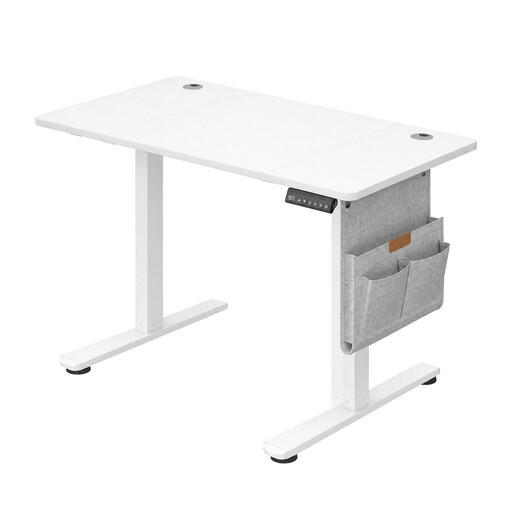
Why it suits this profile: Its compact size works well in a bedroom, student room or small home office. According to the product description, this model has four memory height settings and a steel frame.
The product information lists adjustable feet, cable holes and a storage bag. That means you won’t need to buy extra organisers straight away.
Dimensions of 120 x 60 cm, four memory settings, height range of 72 to 120 cm and a maximum static load of 70 kg.

Why it suits this profile: The spacious desktop is designed for users with multiple screens, a laptop and extra accessories. The product description mentions a USB-C connection and a memory function.
Its dimensions reduce the risk of ending up with a desktop that’s too small. Two cable holes, an organiser and a hook also help with cable management.
160 x 70 cm desktop, height range of 72 to 120 cm, USB-C port, memory function and maximum static load of 70 kg.

Why it suits this profile: This size gives you room for an extensive home-working or gaming set-up. According to the product description, the control panel has a lock function.
The adjustable feet help you position the desk securely on a floor that isn’t completely level. Cable holes keep wires out of the immediate movement area.
Spacious 160 x 70 cm desktop, steel frame, height range of 72 to 120 cm and a load capacity of 70 kg.
We’ve put together a complete, up-to-date list of products that meet these strict selection criteria and the applicable European safety regulations.
Start with a low sitting position and adjust the desktop to suit your chair and keyboard. When standing, position the keyboard so your shoulders stay relaxed. Then check that cables, monitor arms and wall shelves have enough clearance.
Its lifespan depends on assembly, load, how often it’s used and maintenance. Keep within the stated load capacity and don’t run the motor continuously for long periods. On the models mentioned, overheat protection may kick in after around two minutes of continuous adjustment.
Power consumption varies by motor and length of use. The motor mainly uses electricity while the desk is adjusting; exact figures should be listed in the product information or manual. A memory function saves height settings, but doesn’t by itself determine energy consumption.
