
Vandaag of morgen in huis

Kwaliteit gegarandeerd

Welkomstaanbiedingen ontgrendelen: GRATIS bezorging | Tot 80% korting | Gratis 30 dagen JoyPlus-proefperiode
Download de app
A height-adjustable desk can be useful for working from home, studying or gaming, but not every model will suit every room or way of working. Marketing copy often highlights features such as “ergonomic”, “quiet” or “stable”, while important details are less visible. These include the minimum height, weight capacity, available legroom and how the motor is protected.
Use these checks to compare an electric height-adjustable desk based on practical specifications rather than individual marketing claims.
A 140 x 60 cm desktop may look spacious, but monitor stands, a laptop, keyboard and documents can quickly take up room. This size may be enough for one screen and everyday writing. If you use two monitors, speakers or a printer, a 160 x 70 cm desk or larger is often a better choice.
Pay attention to the depth, too. A shallow desktop limits the distance between your eyes and the screen. So check not just the width, but also whether you can arrange your equipment comfortably.
A stable desk needs more than a high stated maximum weight capacity. The construction, adjustable feet, frame and weight distribution all play a part. A heavy desktop computer on one side can have a different effect from an evenly distributed load.
The stated weight capacity is also usually a maximum static load. This is not automatically the same as the safe load while the desk is moving up or down. Follow the product instructions and place the desk on a level surface.
A desk with a memory function can save your preferred sitting and standing heights. This is useful if several people share the desk or you often change your working position. However, the number of memory settings tells you nothing about the height range, speed or maximum load.
If you’re considering a desk with a USB-C port, check what the port is designed for and how much power it supplies. A USB-C connection doesn’t automatically mean you can charge every laptop with a single cable.
Check the lowest and highest settings. For example, the models in this selection have a range of around 72 to 120 cm. This offers flexibility, but the right height depends on your height, chair and screen set-up.
Adjust the desktop so your shoulders stay relaxed and your arms can reach the keyboard and mouse comfortably. A height-adjustable desk is no substitute for a good chair or correctly positioned monitor; it simply makes it possible to vary your working position.
Also check whether the desk has a memory function, shortcut buttons, a lock or an anti-collision sensor. The product descriptions for the JOYFURNOS and Ochama models state that these features are included. Read the instructions before use, especially for setting up the sensor.
These dimensions are useful to compare when choosing a desk for a home office:
Check the maximum static load for every electric model. The JOYFURNOS and Ochama desks in this selection have a stated capacity of 70 kg. Remember to include monitors, computer, monitor arms and other accessories in your calculations.
Cable holes, an organiser and hooks can help keep your desk tidy. They’re useful, but check that your cables are long enough to move with the frame.
A quiet motor is welcome in a shared home or bedroom, but “quiet” is a brand claim. JOYFURNOS and Ochama state in their product descriptions that their motors are quiet and have overheat protection. Treat this as information from the brands, not a universal guarantee of noise levels.
Several models state that the height adjustment temporarily switches off after around two minutes of continuous movement and can only be used again after 18 minutes. This matters if you often move the desk or test it several times during assembly.
Don’t position the desktop right up against a wall while adjusting it. Keep liquids away from electrical parts and don’t exceed the stated load. For electrical products in the Netherlands, it’s a good idea to keep the instructions, adapter details and supplied safety information.
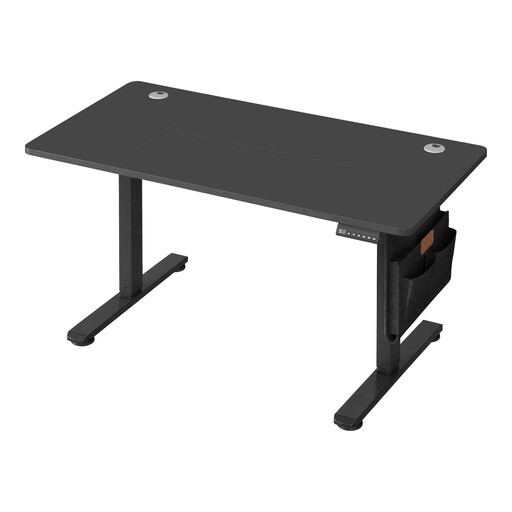
Why it suits this profile: The 140 x 60 cm size offers a practical compromise for a bedroom, study or compact home office. The memory function and USB-C port add convenient controls without the need for a larger desktop.
The specifications list a height range of 72-120 cm, a static weight capacity of 70 kg and adjustable feet. This means you can check the important details instead of relying solely on the word “ergonomic”.
140 x 60 cm; memory function; USB-C port; steel frame; cable holes and hook.
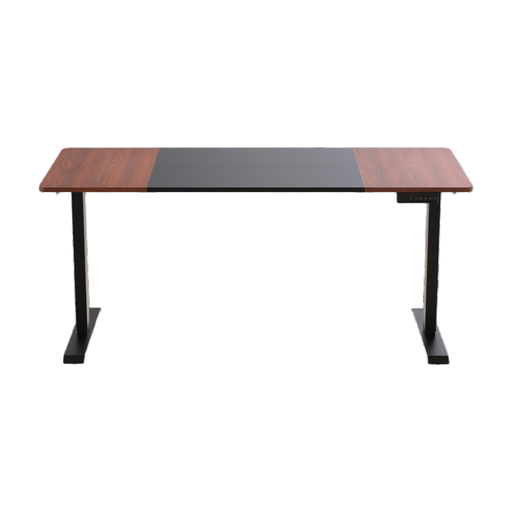
Why it suits this profile: This model is designed for a spacious 160 x 70 cm workspace. The product description lists a dual-motor frame, programmable memory settings and a laminated desktop.
The dual-motor construction and memory controls are specifically listed in the product information. Before buying, check the current weight capacity and whether your equipment is compatible.
160 x 70 cm; two motors according to the product description; memory settings; scratch-resistant laminated surface.

Why it suits this profile: The spacious desktop is well suited to intensive home working, studying with several screens or an extensive gaming set-up. The cable holes, organiser and hook help keep a permanent set-up tidy.
The product information lists a static weight capacity of 70 kg, adjustable feet and a sensor function. Bear in mind the stated pause after extended adjustment.
160 x 70 cm; height range of 72-120 cm; memory function; USB-C connection; cable management.

Why it suits this profile: The compact size is a better fit for a smaller room or student accommodation. This model combines electric height adjustment with a memory function, cable management and a USB-C port.
The dimensions and 72-120 cm height range are clearly stated. The product description also lists the 70 kg static limit and overheat protection.
120 x 60 cm; adjustable from 72 to 120 cm; memory function; USB-C port; three hooks and storage bag according to the product information.
We’ve put together a complete, up-to-date list of products that meet these strict selection criteria and the applicable European safety regulations.
Start with the desk at a low setting, with your feet flat on the floor and your knees comfortable. Then adjust the desktop so your shoulders are relaxed. Position the screen directly in front of you, and check that cables, the wall and accessories remain clear when you adjust the desk.
Its lifespan depends on the motor, frame, load, assembly and frequency of use. A stated weight capacity doesn’t indicate how long the desk will last. Use the desk within its stated limits, follow the recommended breaks if it overheats, and tighten the fixings after assembly as directed in the instructions.
Power consumption depends on the motor, how often you adjust the desk and its standby function. You can only work out the exact cost using the stated wattage and your energy tariff. An energy-saving mode, listed for some models in this selection, can reduce power use while the desk is idle. Check the technical specifications for the model you choose.
