
Vandaag of morgen in huis

Kwaliteit gegarandeerd

Welkomstaanbiedingen ontgrendelen: GRATIS bezorging | Tot 80% korting | Gratis 30 dagen JoyPlus-proefperiode
Download de app
A height-adjustable desk can make your workspace more flexible, but not every model will suit every user. People working from home often focus on the adjustable height, while students tend to prioritise price and size. For gamers, cable management and space for monitors are important. If you choose based only on an attractive offer or a good-looking photo, you could end up with a wobbly frame, limited legroom or awkward controls.
A load capacity of, say, 70 kg may sound generous, but this usually refers to the maximum static load. The weight of the desktop, monitor arms, screens, computer, speakers and accessories all counts. Check whether the stated load applies to the whole desk, and leave a safety margin.
A 120 x 60 cm desktop offers a different working experience from a 160 x 70 cm desk. A computer desk for a single laptop needs less space than a workstation with two monitors. Also consider the depth: a shallow desktop can leave cables and equipment very close to you.
A desk may look sturdy on paper, but become more prone to movement at its highest setting. A steel frame, adjustable feet and a level surface help keep the desk stable. With electric models, you should also follow the instructions. For example, the product information for several JOYFURNOS models states that an overheating protection feature may kick in after two minutes of continuous adjustment. You then need to wait 18 minutes before adjusting the desk again.
An electric sit-stand desk is particularly practical if you regularly switch between sitting and standing while you work. Check:
The electric models in this selection have height ranges of approximately 71/72 to 120 cm. This suits a variety of workstation setups, but the right height depends on your height, chair and monitor position. Adjust your screen so you don't have to keep looking down.
A desktop measuring 80 x 50 cm may be enough for a compact study. A spacious ergonomic desk for working from home gives you more room for a laptop, monitor and documents. For frequent use, these details are worth considering:
A steel frame does not guarantee that a desk will be completely free from movement in all conditions. Place it on a level surface, adjust the feet and do not exceed the stated load capacity.
A desk with cable management keeps power and monitor cables from trailing loose on the floor. Look for cable holes, an organiser, hooks and the position of the control panel. A desk with a USB-C port can also be handy for charging compatible devices. Check the stated charging function and only use adapters with the correct voltage.

Why it suits this type of user: This compact computer desk is designed for work, study or relaxation, and takes up very little floor space.
The product description mentions adjustable feet for uneven floors and a stated maximum static load of 50 kg.
Measures 80 x 50 cm and is made from chipboard with a steel frame; suitable for a simple, fixed workstation.

Why it suits this type of user: The spacious desktop is ideal for a fully equipped home office with multiple screens, documents or equipment.
The specifications list a steel frame, motor, memory function, two cable holes and adjustable feet. The maximum static load is 70 kg.
160 x 70 cm desktop, four memory settings and a USB-C port according to the product description.
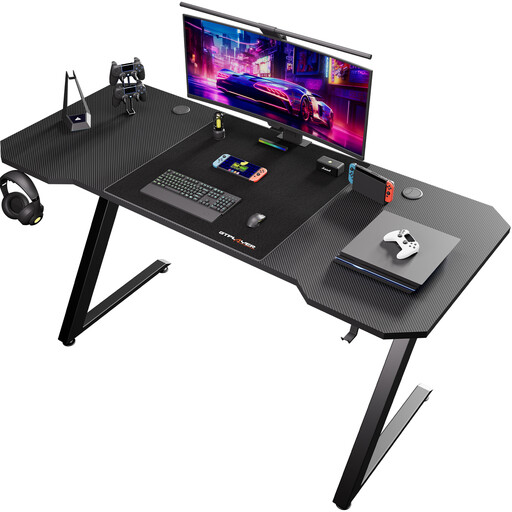
Why it suits this type of user: This gaming desk is designed for users looking for a PC setup with a headset and a distinctive carbon-fibre look.
The stated dimensions of 120 x 60 cm make the available space clear from the outset. An integrated hook is designed to hold a headset.
Carbon-fibre surface and headset hook according to the product name; the size suits a compact gaming setup.

Why it suits this type of user: This electric desk is a good fit for people working from home who want a mid-sized desktop and to switch quickly between saved heights.
The product information lists four memory settings, cable management, a USB-C port and a maximum static load of 70 kg.
Measures 140 x 60 cm, has a height range of 71 to 120 cm and comes with practical storage accessories.
We’ve put together a complete, up-to-date list of products that meet these strict selection criteria and the applicable European safety regulations.
Power consumption depends on the motor, how often you use it and the standby mode. The motor uses most of its energy while adjusting the desk. Check whether the control panel has an energy-saving mode, and unplug the desk if it will not be used for a long time, provided the instructions allow this.
Start by placing it on a stable, level surface. Adjust the chair and desktop so your shoulders stay relaxed and your arms rest comfortably on the desk. Position the monitor directly in front of you, and check for cables, drawers or other obstacles before moving the desk.
Its lifespan depends on the load, assembly, maintenance and how often it is adjusted. Do not exceed the maximum load capacity, keep electrical components dry and observe the recommended rest period if you adjust the desk for an extended time. After assembly, regularly check that the screws and adjustable feet are still secure.
