
Vandaag of morgen in huis

Kwaliteit gegarandeerd

Welkomstaanbiedingen ontgrendelen: GRATIS bezorging | Tot 80% korting | Gratis 30 dagen JoyPlus-proefperiode
Download de app
A height-adjustable desk can be useful when you want to adapt your workspace regularly. However, an electric frame or modern design does not automatically mean that a desk will suit your space and how you use it. People working from home often pay too little attention to the minimum height, students underestimate the depth they need and gamers sometimes focus mainly on lighting.
The Joybuy Product Recommendation Officer has therefore listed the most important points to check. This lets you compare an electric sit-stand desk based on concrete features rather than marketing claims.
A wide height range sounds appealing, but also check the desktop dimensions and maximum load. A desk that can rise high enough for standing must also remain stable with a monitor, laptop, lamp and accessories on it.
Pay attention to the full specification, such as 72–120 cm. The correct working height depends on your height, chair and equipment. A memory function makes switching between positions easier, but it does not replace properly adjusting your office chair and monitor.
A desk with lots of equipment can quickly become untidy. Check whether it has cable ports, a cable tray, organiser or hook. A desk with a USB-C connection can be useful for charging a compatible device, but always check the stated charging capacity and whether your own cable and adapter are suitable.
On electric models, cables must be able to move freely while the desk is being adjusted. Do not place the desk tightly against the wall if the desktop moves up or down.
A thick desktop or metal frame does not automatically indicate how much weight the desk can support. Check the stated maximum static load and the materials used. Many models combine chipboard and steel rather than solid wood.
A gaming desk with RGB lighting also requires extra attention. Check where the power connections are located, whether the lighting is controlled via an app and how to protect the electronic components from liquids.
For a desk for working from home or a desk for studying, the available depth is important. A desktop 60 cm deep may be suitable for a laptop and one screen, while 70 cm deep provides more room for a monitor, keyboard and documents.
A 160 x 70 cm desk is better suited to several devices, but it also requires more floor space. Measure not only the width of the wall, but also allow for cables, drawers and the space needed to move around the desk.
If you want to make use of a corner, consider a corner desk with drawers. Check in advance which side the storage will be on and whether the design is reversible.
An adjustable computer desk should stand firmly on the floor. Useful features include adjustable feet, a steel frame and a locking function on the controls. According to the product information for the JOYFURNOS models mentioned, the maximum static load is 70 kg. This is a product specification, not a recommendation to load the desk to its maximum.
The floor does not need to be completely level: adjustable feet can compensate for small differences. Position heavy equipment as centrally as possible and check whether the monitor stand or PC holder has its own separate weight limit.
An electric motor should move smoothly and without noticeable interruptions. Also look at the control functions:
JOYFURNOS product information states that the height adjustment may be temporarily disabled after more than two minutes of uninterrupted movement, after which it must cool down for 18 minutes. This is relevant for intensive users and offices where the desk is adjusted frequently.

Why it suits this profile: The compact 120 x 60 cm desktop is suitable for a smaller room, student accommodation or a simple home-working setup with a laptop and one screen.
The product information lists a memory function, USB-C port, cable management and adjustable feet. This means you will not need to add these features straight away with separate accessories.
Height range of 72–120 cm, maximum static load of 70 kg, plus a storage bag and hooks included.

Why it suits this profile: This spacious 160 x 70 cm desk accommodates several screens, a laptop and work accessories without the desktop quickly becoming cluttered.
Two cable ports, an organiser and a hook address the most common cable and storage problems. The controller also has a locking function.
Steel frame, quiet motor according to the product description, USB-C connection and a stated load capacity of 70 kg.
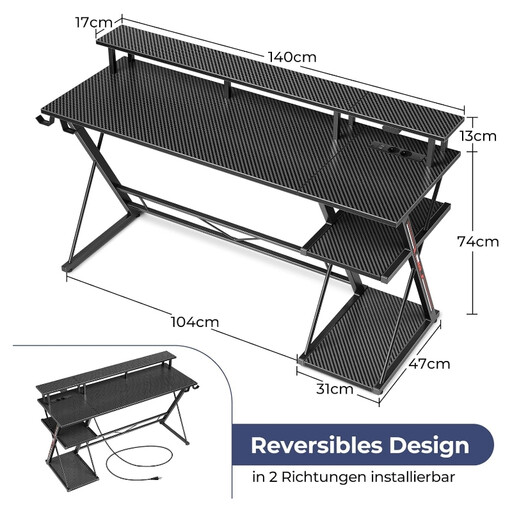
Why it suits this profile: Designed for gamers and users with peripheral equipment. The 140 cm-wide setup combines a monitor stand, PC holder and RGB lighting.
The PC stand can be adjusted to the left or right. Two power sockets and two USB ports are also integrated, so separate charging accessories take up less space.
Metal frame, thick chipboard, monitor stand, headphone hook and app-controlled RGB LED lighting according to the product information.
Place the desk on a level surface and keep moving parts clear of walls, cables and other obstacles. Do not allow liquids near the controller, USB port or other electrical components. Before assembly, check that all parts are present and follow the instructions provided.
If you want a corner setup with extra storage, also take a look at the LANTINE reversible corner desk with four drawers and two shelves. According to the product description, the drawers can be installed on either the left or right. This model is not height-adjustable, but may be suitable when storage and a corner layout are more important than a sit-stand function.
We have compiled a complete, up-to-date list of products that fully meet these strict selection criteria and the applicable European safety regulations.
Adjust the desk so that your shoulders remain relaxed and your forearms are roughly horizontal while typing. Check this both when sitting and standing. A range such as 72–120 cm offers flexibility, but the ideal position varies from one user and chair to another.
Its lifespan depends on the motor, frame, load, assembly and frequency of use. Do not exceed the stated load capacity and observe the specified cooling period when adjusting the desk for prolonged periods. A stable surface and effective cable management help to limit unnecessary strain and damage.
Consumption varies by model and duration of use. The product information for some JOYFURNOS models mentions an energy-saving mode on the controller. Actual consumption depends on how often you adjust the height and how long the controls or USB-C connection are used.
