
Vandaag of morgen in huis

Kwaliteit gegarandeerd

Welkomstaanbiedingen ontgrendelen: GRATIS bezorging | Tot 80% korting | Gratis 30 dagen JoyPlus-proefperiode
Download de app
A height-adjustable desk can be useful when you work from home, study or game and regularly want to change your working position. However, not every sit-stand desk is equally suitable for your space or equipment. An appealing photo, built-in USB port or promise of quiet operation says little if important details are missing.
Pay particular attention to these three common pitfalls:
First, measure the space available in your home office or study. A 160 x 70 cm desk offers more room for several screens than a compact computer desk measuring 120 x 60 cm. However, a larger desktop requires more floor space.
Also check the height adjustment range. The models in this selection range, for example, from 72 to 120 cm or from 71 to 120 cm. The right height depends on your height, chair and monitor position. Your forearms should rest comfortably while typing, without your shoulders being raised constantly.
Do not only look at the maximum static load capacity. Add up the weight of all your equipment:
Several electric desks below state a maximum static load capacity of 70 kg. The compact fixed desks in the selection state 50 kg. A metal frame, adjustable feet and a level surface can all contribute to a more stable desk, but always position the desk according to the product instructions.
Be aware of the difference between an adjustable computer desk and a genuine electric sit-stand solution. A computer riser generally only raises your working surface, whereas an electric desk moves the entire desktop.
A desk with a memory function can save several preferred positions. This saves time if you regularly switch between sitting and standing. Some models also have a USB-C connection or USB-C port for charging compatible devices.
However, check exactly what the connection supports. A USB-C port does not automatically mean that every device will charge at the same speed. Keep electrical components away from liquids and make sure the desktop does not come into contact with a wall, cupboard or windowsill while being adjusted.
According to the product descriptions for the JOYFURNOS and Ochama models, a safety feature may temporarily interrupt height adjustment after prolonged continuous use. For these models, the instructions state that you must wait 18 minutes after approximately two minutes of uninterrupted movement. This is a product-specific instruction, not a general feature of every electric desk.

Why it suits this profile: Measuring 120 x 60 cm, it takes up relatively little space while still offering an electric sit-stand function for working from home or studying.
The product description lists specific dimensions, a load capacity of 70 kg, and warnings concerning distance from walls, liquids and prolonged operation.
Electric height adjustment, memory function, USB-C port, cable management and a stated range of 72 to 120 cm.

Why it suits this profile: The spacious desktop is suitable for a comprehensive workstation with several screens, documents and peripherals.
The specifications list not only the size, but also a maximum static load of 70 kg, adjustable feet and a locking function on the control panel.
160 x 70 cm desktop, height range of 72 to 120 cm, memory function, USB-C connection and cable ports.
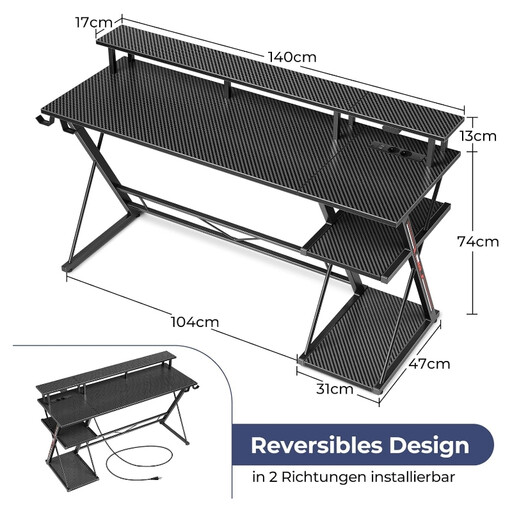
Why it suits this profile: This gaming desk is designed for a fixed PC setup with a monitor stand, CPU stand, headphone hook and integrated lighting.
The product information makes it clear that the desktop is made from chipboard and metal, not solid wood, and includes warnings about load capacity, liquids and a level surface.
Metal frame, thick chipboard, CPU stand, monitor stand, two power sockets, two USB ports and app-controlled RGB lighting.
We have put together a complete, up-to-date list of products that fully meet these strict selection criteria and the applicable European safety regulations.
Start with a low seated position, keeping your feet flat on the floor. Adjust the desktop so that your elbows are at approximately a right angle while typing. Then check the monitor height and make sure the cables have enough slack when the desk moves upwards. Only use the memory buttons after checking that the desktop cannot collide with anything.
Its lifespan depends on the motor, frame, load, assembly and usage. Follow the stated maximum load capacity and avoid adjusting the desk unnecessarily for long periods at a time. After assembly, check that all screws are securely tightened and place the desk on a level surface. If problems occur, always consult the manual and product support.
Energy consumption depends on the motor power, the number of adjustments and the standby mode. A desk that is only adjusted briefly will generally use energy mainly while it is moving. A model with an energy-saving mode can reduce consumption when not in use, but check the specific product’s technical details before making a calculation.
