
Vandaag of morgen in huis

Kwaliteit gegarandeerd

Welkomstaanbiedingen ontgrendelen: GRATIS bezorging | Tot 80% korting | Gratis 30 dagen JoyPlus-proefperiode
Download de app
An height-adjustable desk can be useful when you want to alternate between sitting and standing while working. However, not every desk with a motor is automatically suitable for your space or working posture. A desktop that is too small, limited stability or poorly managed cables are often only noticed after installation.
For home workers, students, professionals and gamers, three pitfalls are particularly important:
Start by measuring the available space. A desktop measuring 120 x 60 cm is suitable for a laptop, one monitor and everyday accessories. For two monitors, a printer or plenty of writing space, a width of 140 to 160 cm is more practical.
With an electric sit-stand desk, check the full adjustment range. Several models in this selection adjust from approximately 72 to 120 cm. A desk that can be lowered further gives you more flexibility when setting your seated position. Also check whether there is enough space behind the desk for cables when the desktop is raised.
A steel frame and adjustable feet can help you position a desk securely. Also consider:
A stated load capacity of 70 kg does not mean that you should place an unlimited load on the desk while adjusting it. Monitor arms, computers and speakers can become heavy when combined. Distribute the weight as evenly as possible and follow the instructions.
With a fixed-height computer desk, adjustable feet are useful on an uneven floor. However, they do not replace secure assembly or a level surface.
A desk with a memory function can store several height settings. This is useful when different people use the same desk or when you regularly change position. Check how many memory settings are available and whether the control panel has a safety feature.
A desk with a USB-C port can charge a phone or another compatible device. Charging capacity and compatibility must be checked for each product; USB-C does not automatically mean that every device will charge at the same speed.
Cable grommets, an organiser or a headphone hook help keep the desktop tidy. This is particularly relevant with a gaming desk because of the combination of monitor, computer and audio cables.
A small modern desk fits well in a bedroom or study, but offers less space for multiple screens. An electric desk with a memory function requires a larger budget and a power connection, but provides more flexible working heights. If you mainly want plenty of storage, it may be better to look for a corner desk with storage space.
The recommendations below are based on the stated product specifications, dimensions, materials and features. Claims about comfort or ergonomic performance come from the product descriptions provided by the respective brands and are not presented here as medical benefits.

Why it suits this profile: This fixed-height desk is an accessible choice for students or home users who do not need electric height adjustment.
The fixed height makes it clear what you are buying. There are no motor specifications or hidden controls to misinterpret.
80 x 50 x 76 cm, steel frame, adjustable feet and a stated static load capacity of 50 kg.

Why it suits this profile: The spacious work area provides room for multiple screens, documents and accessories in an ergonomic home-office desk.
The specifications state an adjustment range of 72 to 120 cm, a maximum static load capacity of 70 kg and overheating protection.
160 x 70 cm, memory function, USB-C port, two cable grommets, organiser and hook.
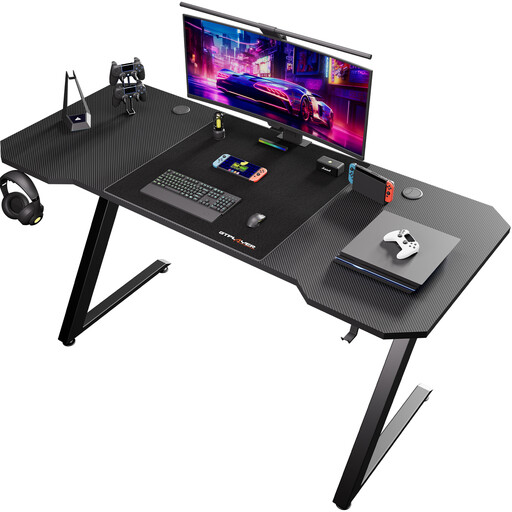
Why it suits this profile: A practical choice for gamers who need a fixed surface with room for a monitor, keyboard and headset.
The product name and size make it clear that this is not a sit-stand desk. This means you do not pay for a height function you will not use.
120 x 60 cm, carbon-look surface and a headphone hook according to the product information.

Why it suits this profile: This corner desk with storage is suitable for a study or home office where documents, equipment and accessories need a designated place.
The storage space is part of the design, so you do not have to rely solely on separate organisers or cabinets next to the desk.
Dimensions of 150 x 110 x 75 cm, reversible L-shape, two open shelves and four drawers.
We have compiled a complete, up-to-date list of products that fully meet these strict selection criteria and the applicable European safety regulations.
Do not place an electric desk directly against the wall when adjusting its height. Beforehand, check that the windowsill, cupboard, radiator and cables remain clear. Keep electrical components away from liquids and connect the adapter according to the instructions.
Overheating protection is specified for several models. The product information states that after approximately two minutes of continuous adjustment, a waiting period may be required. Therefore, use the motor in short movements and do not exceed the stated load capacity.
Adjust the desktop so that your keyboard and mouse are close to your body and your screen is directly in front of you. These are practical adjustment points; they do not constitute a medical guarantee.
Power consumption depends on the type of motor, how often you adjust the desk and its standby mode. A motor usually only runs briefly when changing height. For exact information, check the energy label, adapter specifications and instructions for the model you have chosen.
Its lifespan depends on assembly, load, frequency of use and maintenance. Position the desk on a level surface, distribute equipment across the desktop and do not exceed the static load capacity. Do not allow cables to become taut when the desktop moves.
For a laptop and one screen, 120 x 60 cm is often sufficient. If you work with two screens, paperwork or peripherals, 140 x 60 or 160 x 70 cm will be more suitable. Also measure the clearance around the desk and check that drawers or doors next to it can still be opened.
