
Vandaag of morgen in huis

Kwaliteit gegarandeerd

Welkomstaanbiedingen ontgrendelen: GRATIS bezorging | Tot 80% korting | Gratis 30 dagen JoyPlus-proefperiode
Download de app
A height-adjustable desk can be useful if you regularly want to alternate between sitting and standing while working. However, not every adjustable desk is suitable for every room or set-up. For example, a compact model may offer little space for a monitor and laptop, while a large electric desk can take up too much room in a bedroom or student room.
So don’t just focus on the appearance or terms such as “ergonomic”. Above all, check the dimensions, weight capacity, height adjustment and practical connections. Below, you’ll find the key considerations and some suitable options for different users.
A desk measuring 120 x 60 cm may be suitable for a laptop, keyboard and one screen. If you use two monitors, a docking station, speakers or study materials, the available space can quickly become cramped. A computer desk measuring 160 x 70 cm offers noticeably more room, but it also requires a larger workspace.
Measure the space beforehand and take cables, the clearance behind the desk and the movement of the desktop into account.
A high stated weight capacity does not necessarily indicate how stable a desk feels. Also check the materials and frame construction. A steel frame and adjustable feet can help you position the desk securely, but always place it on a level surface.
Also pay attention to the difference between static weight capacity and the load while adjusting the desk. The electric models in this guide list a maximum static weight capacity of 70 kg. This does not mean you should exceed this weight while the desk is moving or keep it unevenly distributed on one side for long periods.
A desk with memory function and a USB-C port can be useful, but check exactly what is included. For example, look at the number of memory settings, the position of the controls and the function of the USB-C connection. A USB-C port does not automatically replace a laptop charger or docking station; check the product specifications for both devices.
According to the product information, the electric models below adjust from 72 to 120 cm or offer a similar range. Check that the lowest setting works with your chair and that the highest setting is comfortable for your working posture. The right setting depends on your height, chair and monitor height.
For small rooms, a computer desk measuring 80 x 50 cm or an electric model measuring 120 x 60 cm is often more practical. If you use multiple screens or need plenty of space for documents alongside a laptop, it may be better to consider a desk measuring 140 x 60 cm or 160 x 70 cm.
Look for a combination of a steel frame, a sturdy desktop and adjustable feet. Particleboard is a commonly used material for desktops. When assessing this, check whether the edge finish and thickness are listed in the product details.
A large fixed desk measuring 160 x 80 cm can provide plenty of workspace. The LANTINE model lists a maximum weight capacity of 400 kg, but this is a product specification provided by the seller. Use the desk within the stated conditions and distribute heavy equipment as evenly as possible.
A desk with cable management prevents cables from hanging over the edge or catching against the moving frame. Cable grommets, an organiser and hooks are particularly useful with a home office desk holding a monitor, webcam, headphones and chargers.
Extra care is needed with electric desks: keep electrical components dry, use the supplied adapter as instructed and leave clear space around the moving desktop. According to the product information, a safety feature may temporarily activate after prolonged, continuous adjustment. Always consult the included manual for exact operating instructions.

Why it suits this user profile: This compact computer desk is suitable for a laptop, homework or a simple workstation in a bedroom, study or small home office.
The dimensions and maximum static weight capacity of 50 kg are clearly stated. Adjustable feet help when the floor is uneven.
80 x 50 x 76 cm, steel frame, particleboard desktop and adjustable feet.
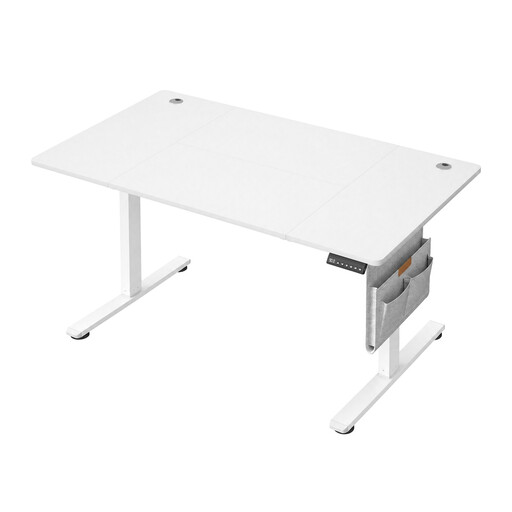
Why it suits this user profile: The spacious work area is ideal for home workers and professionals with multiple screens, a laptop and accessories.
The height adjusts electrically from 72 to 120 cm. The product information lists a memory function, USB-C port, cable grommets, organiser and hook.
160 x 70 cm desktop, steel frame, adjustable feet and maximum static weight capacity of 70 kg.
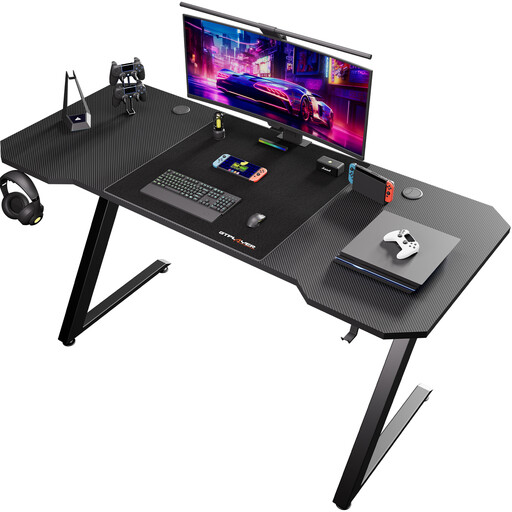
Why it suits this user profile: This gaming desk is aimed at users looking for a PC set-up with a headphone accessory and a carbon-look work surface.
The 120 x 60 cm dimensions make the available space clear in advance. However, check that your monitor arm, PC and other equipment fit within this surface area.
Carbon-look surface and supplied headphone hook, according to the product listing.
We’ve put together a complete, up-to-date list of products that fully meet these strict selection criteria and the applicable European safety regulations.
An electric desk only uses electricity while it is being adjusted and, in some cases, to power the controls or USB connection. Exact consumption depends on the motor, the number of adjustments and the standby mode. Check the technical details for the specific model if energy consumption is important to you.
For a laptop and one monitor, 120 x 60 cm may be sufficient. For a more extensive home office with multiple screens, documents and accessories, 140 x 60 cm or 160 x 70 cm is more practical. Also take the depth of your monitor stand and your preferred viewing distance into account.
Its lifespan depends on the quality of the frame, motor and assembly, as well as the load. Use the desk within the stated weight capacity, avoid uneven loading and follow the manufacturer’s maintenance and safety instructions. This will help minimise unnecessary wear on the adjustment mechanism.
