
Vandaag of morgen in huis

Kwaliteit gegarandeerd

Welkomstaanbiedingen ontgrendelen: GRATIS bezorging | Tot 80% korting | Gratis 30 dagen JoyPlus-proefperiode
Download de app
A height-adjustable desk can be useful when you work from home, study, game or want to create a flexible office space. However, not every desk with an electric motor is automatically suitable for your room. A tabletop that is too small, limited stability or unclear information about load capacity can quickly lead to a disappointing purchase.
The key question is therefore not simply whether a desk is electrically adjustable. You should also consider its dimensions, adjustment range, controls, cable management and how it needs to be used safely.
Marketing often emphasises electric adjustment, but the motor tells you little about the overall user experience. Also check the height range, maximum static load and frame stability. A desk may be technically adjustable but still not provide enough space for a monitor, laptop and accessories.
Also pay attention to usage restrictions. For several models in this selection, the product information states that the electric adjustment is temporarily disabled by the overheating protection after approximately two minutes of continuous movement. According to the product description, you must then wait 18 minutes.
A compact desk fits more easily in a bedroom or study, but provides less room for a large screen, keyboard and documents. For a laptop and one monitor, an adjustable desk 140 x 60 cm can be practical. If you use two screens or also want space for speakers and a desk lamp, an adjustable desk 160 x 70 cm is often a better fit.
Do not measure only the available wall width. Also allow for the movement of the tabletop as it is adjusted. According to the product information, some electric models must not be positioned directly against a wall while moving.
An electric desk with memory function can save preset sitting and standing heights. This is particularly useful when several people share the same desk or when you regularly change your working position. A desk with a USB-C connection can also charge a phone or another compatible device, but always check the stated charging function and compatibility.
A memory function does not automatically make a desk suitable for everyone. Check whether the controls are easy to reach and whether the height is suitable for your chair, screen and height.
The available models come in different sizes:
The electric desks in this selection have an adjustment range of approximately 72 to 120 cm or 71 to 120 cm, depending on the model. Before buying, check that the lowest setting works with your office chair and that the highest setting is comfortable for standing use.
Pay attention to the difference between the weight of the desk and the maximum static load. The JOYFURNOS models measuring 120, 140 and 160 cm state a maximum static load of 70 kg. This includes monitors, computers, lighting and other items on the tabletop.
A steel frame and adjustable feet can help create a stable setup. This does not mean that every desk will be completely wobble-free on every floor. Place the desk on a level surface, adjust the feet carefully and do not exceed the stated load capacity.
A practical ergonomic desk is not just about height. Cable holes, a fabric organiser and hooks help keep cables and accessories away from the moving frame. Check that the cables have enough slack when the tabletop rises.
With electric models, keep liquids away from the controls, adapter and motor. Use only a suitable power connection and set the obstacle sensor according to the instructions. The product information for several models recommends a higher sensitivity so that fixed obstacles can be detected more effectively.

Why it suits this profile: This fixed computer desk is suitable for anyone who wants to set up a simple workspace without electric controls. Measuring 80 x 50 cm, it fits in a smaller room.
The specifications clearly state the fixed height of approximately 76 cm, so you do not pay for an adjustable model when you do not need that feature.
80 x 50 cm, steel frame, adjustable feet and a stated maximum static load of 50 kg.
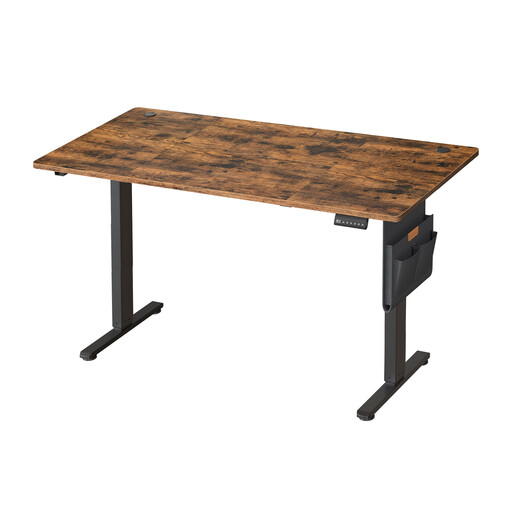
Why it suits this profile: This sit-stand desk combines a compact worktop with electric height adjustment. It is aimed at people working from home and students who want preset height settings and a USB-C port.
The product description states the adjustment range of 72 to 120 cm, along with a memory function, cable holes and a maximum static load of 70 kg.
140 x 60 cm, USB-C connection, storage organiser, hook and lockable controls according to the product information.

Why it suits this profile: The larger tabletop provides extra space for multiple screens, a desktop computer, accessories or study materials. This makes it suitable for intensive home working, gaming and long-term use as an office desk.
The dimensions and load capacity are clearly stated: 160 x 70 cm and a maximum static load of 70 kg. This makes it easier to compare the desk with your equipment.
Adjustable from 72 to 120 cm, memory function, USB-C port, cable management, organiser and three hooks according to the product description.
First place an electric height-adjustable desk on a level surface and check that all cables can move freely. Do not position the desk tightly against the wall while raising or lowering it. Adjust the feet before placing monitors and other equipment on the desk.
A desk for working from home and studying is more comfortable to use when the screen is directly in front of you and the keyboard has enough space. Only use the memory function after setting the correct heights manually. Take into account the total weight of monitor arms, speakers, computers and accessories.
Would you prefer not to have electric adjustment but still want a large fixed worktop? The LANTINE Desk measuring 160 x 80 cm states that it has a steel frame, adjustable foot pads and a fixed height of 75 cm. With this model, however, check that the stated load capacity is suitable for your own use and interpretation of the product information.
We have put together a complete, up-to-date list of products that fully meet these strict selection criteria and the applicable European safety regulations.
Start with a comfortable sitting height, with your feet flat on the floor and your arms resting naturally on the worktop. Then adjust the standing height to suit your posture. Always check that cables, the wall and other obstacles remain clear while the desk is moving.
Its lifespan depends on factors including the load, assembly, frequency of use and maintenance. Do not exceed the stated maximum static load and follow the instructions for the overheating protection. With the models mentioned, you may need to wait after prolonged continuous adjustment before using the motor again.
Power consumption depends on the motor, the number of adjustments and the use of functions such as a USB-C port. Adjustments usually last only a short time. Check the product information and use a suitable adapter. An energy-saving mode, as stated for some models, can limit consumption when the controls are not being used.
