
Vandaag of morgen in huis

Kwaliteit gegarandeerd

Welkomstaanbiedingen ontgrendelen: GRATIS bezorging | Tot 80% korting | Gratis 30 dagen JoyPlus-proefperiode
Download de app
A height-adjustable desk can give you a flexible sit-stand workspace, but not every model will suit every room, user or set-up. A compact desk, for example, can work well in a student room, while a large desktop may be needed for two monitors. Features such as a memory function, USB-C port or cable management may sound appealing, but they’re only useful if they fit the way you work day to day.
Focus on specifications you can check. Marketing terms tell you less than the adjustment range, weight capacity, dimensions and options for connecting your cables and screens.
An electric height-adjustable desk might have a maximum static weight capacity of 70 kg. That doesn’t automatically mean it will feel equally stable in all conditions. The surface it stands on, how the weight is distributed and the height of the desktop all play a part.
Avoid placing a heavy monitor arm, computer tower and books all on one side. Also check whether the stated capacity is static, rather than describing the weight the desk can support while it’s being adjusted.
A desk that adjusts from 72 to 120 cm won’t suit every user in the same way. Check that you can keep your elbows at a relaxed angle when sitting, and that you don’t have to hunch your shoulders when standing. Your chair, monitor height and keyboard position all affect how well your workspace is set up.
A height-adjustable desk for working from home also needs to fit the space available. Measure the depth as well as the width, and leave room behind the desk for cables and movement.
A desk with a memory function makes it easier to return to saved sitting and standing heights. This is handy if you switch between positions every day. A USB-C port can be useful for charging compatible devices, but check that its charging output is suitable for your laptop or phone.
A desk with cable management helps keep your set-up tidy, but cable holes are no substitute for positioning your power strip, adaptor and monitor cables properly. Also check that the cables are long enough when the desk is raised.
A 120 x 60 cm desk may be enough for one laptop and a monitor. If you work with a large screen, keyboard, documents and a docking station, a 140 x 60 cm or 160 x 70 cm desk gives you more room to move. Remember to allow for walkways and the distance from the wall.
Many of the electric models in this selection have an adjustment range of around 72 to 120 cm. However, a sit-stand workspace involves more than just the desk: check the height of your chair, monitor stand and armrests too.
Check the maximum static weight capacity and the frame material. The JOYFURNOS models listed combine a steel frame with a particleboard desktop and state a maximum static weight capacity of 70 kg. This is a verifiable product specification, but distribute the weight evenly and don’t exceed the limit.
An adjustable desk may be more prone to movement at its highest setting than at its lowest. Adjust the feet properly and place the desk on a firm, level surface.
A memory function with four saved heights is useful if several people share the same desk or you often switch between sitting and standing. Some models also list a lock function, obstacle detection and overheating protection.
According to the product descriptions provided by JOYFURNOS and Ochama, overheating protection may activate if you adjust the desk continuously for more than two minutes. The descriptions say you should then wait 18 minutes. Don’t place the desk directly against a wall, and keep electrical components away from liquids.

Why it suits this type of user: Its compact size makes it a good fit for a smaller home-working space, student room or first home office. According to the product description, it has four memory settings and a weight capacity of 70 kg.
The dimensions and 72-120 cm adjustment range are clearly stated, so you can check in advance whether the desk will fit your room and work with your chair.
120 x 60 cm, four memory settings, cable holes, storage pouch and hook.

Why it suits this type of user: The wide desktop is suited to a home office with several screens, a laptop and accessories. According to the product description, the desk has a USB-C port and a memory function.
The space requirements, connection and controls are clearly described. This helps you decide whether the 160 x 70 cm size and USB-C connection suit your equipment.
160 x 70 cm, USB-C port, memory function, steel frame and adjustable feet.
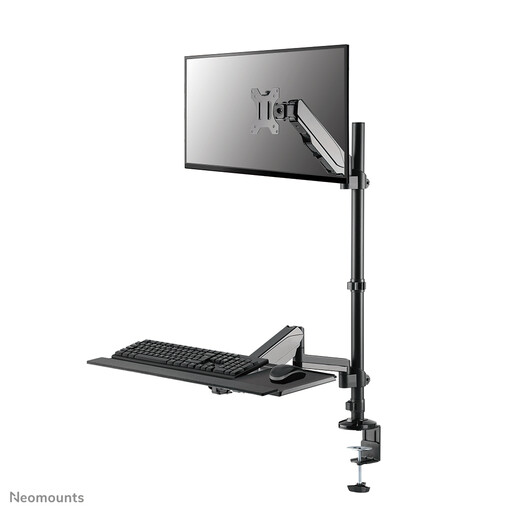
Why it suits this type of user: This desk-mounted workstation is for anyone who wants to keep their existing desk and adjust their monitor and keyboard. It supports screens from 17 to 32 inches.
This isn’t a fully electric desk, so you won’t buy it by mistake if all you want is a more flexible position for your monitor and keyboard.
44-95 cm adjustment range, weight capacity up to 9 kg, VESA 75x75 and 100x100 mm, cable management and gas spring adjustment.

Why it suits this type of user: Four memory settings are useful when housemates or colleagues share the same desk. There’s room for a basic set-up with a laptop or one monitor.
The product description gives the dimensions, 71-120 cm adjustment range and 70 kg weight capacity. This helps you check whether the workspace will suit your room and equipment before you buy.
Four memory settings, USB-C port, cable management, storage bag and three hooks.
We’ve put together a complete, up-to-date list of products that meet these strict selection criteria and the applicable European safety requirements.
Power consumption depends on the motor, how often you adjust the desk and how long you use it. As a desk usually only moves up or down for a short time, adjusting it is generally not a significant ongoing power drain. Check the product specifications and switch the desk off if you won’t be using it for an extended period.
Start with your sitting position. Adjust your chair so your feet rest on the floor, then position the keyboard at a comfortable working height. Next, set the desk height for standing. Your screen should be directly in front of you, so you’re not constantly looking down. Change positions regularly and avoid working in one posture for long periods.
Its lifespan depends on the motor, frame, load, assembly and how you use it. Stay within the maximum weight capacity, distribute heavy equipment evenly and make sure the desktop won’t hit a wall or cabinet as it moves. Also follow the manufacturer’s assembly and safety instructions.
