
Vandaag of morgen in huis

Kwaliteit gegarandeerd

Welkomstaanbiedingen ontgrendelen: GRATIS bezorging | Tot 80% korting | Gratis 30 dagen JoyPlus-proefperiode
Download de app
A height-adjustable desk can be useful if you work from home, study or regularly want to switch between sitting and standing. However, not every electric desk is suitable for every room or setup. For example, a large desktop may be too deep for a small room, while a compact model may offer less space for two monitors.
When comparing desks, do not just look at a modern appearance or terms such as “ergonomic”. Pay particular attention to the dimensions, load capacity, height adjustment and the details around assembly and safety. This will help you avoid paying for features you will not use.
A desk measuring 160 x 70 cm provides space for multiple screens, a keyboard and documents. However, the total space around the desk is also important. An electric sit-stand desk moves up and down. If it is positioned tightly against a wall or underneath a shelf, the desktop could hit something while being adjusted.
Check the following in advance:
Online shops may present load capacities in different ways. Check whether the figure refers to static load: the weight the desk can support while stationary. This is not automatically the same as the practical load during electric adjustment.
Add up the weight of monitors, a computer tower, speakers, lamps and accessories. Also take the safety limit in the product information into account. A model with a stated static load of 70 kg must not be used above that limit.
An adjustable desk with memory function is useful if several people use the same workspace or if you want to save set sitting and standing heights. A desk with a USB-C port can reduce the number of cables on your desktop, but check exactly what the port supports. “Fast charging” is a claim from the product description and may depend on your cable, adapter and connected device.
A memory function, cable management and a USB-C connection are practical extras. They do not replace a stable frame or a desktop that suits your needs.
The right height depends on your height, chair and monitor position. The desks featured in this selection have different ranges, including approximately 72 to 120 cm. Check that your forearms remain roughly horizontal while typing and that your screen is at a comfortable viewing height.
An electric desk with shortcut buttons makes switching between settings easier. Some models have several memory settings. According to the product description, certain desks can also set reminders to take breaks. Treat this as a control feature, not as a medical function or a guarantee of better posture.
For a home office desk with one monitor, 120 x 60 cm may be sufficient. If you work with two screens, a laptop and paper documents, a 160 x 70 cm desk gives you noticeably more room to work. A depth of 70 cm also provides more distance between your eyes and the screen than a shallow computer desk.
Consider the proportions of the desktop in relation to your room. A large desk is not automatically practical if it leaves your office chair, cables and walking space cramped.
A stable desk with cable management needs more than just a thick desktop. Look for:
The product descriptions of various JOYFURNOS models mention a steel frame, cable openings and adjustable feet. According to the same information, overheating protection may be activated when the desk is adjusted for more than two minutes continuously. You must then wait 18 minutes, according to the instructions. This is relevant if you adjust the desk repeatedly in quick succession.
Electrical components should be used indoors and away from liquids. Only use a suitable adapter and do not exceed the stated load capacity.
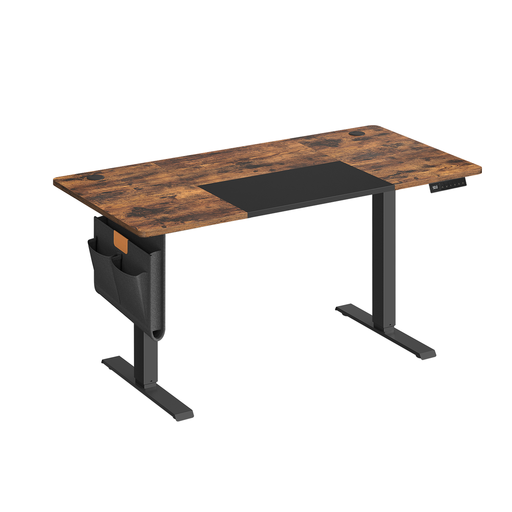
Why it suits this profile: The 140 x 60 cm size is a good fit for a compact home workspace and offers electric height adjustment with four memory presets.
The product information states the size, a height range of 71 to 120 cm and a maximum static load of 70 kg. This allows you to assess the available space and load more effectively in advance.
140 x 60 cm, four memory presets, USB-C port, cable management and a steel frame according to the product description.
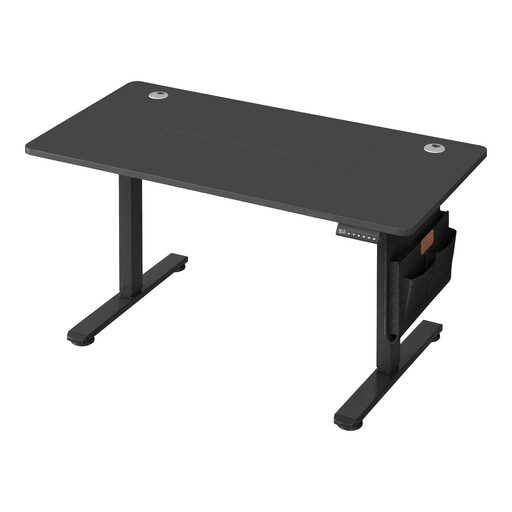
Why it suits this profile: This spacious desktop is designed for users with multiple screens, a laptop or additional equipment at a permanent workstation.
The dimensions and maximum static load of 70 kg are stated in the product information. Adjustable feet, cable openings and lockable controls are also mentioned.
160 x 70 cm desktop, height range of 72 to 120 cm, USB-C connection and cable management according to the product description.
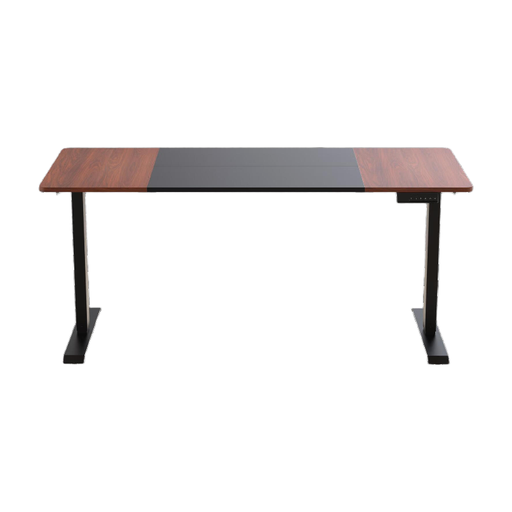
Why it suits this profile: This model is aimed at users looking for an electric desk with dual motors and programmable height settings.
The product description mentions a dual-motor frame, programmable memory presets and an included 160 x 70 cm desktop. Before buying, check that the height and load capacity suit your equipment.
Place the frame on a level surface and check all the screws after assembly. With a desk featuring electric controls, it is sensible to leave the cables loose enough to accommodate the full height range. Do not place the desktop directly against the wall while the desk is moving.
A break function or memory setting is most helpful when you use it consistently. Change settings calmly and avoid repeatedly raising and lowering the desk in quick succession. If you need to dismantle the desk or encounter a fault, consult the manual; electrical components should not be opened without suitable instructions.
We have put together a complete, up-to-date list of products that fully meet these strict selection criteria and the applicable European safety regulations.
Adjust the desk so that your shoulders remain relaxed and your elbows form approximately a right angle while typing. The ideal height varies from person to person. Therefore, check the stated height range, such as 72 to 120 cm, rather than judging the desk by its appearance alone.
Power consumption depends on the motor, the number of adjustments and standby mode. The movement usually lasts only a short time, but check the technical specifications for the specific model. According to the product description, an energy-saving mode on the control panel can limit consumption when the desk is not being adjusted.
Its lifespan depends on assembly, load, frequency of use and maintenance. Do not exceed the maximum load capacity, keep liquids away from the controls and leave enough space for the moving desktop. Also check that details of available parts and warranty terms are clearly stated on the product page.
