
Vandaag of morgen in huis

Kwaliteit gegarandeerd

Welkomstaanbiedingen ontgrendelen: GRATIS bezorging | Tot 80% korting | Gratis 30 dagen JoyPlus-proefperiode
Download de app
A height-adjustable desk can be useful for working from home, studying, gaming or alternating between sitting and standing. But an electric mechanism alone doesn’t tell you everything. A desk that’s too small, wobbly or unable to support enough weight can quickly disappoint in everyday use.
There are three common pitfalls:
So don’t focus only on the price or appearance. Check the technical specifications, assembly instructions and the space you have available at home.
Check the minimum and maximum height of the frame, rather than relying only on a description such as “ergonomic desk”. When sitting, the desktop should be level with your elbows. When standing, your shoulders should stay relaxed and the screen should be roughly at eye level.
An electric sit-stand desk with memory settings can be useful if several people use it or if you regularly switch between sitting and standing. Check the controls, too: a digital display and preset positions make everyday adjustments easier. Make sure you know how many settings are available and whether the motor can handle the combined weight of the desktop and your equipment.
For a home-working desk, a desktop measuring 120 × 60 cm is often a useful starting point for a laptop, monitor, keyboard and accessories. A gaming desk with multiple screens may need more depth or width.
Weight capacity is usually listed in kilograms. Don’t just count the monitor or laptop: include a monitor arm, speakers, books and other accessories, too. The adjustable desk frame also needs to suit the dimensions and weight of your chosen desktop.
A stated weight capacity is a product specification, not a guarantee that every set-up will feel equally stable. Check the type of legs, the number of motors and whether the desk will stand on a level surface.
Check whether the frame is made from steel or another specified material, and whether the legs can be adjusted in several sections. Legs with multiple sections can help you make the most of a wider height range, but the end result also depends on the construction and assembly.
Keep the following points in mind:
If you mainly use a laptop, you may not need a fully electric desk. A laptop stand or ergonomic laptop stand can raise the screen on an existing desk. You could pair it with a separate keyboard and mouse.

Why it suits this type of user: This complete desk combines an electric adjustable frame with a walnut-coloured desktop. It’s a good fit for people working from home, students and anyone who’d rather not choose a desktop and frame separately.
The product information lists a 120 × 60 cm desktop, a height range of 72–118 cm and a weight capacity of up to 70 kg. This means the key measurements are clear before you buy.
Digital control panel, two memory settings, two hooks and, according to the product information, CE and European standard certification.
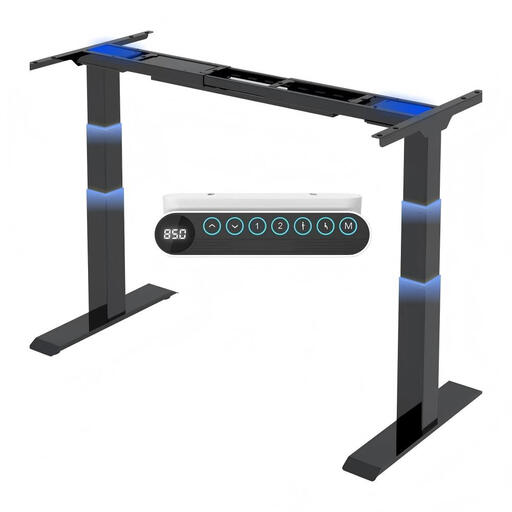
Why it suits this type of user: This separate desk frame is designed for anyone who wants to choose their own desktop and is planning a heavier-duty set-up.
The product name specifies two motors, three-section legs and a weight capacity of up to 160 kg. Check that your chosen desktop is suitable for this set-up.
The product name lists four memory settings and a USB connection; a good choice for a workspace you’re putting together yourself.
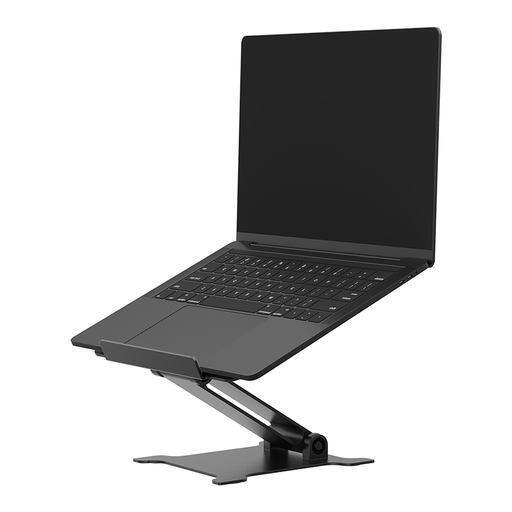
Why it suits this type of user: A good option for laptop users who want to adapt their existing desk without buying a fully electric one.
The product specifications give an adjustment range of 1.7–16.8 cm, a maximum load of 5 kg and compatibility with 11–15-inch laptops.
Foldable design, open ventilation and non-slip silicone pads; the manufacturer also states that it comes with a five-year guarantee.
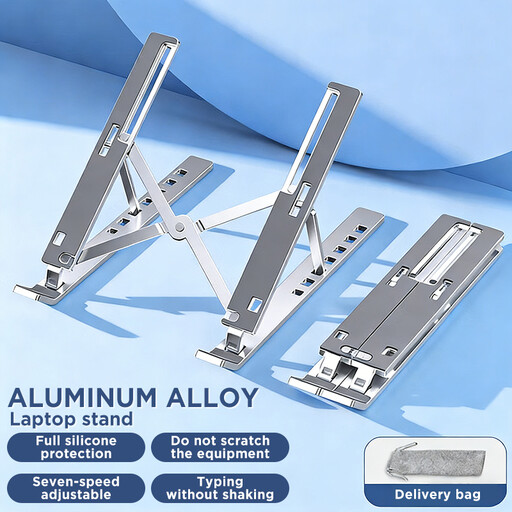
Why it suits this type of user: Its foldable design is handy if you move between rooms, homes or study spaces and mainly work on a laptop.
The product name describes an adjustable, foldable aluminium design for laptops measuring 10–15.6 inches and tablets. Check your device’s exact dimensions before buying.
Portable design and stated compatibility with a wide range of laptop brands and tablets.
We’ve put together a complete, up-to-date list of products that meet these strict selection criteria and the applicable European safety requirements.
An adjustable desk is just one part of your set-up. Adjust your chair first, then set the desktop at elbow height. Position the screen directly in front of you. If you use a laptop, it’s best to raise it on a laptop stand and use a separate keyboard. This helps you avoid looking down at the screen while having to hold your hands too high.
For a gaming desk, cable management, legroom and stability are especially important. If you’re choosing a desk for a study, consider whether it can accommodate books, lighting and a laptop at the same time. Before buying, sketch out the available space and measure the doors, walls and plug sockets.
Power consumption depends on how often you adjust the desk, the motor and how the control panel is connected. The motor usually only runs while the desk is moving. For an accurate estimate, check the technical information for the specific model.
Its lifespan depends on factors such as the load, assembly, frequency of use and maintenance. Make sure the desk is level, don’t exceed the stated weight capacity and check the screws and electrical connections regularly. If you’re using a separate adjustable desk frame, make sure your chosen desktop is a good fit and securely attached.
Not necessarily. If you mainly want to raise your laptop screen, an ergonomic laptop stand can be a practical solution. If you often switch between sitting and standing, an electric height-adjustable desk with memory settings may be more useful. The right choice depends on your space, working posture, equipment and budget.
