
Vandaag of morgen in huis

Kwaliteit gegarandeerd

Welkomstaanbiedingen ontgrendelen: GRATIS bezorging | Tot 80% korting | Gratis 30 dagen JoyPlus-proefperiode
Download de app
A height-adjustable desk can be useful if you want to alternate between sitting and standing while you work. However, an electric frame alone does not tell you whether a desk is right for you. A desktop that is too small, limited stability or no cable management can make it less practical for everyday use.
Look out for these three common pitfalls:
First, check the minimum and maximum height. According to the product information, the JoySelect models in this selection adjust from 72 to 118 cm and have a digital control panel with two memory settings. Other models have a specified range of around 72 to 120 cm.
An electric sit-stand desk is especially practical if you often switch between working heights. Memory buttons save you from having to set your preferred position manually each time. Check, though, that the control panel, motor and any sensors are clearly described.
A memory function does not guarantee a comfortable working posture. Before you order, measure the distance between the floor, your chair and your keyboard at home.
A 120 x 60 cm desk is often a practical size for a laptop, keyboard and one monitor. If you have two monitors, speakers or lots of documents, a deeper or wider desktop may be more useful. This selection also includes models measuring 140 x 60 cm and 160 x 70 cm.
Also check the stated static load capacity. Several electric models below list a maximum of 70 kg. This figure includes more than just your screen: remember to allow for a monitor arm, computer, lamp and other items on the desktop too.
A steel frame can provide extra support, but assess the whole construction: the number of sections, the width of the feet and how the frame is fitted beneath the desktop. Place the desk on a level surface and, once assembled, check that all the connections are secure.
An electric height-adjustable desk needs space for its power adapter and cables. Check whether it has cable holes, a cable tray or another way to route cables. For models with a USB-C port, check what the port is designed for too: charging, data transfer and power supply are not always specified in the same way.
Leave enough space between the desk and the wall during assembly. According to the product information for several models, the desk may hit an obstacle as it moves. Some models also specify protection against overheating after prolonged, uninterrupted adjustment. Follow the instructions, and use the electrical components indoors only, away from liquids.
Treat a CE mark or reference to European standards as information about compliance with applicable requirements, not as a general guarantee of quality. The JoySelect product pages state CE and European standards certification; always check the current documentation for the specific product.
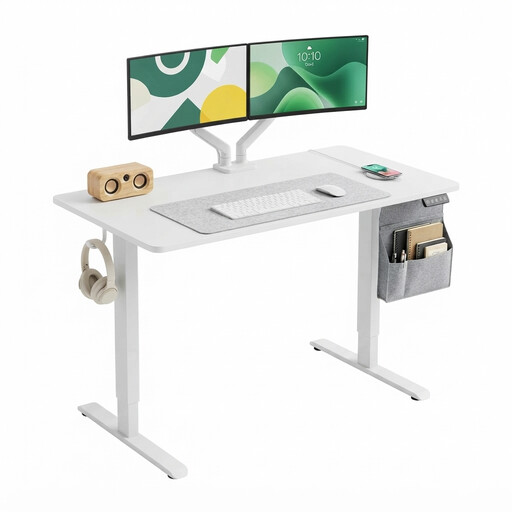
Why it suits this profile: This compact electric sit-stand desk combines a 120 x 60 cm desktop with a height range of 72–118 cm. It’s a good fit for a home workspace, study or simple gaming set-up.
The specifications list a digital control panel, two memory settings and a maximum static load capacity of 70 kg. This means the key details you need to know for everyday use are clear before you buy.
120 x 60 cm desktop, two memory settings, 70 kg load capacity and two accessory hooks.

Why it suits this profile: This model is designed to keep your workspace organised, with a memory function, USB-C port, cable holes and included storage options. Its size makes it suitable for a home office or study.
The product information lists specific cable management and control features. Before buying, check the USB-C port’s charging function and technical specifications.
120 x 60 cm, memory function, USB-C port, cable management and a stated static load capacity of 70 kg.

Why it suits this profile: The 160 x 70 cm desktop gives you more room for multiple screens, documents and peripherals. This makes it a good choice for intensive home working, a fully equipped home office or a gaming set-up.
The larger dimensions mean you won’t have to squeeze your screens and accessories onto a desktop that’s too small. The product information lists a maximum static load capacity of 70 kg.
160 x 70 cm desktop, memory function, USB-C port, cable management and a steel frame, according to the product description.

Why it suits this profile: Four memory settings are handy if several people use the same desk or you want to save different working heights. The 140 x 60 cm desktop gives you extra room.
The product information lists cable management, hooks, four memory settings and a maximum static load of 70 kg. It also describes restrictions on prolonged adjustment.
140 x 60 cm, four memory settings, USB-C port, three hooks and a stated height range of 72–120 cm.
We’ve put together a complete, up-to-date list of products that meet these strict selection criteria and the applicable European safety requirements.
Place the desk on a level surface and make sure the cables can move freely. Set the seated height so your forearms rest comfortably on the desktop. Then choose a separate standing height that positions the screen directly in front of you. Test the desk’s movement before placing heavy equipment on it, and check that there’s no wall, cupboard or cable in the way.
Its lifespan depends on the motor, frame, load, assembly and how often you use it. So check more than just the warranty: look at the maximum load capacity, assembly instructions and any protection against overheating too. Retighten the connections regularly after assembly, and don’t use abrasive cleaning products on the desktop.
Most of the electricity is used while the desk is moving, with a small amount used when the controls are on standby. How often you adjust the height therefore matters more than the total time you spend working at the desk. Switch off the adapter if it’s safe to do so according to the instructions, and don’t use an adapter with an unsuitable voltage.
