
Livraison le jour même et le lendemain

Qualité garantie

Débloquez vos offres de bienvenue: Livraison GRATUITE | Jusqu'à -80 % | 30 jours d'essai gratuits à JoyPlus
Téléchargez l'application
An height-adjustable desk can be useful if you regularly want to change position while working, studying or gaming. However, simply looking at the motor or design does not automatically mean you will buy a suitable workstation. Dimensions, load capacity, stability and cable space often have a greater impact on everyday use.
Pay attention to marketing terms too. A desk may be described as “quiet” or “ergonomic”, while the product page provides little technical information. Always check the specific product specifications.
The stated load capacity is usually a static load: the weight the desk can support under certain conditions. A monitor arm, desktop computer and full storage box exert additional forces while the desk is being adjusted. Leave some spare capacity between the weight of your equipment and the stated limit.
A compact desk measuring 120 x 60 cm is suitable for a laptop, monitor and keyboard, but may feel cramped with two screens or a large PC case. If you use a printer, study materials or several monitors, 140 x 60 cm or 160 x 70 cm may be a better choice.
Check the depth too. A narrow desktop may save space, but leaves less distance between your eyes and the screen.
A desk may look sturdy on paper, but a wobbly desktop is distracting when typing or gaming. Look for a steel frame, adjustable feet and a well-constructed leg design. With an electric sit-stand desk, it is also important to leave enough clear space around the legs. According to the product information for several models, the desk should not be positioned directly against a wall while it is moving.
Look at the minimum and maximum height, rather than relying solely on the term “height-adjustable”. For example, the models in this selection have a range of approximately 72 to 120 cm. This allows for both seated and standing use, but the ideal setting depends on your height, chair and working posture.
Adjust the desktop so that your forearms can rest comfortably on the work surface. An adjustable desk is no substitute for a suitable chair, correct screen position or sufficient legroom.
A desk with cable grommets, a storage pouch or a hook can help keep cables and small accessories off the desktop. A desk with a USB-C port is particularly practical if you regularly want to connect a phone or another compatible device. However, check the stated charging function and only use suitable adapters.
With an electric desk featuring a memory function, you can save your preferred heights. This makes it easier to switch between settings. Some models offer two memory positions, while others provide four.
Be aware of usage restrictions. The product information for several JOYFURNOS models states that the overheating protection may activate after approximately two minutes of continuous adjustment. According to the instructions, you must then wait 18 minutes. This is relevant if you adjust the desk very frequently in succession.
A digital display, obstacle detection and a lock function are features that can be checked. They make the desk easier to use, but you should still read the assembly and safety instructions carefully.

Why it suits this profile: This compact electric sit-stand desk is ideal for a student bedroom, bedroom or small home office. The four memory heights make it easy to switch between saved settings.
The product information specifies dimensions of 120 x 60 cm, a load capacity of 70 kg and a steel frame. This allows you to assess the available space and load in advance.
Height range of 72–120 cm, four memory heights, cable grommets and a storage compartment. The stated static load capacity is 70 kg.

Why it suits this profile: The spacious desktop is suitable for professionals and people working from home with multiple screens, a laptop and documents. The USB-C port and memory function provide added convenience.
The specifications state a range of 72–120 cm, a maximum static load of 70 kg and adjustable feet. This means important features can be verified rather than relying solely on marketing language.
160 x 70 cm desktop, memory function, USB-C port, cable management and a steel frame. Suitable for indoor use only.
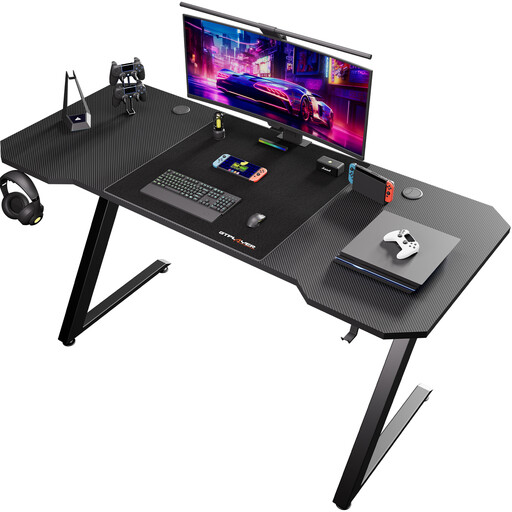
Why it suits this profile: This gaming desk solution is aimed at users looking for a compact PC setup with a carbon-effect desktop, headphone hook and space for peripherals.
The product name states the dimensions of 120 x 60 cm and mentions the presence of a headphone hook. Before buying, check that these fixed dimensions suit your monitors and PC.
Carbon-fibre effect, compact size and an integrated hook. Check the current product page for additional load capacity and assembly details.
We have put together a complete, up-to-date list of products that fully meet these strict selection criteria and the applicable European safety regulations.
Start with a low seated position, keeping your feet flat on the floor and your shoulders relaxed. Then adjust the height for standing use without raising your shoulders. Position the screen directly in front of you and make sure cables cannot become trapped while the desk is being adjusted.
Its lifespan depends on the motor, frame, load, assembly and frequency of use. Do not exceed the stated static load capacity and follow the instructions regarding the maximum continuous adjustment time. Periodically check the screws, cables and plugs.
Power is mainly used while the desk is moving up or down; when idle, consumption is generally limited to the connected control system. Unplug the desk when this is safe to do according to the manual, and do not use an adapter with an unsuitable voltage. Always keep electrical components away from liquids.
