
Speakers dealing with household noise
If housemates or other noises drown out your voice during online meetings, focus on the microphone’s position and features. TeamValue identifies noise as a relevant factor when choosing a work headset.


If you live in a noisy flat, start by choosing a headset with a well-positioned microphone, and check that microphone noise reduction is included with the specific model. Logitech and Yealink describe these features for certain models, but that doesn’t prove how a recording will sound in your home. To capture other participants’ voices, you’ll also need a recording or transcription feature from your meeting platform. Be sure to consider privacy rules too.
If housemates or other noises drown out your voice during online meetings, focus on the microphone’s position and features. TeamValue identifies noise as a relevant factor when choosing a work headset.
A headset handles your own audio, but it isn’t the same as recording or transcribing everyone in the meeting. Microsoft Support describes these meeting features separately. The European Data Protection Board explains that organisations need an appropriate GDPR legal basis when processing personal data.
If you wear a headset for a long time, fit, how well it blocks out sound and the choice between mono and stereo may all matter. Jabra and HP Poly describe different models, so check the features of the specific one you’re considering.
Start with how clearly your own voice comes through, then decide whether you also need to capture the other participants. Logitech and Yealink describe microphone noise reduction for specific models; Yealink also explains how to position the microphone boom closer to your mouth. This isn’t a measure of recording quality in your home.
| What to consider | What to look for | Who is this important for? |
|---|---|---|
| How clearly your voice comes through | Check the position of the microphone boom and the microphone noise reduction. If possible, make a test recording with your usual household noise in the background. | If household noise drowns out my voice, I mainly want to make sure people can hear what I say. Around 39% of consumers put voice clarity first. |
| Recording or transcription | Check whether the meeting platform offers the feature you need and whether you can use the headset for both audio input and output. | If I need a summary of everyone’s contributions, I also look at the meeting platform’s features and terms. Around 23% of consumers prioritise capturing everyone’s contributions. |
| Comfort over long periods | Check the fit, whether it’s mono or stereo, and whether the described noise isolation or ANC suits your needs. | For long meetings, I want a comfortable headset that still lets me hear others clearly. Around 23% of consumers put listening comfort over long periods first. |
| Connection and freedom to move | Check your device’s port, the exact wired or wireless model, and whether any adapters are included. | If my computer needs a specific connection or I want to move around during calls, I check the connection first. Around 15% of consumers prioritise connectivity or freedom to move. |
Jabra describes ANC for the listener and noise-cancelling microphones as separate features. ANC for your ears alone doesn’t tell you how background noise will sound to other participants.
Check the microphone specifications separately from ANC, and see how you can position the microphone boom.
A headset handles your audio connection, but won’t record everyone’s contributions on its own. Microsoft Support describes recording and transcription as separate meeting features, each with its own access requirements.
Decide which voices need to be included in your summary, and check whether the organiser and platform allow the feature you want.
Mono, stereo and connectivity options can vary. For example, HP lists USB-C, a USB-A adapter and 3.5 mm for a specific Blackwire 5220 model; these connections don’t automatically apply to every model in the range.
Compare the full model name and the included connection or adapter with the ports on your device.
Logitech describes the Zone Wired as a wired USB work headset for a fixed workspace.
Jabra describes the Evolve2 50 as a wired work headset available in mono and stereo versions.
According to HP Poly, the Blackwire 5200 series includes wired work headsets such as the mono 5210 and stereo 5220.
Yealink describes the UH37 as a wired USB work headset available in mono and dual-ear versions.
EPOS describes the IMPACT 1000 as a range of wireless work headsets.
This selection includes wired USB headsets and a wireless headset for online meetings. First decide whether a fixed connection or the freedom to move around is better for your workspace. A headset won’t replace a separate recording or transcription feature.
 No image available
A wired USB option for a fixed workspace. Check the product details for the microphone features and boom position on the model being sold.
 No image available
A wired USB headset to consider for a fixed computer workspace. Check whether the microphone features described suit your needs and connection.
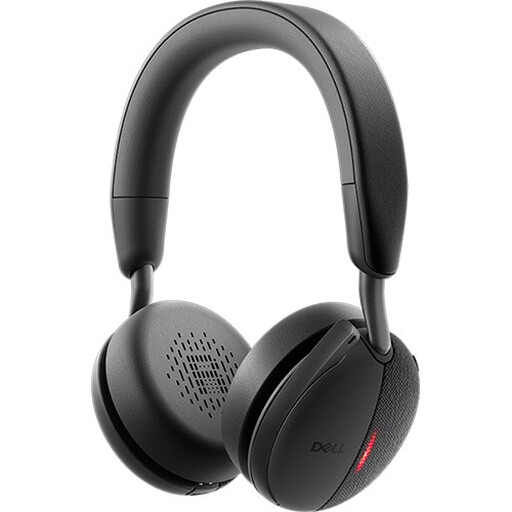 No image available
The product name identifies this as a wireless ANC headset. Check the microphone features separately, and choose this model only if wireless use and listening comfort suit your needs.
Remember to charge it before use.
 No image available
A wired headset to compare for a fixed workspace. Check the exact connection and what the microphone features mean for your meeting set-up.
 No image available
A wired USB headset to consider for a fixed workspace. Check the microphone features and whether this model suits the way you hold meetings.
No. A headset handles your audio input and output; you’ll need a separate recording or transcription feature to capture what other participants say. Microsoft Support explains that access to these features in Teams depends, among other things, on the organiser’s settings and licence.
If your model has an adjustable microphone boom, position it closer to your mouth as instructed. Select the headset as your microphone and speaker, then make a short test recording with your usual household noise in the background. Yealink provides instructions for positioning the microphone boom on the UH37.
Not necessarily. If an organisation processes personal data when recording a meeting, the European Data Protection Board says it must establish an appropriate legal basis under the GDPR. The Dutch Data Protection Authority stresses that people must be told what happens to their personal data and why. Whether a particular recording is allowed depends on the circumstances and the applicable policy; a notification in the meeting platform doesn’t replace that assessment.
Check in advance whether replacement ear cushions are available for your model; Yealink says UH37 cushions must be bought separately. In the Netherlands, consumer purchases are covered by a legal guarantee that the product must be of satisfactory quality, with no fixed statutory guarantee period. The Dutch Government identifies the retailer as your point of contact if something goes wrong.