
Active workshop participant
If you read out your work and respond to feedback, look for a microphone boom that’s easy to position and a mute button you can find quickly. Logitech describes in-line controls on the H390 and Zone Wired.


If you usually stay at your desk, a wired USB headset can be a practical choice, provided the cable has enough slack when your desk is at its highest setting. A wireless headset gives you more freedom to move, but you’ll need to consider connectivity and charging. Also check the microphone boom, mute controls, connection and fit of the exact model. Noise cancellation for what you hear doesn’t automatically mean the microphone cancels out background noise.
If you read out your work and respond to feedback, look for a microphone boom that’s easy to position and a mute button you can find quickly. Logitech describes in-line controls on the H390 and Zone Wired.
If you change your desk height or walk around while listening, compare the cable routing with a wireless connection, and remember that wireless headsets need charging. Logitech lists a 1.9 m cable for the H390; Jabra and JLab describe wireless options.
If you take part in longer discussions, consider the fit, whether it has one or two earcups, and how much of your surroundings you want to hear. Jabra and HP Poly describe mono and stereo versions.
A good choice if: you mostly stay at your desk and don’t want to charge a headset battery.
Consider: the cable limits how far you can move, so check its route with your desk at its highest setting.
A good choice if: you might step away from your desk during the workshop or don’t want a cable running alongside your adjustable desk.
Consider: check that Bluetooth or the included adapter works with your computer and app, and plan when you’ll charge it.
| What to consider | What should you check? | Who should pay particular attention? |
|---|---|---|
| Speaking and muting | Check that you can position the microphone boom comfortably and reach the mute control easily. Test which microphone the workshop app uses in a trial call. | If I’m reading aloud and responding to feedback, I want to be able to position and mute my microphone quickly. Around 33% of consumers say clear speech is their main reason for buying. |
| Freedom to move | With a wired headset, check the cable route with your desk at its highest setting. Logitech lists a 1.9 m cable for the USB-A H390; check whether that length works with your setup. | When I adjust my desk or step away for a moment, I don’t want a cable to hold me back. Around 27% of consumers say freedom to move is their top priority. |
| Listening comfort | Compare the fit and mono or stereo options. ANC affects what you hear, but doesn’t prove that the microphone filters out background noise. | During a long discussion, I want to listen comfortably and choose how much of the room’s noise I can still hear. Around 20% of consumers choose a headset mainly for listening comfort. |
| Connection and controls | Check the exact USB connection, any adapter and compatibility with your computer and workshop app. Select both the headset speaker and microphone in the app. | When I’m ready to start the workshop, my headset needs to work with the available port and app. Around 20% of consumers prioritise hassle-free connectivity. |
ANC for the listener and noise reduction on the outgoing microphone are different features. So, a headset with ANC won’t necessarily make your voice clearer to other people in your room.
Check which features come with the exact model and test the microphone in a trial call from the place where you’ll be taking part in the workshop.
The stated cable length alone won’t tell you whether you’ll have enough room to move when standing at your desk.
Check the cable route with your desk at its highest setting, and leave enough slack to move your head comfortably.
For the HP Poly Blackwire 3300 series, the listed 3.5 mm option applies to specific models. Jabra says the Evolve2 55’s charging stand depends on the version.
Before buying, compare the full model name, your computer’s port and what’s included in the box.
The H390 and Zone Wired are wired USB options for calls at your desk.
The Evolve2 55 is available in mono and stereo versions for wireless calls.
The wired Blackwire 3300 series includes mono and stereo versions.
The wireless Go Work Pop is an on-ear option with a microphone boom, suited to switching between devices.
The IMPACT 1000 series includes wireless mono and stereo versions with call features.
This selection includes wired USB headsets and wireless headsets with microphones, for participants who want to speak and listen during a writing workshop at a sit-stand desk.
 No image available
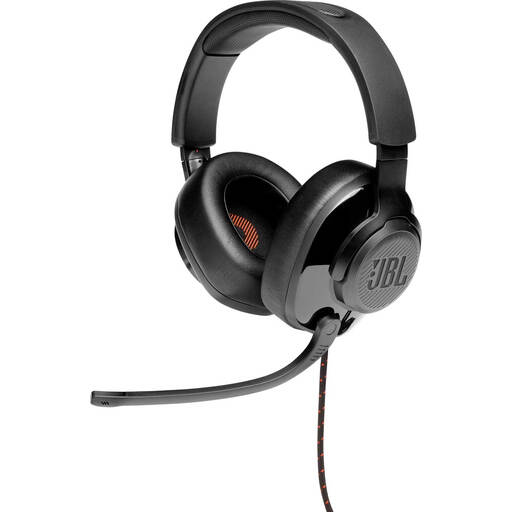
A good fit if you’re looking for a wired headset with a microphone boom that flips up when you want to listen.
The product description lists a USB audio adapter and a flip-up microphone boom that mutes when raised.
 No image available
A good fit if you want a wired computer connection and easy-to-reach mute controls while reading aloud and responding.
The product description lists an adjustable microphone boom, in-line mute and volume controls, and a USB connection.
 No image available
A good fit if you want to move around during the workshop without a headset cable and prefer a stereo version.
The product description lists Bluetooth, an included Link 380 USB-C Bluetooth adapter, a flexible microphone boom and mute controls. ANC is a listening feature and doesn’t, on its own, prove that the microphone reduces background noise.
 No image available
A good fit if you’re looking for a wireless mono version and want to keep one ear free.
The product information lists Bluetooth, an included USB-A Bluetooth adapter and a microphone system for calls.
 No image available
A good fit if you’re looking for a wired USB headset for speaking and muting during the workshop.
The product information lists an adjustable microphone, an in-line mute control and compatibility with PC and Mac.
First, check that the connection on the exact version matches an available port on your computer. Then select the headset separately as the speaker and microphone in the workshop app, and test the mute button and microphone position in a short trial call.
Yes, as long as the cable is long enough when your desk is at its highest setting and doesn’t pull tight anywhere. Logitech lists a 1.9 m cable for the USB-A H390 described here; check whether that length works with your setup.
Before the workshop, check the battery level and make sure the headset connects to your computer and app. Stated talk time applies under specific conditions; for example, Jabra lists different maximum times for the Evolve2 55 depending on ANC and the busylight.
According to ACM ConsuWijzer, if a product becomes faulty sooner than reasonably expected under normal use, the seller must put it right free of charge, for example by repairing or replacing it and, where applicable, providing a refund. ACM ConsuWijzer says online purchases come with a 14-day cooling-off period from delivery, subject to statutory exceptions. This statutory right is separate from any manufacturer’s warranty.
The Dutch Authority for Digital Infrastructure says that manufacturers, importers and sellers of radio equipment must comply with European requirements. The authority also explains the CE marking for electrical and electronic equipment; check the product information for the specific version.