Who is this headset suitable for?

Active online participant

You read text aloud and give feedback, so you want your voice to come through clearly. Logitech recommends positioning the microphone boom close to your mouth. Then test in your meeting app to check that the selected microphone works for your workshop.

Participant in dim lighting

You want to mute the microphone or adjust the volume without having to hunt for tiny buttons. Check where the controls are on each version: on the cable, on the earcup or on the microphone boom. EPOS says the controls on the IMPACT 100 series have illuminated symbols.

Participant who wants to stay aware of the room

You may want to hear someone next to you or get up during the workshop. HP Poly describes mono as a style that leaves one ear free. A wireless model gives you more freedom to move, but you’ll need to prepare the connection and make sure it’s charged.

What should you consider when choosing?

For a personal online writing workshop in a dimly lit room, your choice mainly comes down to your voice, the controls, a compatible connection and wearing comfort.

What to consider What to check before buying Who should pay particular attention?
Microphone and voice clarity Check whether the microphone boom is adjustable, and test how your voice sounds in your chosen meeting app before the workshop. When I read aloud or give feedback, I want my voice to come across clearly. Around 36% of consumers say clear speech is their top priority.
Controls in low light Check where the mute and volume controls are, and how you can tell when mute is on. In a dimly lit room, I want to mute the microphone or adjust the volume without searching for tiny buttons. Around 29% of consumers rank easy-to-use controls in low light as their top priority.
Connection and app audio Check that the exact USB or 3.5mm connection is compatible with your device, then select both the headset microphone and headset speakers in the app. Before I sign in, I want to know that the headset works with my device and meeting app. For around 21% of consumers, a suitable, working connection is the top priority.
Style and fit Choose mono if you want to leave one ear free, or stereo if you want to focus both ears on the online group. Check that the style you choose fits comfortably. When I’m listening and taking notes at the same time, I want a comfortable headset that suits what I need to hear in the room. Around 14% of consumers say wearing comfort is their top priority.

Common buying pitfalls

  • Assuming that moving the microphone boom out of the way always mutes it

    The way you mute the microphone varies by model. Logitech lists a separate mute control on the cable for the H390, while Trust says you mute the wired Ayda USB-ENC by flipping the microphone boom up.

    Check how to mute the exact model you’re considering, and test it in your meeting app.

  • Relying on ‘USB headset’ or ‘USB-C’ alone

    The connection and any included adapter can vary between versions. Jabra also warns that not every USB-C mobile device or app supports audio through the Evolve2 40 SE.

    Check the full model name, plug and box contents against your device. With the wrong USB version, you may need to buy a compatible adapter.

  • Confusing noise cancellation with picking up an entire room

    A personal headset is designed for you to join in using your microphone. A product description mentioning noise cancellation doesn’t prove that it will pick up several people around a table clearly.

    Decide in advance whether only you will be speaking, or whether other people in the room also need to be heard remotely.

  • Assuming the manufacturer’s warranty is your full legal protection

    The Dutch government states that there is no fixed statutory warranty period in the Netherlands, and that the seller is responsible for faulty products.

    Keep your proof of purchase and distinguish between any additional manufacturer’s warranty terms and your rights in relation to the seller.

Brands to compare

Logitech

The H390 is a wired headset for taking part from a fixed position, with controls on the cable.

  • Logitech lists an adjustable headband, a positionable microphone boom, and in-line volume and mute controls.
  • Check whether you need the USB-A or USB-C version. The listed features don’t guarantee that background noise will be removed in every room.

Trust

The wired Ayda USB-ENC is designed for personal use; the Ayda Wireless ENC is a separate version.

  • For the wired USB-ENC, Trust lists on-ear controls and muting by flipping the microphone boom up.
  • Check the full model name and current availability of the version you choose.

Jabra

The wired Evolve2 40 SE is worth considering if you want to compare different USB versions and microphone-boom controls.

  • The Jabra manual describes USB-A or USB-C connections, depending on the version.
  • Not every USB-C mobile device or app supports audio through the headset. Teams features and some indicator lights aren’t available on every version.

EPOS

According to EPOS, the IMPACT 100 series includes wired mono and stereo models.

  • EPOS lists USB-C with a USB-A adapter included, in-line controls with illuminated symbols, and an adjustable microphone boom across the series.
  • Illuminated symbols don’t automatically mean you’ll find the buttons comfortable to use by touch, so check the version you choose.

HP Poly

The Blackwire 3200 series includes wired mono and stereo headsets.

  • HP Poly describes mono as a style that leaves one ear free.
  • Connections vary across the series. Check the full model name before assuming it has USB-C or a 3.5mm connection.

Joybuy products for a writing workshop

These Joybuy product picks are intended for personal use with a wired headset. Check that the USB or 3.5mm connection on each model is compatible with your device.

Logitech PC 960 USB headset

Logitech PC 960 USB headset

An option if you want to control the volume and mute the microphone using the cable while you write. Check that your computer has a compatible USB port.

Joybuy

Logitech H340 USB headset, black and wired

Logitech H340 USB headset, black

A good fit if you’re looking for a wired headset with an adjustable microphone boom. Check that the USB connection is compatible with your computer.

Joybuy

Kingston USB Hi-Fi headphones with microphone

Kingston USB Hi-Fi headphones with microphone

An option if you want to position the microphone close to your mouth while speaking. Check that the USB model works with your device.

Joybuy
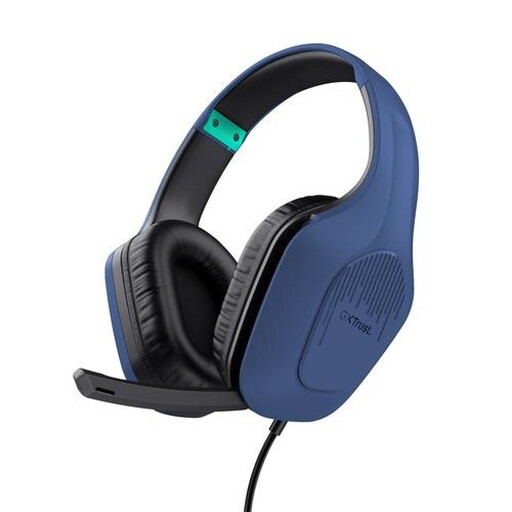
Trust GXT 415B Zirox wired gaming headset

Trust GXT 415B Zirox gaming headset

An option if you want to control the microphone and volume on the headset. Check that your device has a 3.5mm connection.

Joybuy

Trust Ayda wired headset, USB Type-A, black

Trust Ayda noise-cancelling headset, USB Type-A

A good fit if you want to mute the microphone by moving its boom and adjust the volume on the earcup in low light. The title specifies USB Type-A.

Joybuy

Frequently asked questions

Which headset should you choose if someone is talking next to you?

A mono headset can leave one ear free, so you can hear someone in the room. If several people around the same table need to be heard remotely, consider a separate room-audio solution. A personal headset isn’t designed to pick up everyone equally well.

How can you check that the headset works before the workshop?

Select the headset as both your speaker and microphone in your meeting app, then make a test call. Microsoft describes these settings and the test feature for Teams. If you use another app, run its own audio test.

Do you need to charge a wired USB headset?

According to EPOS, the IMPACT 100 is powered via the USB cable, but check the exact version. Trust lists a rechargeable battery for the Ayda Wireless ENC. If you choose a wireless model, also check that your preferred version is available.

What can you do if a headset you bought online is faulty?

Contact the seller: according to the Dutch government, the seller is responsible for faulty products. There is no fixed statutory warranty period in the Netherlands; what you can expect depends, among other things, on the product and the information provided by the seller. Many online purchases also come with a 14-day cooling-off period, although exceptions may apply.
