Headsets at Joybuy
This Joybuy selection includes headsets and over-ear models with listed microphone or computer-use features. Check how each model connects its microphone to your computer, and make a test recording before recording a long take.
 Image unavailable
Sennheiser MOMENTUM 4 Wireless, black
The over-ear design may suit you if you also want to listen through headphones during long takes. Check separately whether the microphone works as an input for your recording.
The product information lists four microphones for calls, a padded headband and deep ear cushions. The product name states a battery life of 60 hours.
View at Joybuy
 Image unavailable
Razer Kraken V3 X, black
This model may be worth considering if you’re looking for a headset with a directional microphone; test it in your own workspace.
The product information lists a cardioid microphone and a weight of 285 grams. The stated 7.1 surround sound support applies to Windows.
View at Joybuy
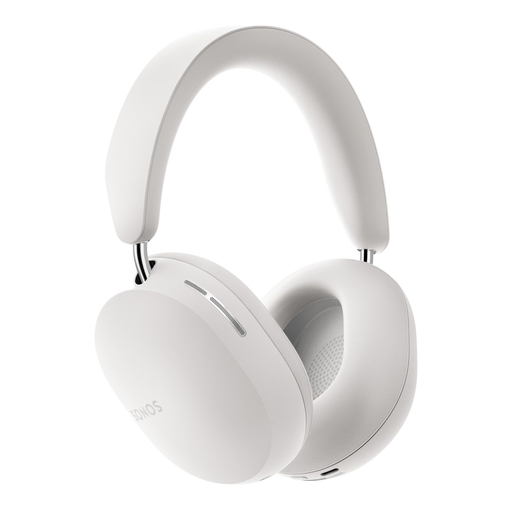 Image unavailable
Sonos ACE, white
The over-ear design may suit you if you want ear cushions that fit around your ears while listening. Check whether the microphone is available as a recording input through your chosen connection.
The product information lists microphones for calls, soft memory foam ear cushions and an adjustable headband. A 3.5mm cable for wired audio sources is listed; this doesn’t confirm that the microphone works through that cable.
View at Joybuy
 Image unavailable
Jabra Evolve2 75
This model may suit you if you’re looking for a headset for computer use and calls; check how the microphone works with your recording software and connection.
The product information lists Bluetooth 5.2, a range of 30 metres, a supplied USB-C cable, an adjustable headband and soft ear cushions.
View at Joybuy
 Image unavailable
Jabra Evolve 30 II MS Stereo
This wired stereo headset may be worth considering if you want to record and listen through one headset; check which connection you’ll use for recording.
The product information lists a microphone, a 3.5mm connection and a LINK MS controller for USB. The stated cable length is 0.95 metres.
View at Joybuy
Frequently asked questions
Will a headset with a 3.5mm plug work in every headphone socket?
No. A headphone output isn’t automatically a microphone input. Audacity notes that some laptops have a combined headset socket; for the RØDE NTH-100M microphone, RØDE specifies using the supplied TRRS cable.
Why do you sometimes hear your voice with a delay while recording?
Audible input monitoring through Audacity can introduce a delay. According to Audacity, software monitoring doesn’t eliminate that delay completely; real-time monitoring requires an audio interface that supports this feature.
How do you check the recording level before a long take?
First, select the microphone you intend to use as the input, record a test passage at your normal volume and check the meter. Audacity recommends peaks between −18 dB and −6 dB for normal speech and warns that a recording reaching 0 dB is clipping; these are guidelines for that software, not a guaranteed setting for every recording set-up.
What can you do if the ear cushions wear out after extended use?
Check whether replacement parts are available for the exact model. RØDE says that the ear cushions and headband padding for the NTH-100 family can be replaced at home. This doesn’t tell you whether the parts are currently available.
What are your rights when you buy a headset online in the Netherlands?
For a standard online product purchase, ACM ConsuWijzer says you generally have a 14-day cooling-off period after delivery, although exceptions can vary depending on the purchase. Products must also be of satisfactory quality: according to the Dutch government, there’s no fixed statutory guarantee period in the Netherlands, and you should be able to contact the seller if something is faulty.


