What should you look for?
First decide what matters most to you: speaking clearly, a compatible connection, comfort or freedom to move around. Then compare the connections and features of the exact headset version you’re considering.
Wired
A good fit if: you usually sit in one place and your device supports the headset’s connection.
Bear in mind: you’ll remain connected to your device by a cable; you won’t need to charge a headset battery for this type of connection.
Bluetooth
A good fit if: you want to be able to get up from the kitchen table during a call or switch between compatible devices.
Bear in mind: check that your device supports Bluetooth, and charge the headset when needed.
| What to consider |
What to look for when buying |
Who is this important for? |
| Speaking clearly |
Check whether the microphone is adjustable and easy to mute. Also look at the settings in the calling app you use. |
I want to speak clearly at a shared kitchen table without assuming that a noise-reduction claim will filter out every voice. Around 33% of consumers in this situation rank speaking clearly as their top buying priority. |
| Connection |
Compare the port on your device with the plug on the exact version you’re considering, and check whether any required adapter is included. |
If I switch between, for example, a laptop and a phone, I want the connection to work with my devices. Around 25% of consumers make device compatibility their top priority. |
| Comfort and hearing |
Compare adjustability and headset style. Check whether the version is mono or stereo if that matters to you. |
For a longer session, I want the headset to feel comfortable and to keep hearing the group clearly. Around 25% of consumers prioritise comfort and being able to hear clearly. |
| Freedom to move around |
Compare Bluetooth with a wired connection. For wireless use, check that your device supports Bluetooth and bear charging in mind. |
If I want to get up from the table during a call, a connection without an audio cable matters to me. Around 17% of consumers make freedom to move around their top buying priority. |
Headsets at Joybuy
This selection includes wired and wireless headsets for joining an online study group. Focus on the connection, microphone controls and how much freedom to move around you need.
 No image available
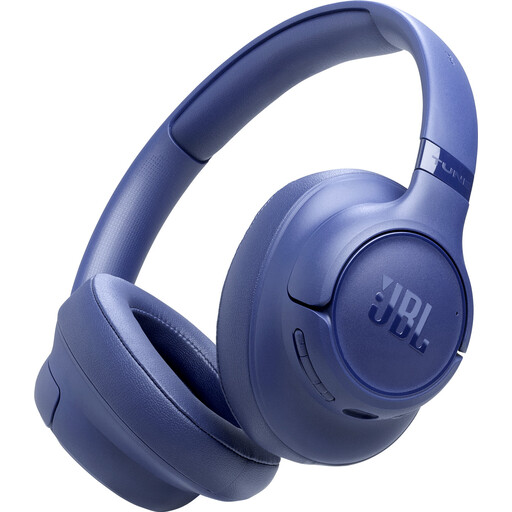
JBL Tune 730BT - Blue
A wireless option if you don’t want to be tethered by an audio cable during a group session. Listed specifications include Bluetooth 6.0, multipoint for two devices and two beamforming microphones for voice calls.
The stated playback time is up to 76 hours; wireless use requires charging.
Joybuy
 No image available
Sennheiser MOMENTUM 4 Wireless - Black
A wireless version for joining a group call without an audio cable. Listed features include Bluetooth and four beamforming microphones for calls.
The product name states 60 hours of battery life; a 3.5 mm audio cable is also listed for wired listening. Bear charging in mind when using it wirelessly.
Joybuy
 No image available
Logitech PC 960 USB
A wired option for a fixed desk setup, with an adjustable microphone boom that can be rotated out of the way.
The listed volume and mute controls are on the cable. Check that the USB connection is compatible with your device.
Joybuy
 No image available
Trust Ayda USB Type-A - Black
A wired option for a table setup; this version has a microphone that flips up to mute.
The listed connection is USB-A with a USB-C adapter cable. The cable is 180 cm long and the headset has on-ear volume controls. Check that the connection is compatible with your device.
Joybuy
 No image available
HyperX Cloud III Gaming Headset - PC, PS5, Xbox Series X|S - Black/Red
A wired headset with a detachable microphone for anyone who needs a mic for a group call.
The listed connections are 3.5 mm, USB-A and USB-C. The product information also lists a mute function; check which connection is compatible with your device.
Joybuy
Frequently asked questions
How do I check that the right microphone is active?
In Teams, select the connected microphone and speaker in the audio or device settings before joining or during the call. Also check that your device or browser has given the app permission to use the microphone; the controls vary between calling apps.
Does noise reduction help when people are talking at the table?
On supported platforms, Teams offers settings to reduce background noise for other participants. This doesn’t guarantee that nearby voices will disappear. Also distinguish between noise reduction on your microphone and sound isolation for your own ears.
What should I do to prepare a Bluetooth headset?
Check that your device supports Bluetooth, pair the headset and charge it before the session. With a wired headset, check instead that the plug fits the port and that you have any adapter you need.
What are my rights if a headset I bought online doesn’t work properly?
According to the Dutch government, when you buy a product you’re entitled to statutory rights; in the Netherlands, there is no fixed statutory warranty period. If a product is faulty, the seller must provide a solution. When buying from a business at a distance, you’ll also usually have 14 days to change your mind; check the applicable terms and conditions.


