For recording on a PC, a wired headset with an adjustable microphone boom may be all you need. A dedicated dictation headset is more relevant if you dictate frequently and for longer periods, and want to use its built-in controls. Check the exact connection, fit and compatibility with your recording or transcription software. A manufacturer's noise-cancellation claim does not prove how accurately your diary will be transcribed.
Who is this for?
Diary recorder who prioritises clear speech
You want to position the microphone properly and test your voice first in your recording or transcription software. Logitech and Jabra offer guidance on microphone positioning, but that alone does not demonstrate transcription results in a small booth.
Regular dictation user
You dictate longer passages, so you pay extra attention to fit, controls and the practical implications of a battery or cable. Philips positions the SpeechOne for frequent dictation, while HP describes different connection options within the Blackwire 5200 series.
Multi-device user
You want your headset to connect to the devices you use and work as an input device with your chosen speech-to-text setup. Logitech describes a USB-A version; for the Blackwire 5200 series, HP lists USB-C with a USB-A adapter and 3.5 mm, depending on the version.
What should you look for when choosing?
First, check how your diary will be recorded or transcribed and which connection you need. Then compare the microphone position and fit with the length of your recording sessions.
| What to consider |
What should you check? |
Who is this important for? |
| Clear voice recording |
Check whether the microphone is adjustable, then make a test recording using your own voice, booth and software. |
If you want to listen back to your diary or have it transcribed, you need to be able to position the microphone properly and check the result yourself. Around 33% of consumers say voice recording is their top purchasing priority. |
| Wearing comfort |
Consider adjustability, contact with your ears and the wearing style that suits the length of your sessions. |
For longer passages, you want a headset that stays comfortable. A short trial does not necessarily tell you how comfortable it will be over a longer period. Around 27% of consumers put wearing comfort first. |
| Connection and dictation setup |
Check whether the exact version has USB-A, USB-C or 3.5 mm, and test that the app selects the headset microphone. |
If you switch between devices or software, you want to know in advance that both the connection and microphone input will work. Around 20% of consumers name device compatibility as their top priority. |
| Diary privacy |
Check how your chosen app processes audio and text. Microsoft states that Windows voice typing uses online speech recognition and requires an internet connection. |
When you dictate personal content, you want to know where transcription takes place and how the service handles your data. Around 20% of consumers put privacy first. |
Pitfalls when choosing and using a headset
-
Assuming noise cancellation guarantees accurate transcription
Logitech and Trust product descriptions mention microphone features, but they do not prove how accurately diary recordings will be transcribed in a small booth.
Make a short test recording using your own voice, booth and chosen software before deciding whether the results meet your needs.
-
Relying on the product name alone when checking the connection
Headsets and product ranges can have different connections. A microphone will only work if the headset connects to your device and is available as an input in your chosen app.
Compare the connection on the exact version with the ports on your device, then test the microphone in the app.
If the connection is incompatible, you may need a different version or an adapter.
-
Assuming a personal diary will automatically be transcribed offline
According to Microsoft, Windows voice typing uses online speech recognition and requires an internet connection. Your choice of headset does not determine how the transcription service processes audio.
Choose your recording or transcription service carefully and check its data policy separately.
-
Assuming there is a fixed two-year statutory guarantee
The Dutch government states that the Netherlands has no fixed statutory guarantee period. A product listing that specifies a period is therefore not automatically a general description of your statutory rights in the Netherlands.
Keep your proof of purchase and contact the seller if there is a fault, as you are entitled to a product that is fit for purpose. What you can expect depends, among other things, on the product and normal use.
Relevant brands
Logitech
The H390 is a wired computer headset for anyone looking for a straightforward USB setup and a positionable microphone boom.
- For the version described, Logitech lists USB-A, in-line controls and a 1.9 m cable.
- The claim that the microphone minimises background noise comes from the manufacturer and does not demonstrate transcription performance in a small booth.
Trust
The Ayda USB-ENC is an on-ear option with an adjustable headband, designed for PC use.
- For this version, Trust describes a microphone that mutes when you flip it up, with a USB or USB-C connection.
- Check the exact product variant: not every headset called Ayda has the same connection.
Philips
The SpeechOne PSM6000 is designed for frequent dictation and speech recognition.
- Philips lists different wearing styles, recording controls and up to 12 hours of recording time, according to the manufacturer.
- Check that the controls work with the app you want to use; the stated recording time is not an independent measurement.
HP Poly
The wired Blackwire 5200 series is worth considering if you want to compare connection options for PCs and mobile devices.
- HP describes USB-C with a connected USB-A adapter, as well as 3.5 mm for mobile phones or tablets.
- The range includes different mono and stereo versions. Check the exact model; sound descriptions are manufacturer claims.
Jabra
The Evolve2 30 SE is a business headset for anyone looking to compare fit and microphone positioning.
- Jabra describes two microphones and memory foam ear cushions. Its support page recommends keeping the microphone close to your mouth.
- The stated performance is based on manufacturer claims, not a test of diary dictation.
Headsets on Joybuy
This selection includes wired USB headsets, a wireless Bluetooth headset and a USB-C in-ear headset with a microphone. Check the connection and wearing style of the exact version before you choose.
 No image available
Logitech H540 USB headset
A wired USB headset for recording on a device with USB-A.
The description mentions plug-and-play, controls on the earcup and a microphone that reduces background noise.
View on Joybuy
 No image available
Logitech H340 USB headset
A wired USB headset for recording on a computer with USB.
The description mentions an adjustable microphone, a lightweight adjustable headband and a microphone that reduces background noise.
View on Joybuy
 No image available
Jabra Evolve2 65 USB-A Black MS Mono
A wireless mono headset for anyone who does not want to be tethered by a cable while recording.
The description mentions Bluetooth 5.0, a USB-A adapter, three microphones, memory foam ear cushions and battery life for music and calls.
View on Joybuy
 No image available
Kingston USB Hi-Fi Headphones with Microphone
A USB headset with an adjustable microphone boom for anyone who wants to change the microphone's position.
The description mentions a microphone boom that rotates through 270 degrees, a padded adjustable headband and a 1.8-metre USB cable.
View on Joybuy
 No image available
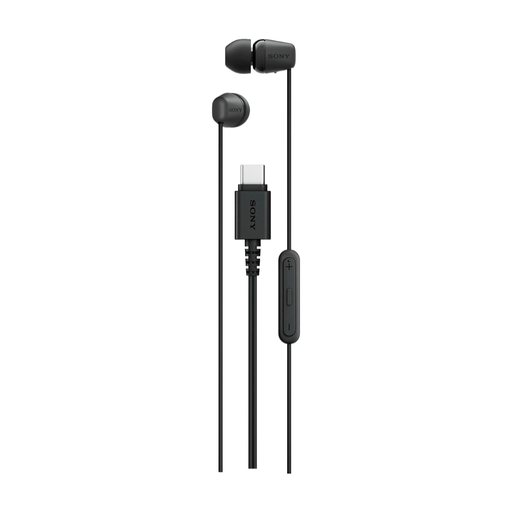
Sony IER-EX15C USB Type-C headset
A wired in-ear headset with a microphone for a device with USB Type-C.
The description mentions a built-in microphone and in-line controls.
View on Joybuy
Frequently asked questions
Can I dictate a diary straight into Windows using a headset?
A working microphone alone is not enough for Windows voice typing: Microsoft states that the feature requires an internet connection and uses online speech recognition. Also check that Dutch (Netherlands) is set as your input language.
How should I position and maintain my headset for regular use?
Adjust the headband to fit and keep the microphone close to your mouth while using it, as Jabra recommends for the Evolve2 30 SE. Philips lists replaceable ear cushions for the SpeechOne; check the care instructions for other models.
Who should I contact if my headset develops a fault in the Netherlands?
According to the Dutch government, the seller is your point of contact when exercising your right to a product that is fit for purpose. The Netherlands has no fixed two-year statutory guarantee period; what you can expect depends, among other things, on the product and normal use.
Can I record a personal diary using my own voice?
The Dutch Data Protection Authority states that processing personal data purely for personal or household use falls outside the GDPR. This does not automatically answer questions about recording other people, sharing content beyond your personal circle or processing by an online transcription service; consider those situations separately.


