If you’re the only person speaking online from the meeting room, a personal headset is a good fit, as long as its microphone, connection and mute controls work with your equipment. If colleagues around the table also need to join in, a speakerphone is a better choice. Check that its microphone range covers everyone’s seats; a headset microphone isn’t designed to pick up everyone around the table.
Who is this choice for?
Meeting leader at the table
You’re leading a hybrid planning meeting where colleagues sitting beside you also need to speak. First, consider whether personal audio will cover the whole conversation. Microsoft Support describes an audio mode for Teams room devices.
The only person speaking online in the room
You’re representing the room in the online meeting and want your voice to come through clearly, with quick access to mute. Trust and Yealink describe personal headsets with microphone controls for this type of use.
Meeting leader who moves around
You move between places or devices while leading the meeting and don’t want to be tied to a cable. HP Poly describes the Voyager 4300 UC series as a wireless option; check which model and accessories you’re choosing.
What should you look for when choosing?
Speakerphone for the whole table
Choose this if: several people in the room need to talk to remote participants.
Bear in mind: where you place it and how far away the furthest speaker will be. Jabra recommends the Speak2 55 for rooms up to 4.5 m × 4.5 m and gives its microphone range as up to 2.3 m.
Personal wired headset
Choose this if: you’re the only person speaking online in the room and want a fixed connection with easy-to-reach mute controls.
Bear in mind: the cable limits your movement, and the microphone is designed for the wearer, not colleagues further along the table.
Personal wireless headset
Choose this if: you want to move around or switch between devices during the meeting.
Bear in mind: the model, adapter and charging requirements. HP Poly gives the Voyager 4300 UC series a maximum wireless range of 50 m. This is a manufacturer’s figure and doesn’t guarantee that range in every room.
For a small planning meeting, your choice mainly depends on who needs to speak in the room. Also check the connection and audio settings in your meeting app.
| What to consider |
What should you check? |
Who is this important for? |
| Several speakers around the table |
Microphone range and distance to the furthest seat; Jabra gives the Speak2 55 a range of up to 2.3 m. |
If colleagues around the table also need to join the online conversation, I want to know whether the microphone will reach their seats. Around 36% of consumers prioritise coverage for multiple speakers. |
| The meeting leader’s voice |
Microphone position and how the chosen model handles muting. |
If I’m the only person speaking online, I want my voice to come through clearly and to be able to mute quickly. Around 29% of consumers prioritise how clearly their own voice comes through. |
| Connection and controls |
Check the USB port and any adapter you may need; select the intended microphone and speaker in your meeting app. |
If I don’t want to struggle with audio settings during the meeting, I want the headset or speakerphone to work with my equipment. Around 21% of consumers prioritise connection and controls. |
| Comfort and freedom of movement |
Check the fit and, for wireless use, the adapter and charging requirements. |
If I want to move around while leading the meeting or wear the headset for a long time, I don’t want to rely on a fixed cable. Around 14% of consumers prioritise comfort and freedom of movement. |
Common buying mistakes
-
Choosing a headset for one person when everyone around the table needs to speak online
A personal headset and a speakerphone are designed for different microphone set-ups. If several people need to speak, check whether the microphone range reaches the furthest seat.
Before buying, decide who needs to be heard from the room. A microphone close to the meeting leader is no substitute for one that covers the whole table.
If colleagues around the table also need to take part, you may need room audio as well.
-
Confusing noise cancellation with coverage of the whole table
A noise-cancellation claim for a personal microphone doesn’t mean it will pick up colleagues sitting further away.
Consider the microphone’s position and who needs to speak into it separately from any claims about background noise.
-
Assuming a product name confirms the exact model
Product ranges can include models with different connections or specifications. Before buying, check the full model name, connection and included accessories.
A wireless model may need a specific adapter, or you may need a different version. Check the product page before you buy.
Brands to consider for this choice
Jabra
The Speak2 55 is a speakerphone worth considering if several people need to join in from a small room.
- Jabra specifies four microphones and an ideal room size of up to 4.5 m × 4.5 m for the Speak2 55.
- The recommended room size and microphone range of up to 2.3 m are manufacturer figures. Check them against your table layout and seating positions.
Trust
The Ayda USB-ENC is a personal wired option for a meeting leader who speaks online themselves.
- Trust describes this model as having a boom microphone that flips up to mute, plus a USB or USB-C connection.
- The product’s claim of clear speech hasn’t been independently verified. Check that you’re looking at the USB-ENC model.
HP Poly
The Voyager 4300 UC series is a wireless option for a meeting leader who wants to move around or switch between a PC and phone.
- HP specifies a BT700 USB adapter and simultaneous connection to a PC or Mac and a phone.
- The maximum wireless range of 50 m is a manufacturer’s figure. Check the model you choose and the items included.
Yealink
The UH37 is a wired USB headset for personal calls, available in mono and dual versions.
- Yealink describes it as having two microphones and mute controls on the microphone boom or a button.
- Check the connector and exact model; the stated noise reduction is a manufacturer’s claim.
Logitech
The Zone Wired may suit personal use if Teams and a USB connection are your priorities.
- Microsoft lists the Zone Wired as a Teams-certified device.
- This certification applies to the model named and doesn’t mean that a personal headset will pick up voices from other people around the table.
Joybuy products for a small planning meeting
This selection includes personal wired and wireless headsets, plus a speakerphone for several people in the meeting room.
 Image unavailable
Jabra Evolve2 30 SE
A personal wired USB headset for a meeting leader who speaks online themselves; colleagues further along the table will need separate room audio.
View at Joybuy
 Image unavailable
Jabra Evolve2 75 USB-A MS Teams, black
A personal wireless headset for a meeting leader who speaks online themselves and wants to move around during the meeting. Check that the model works with your devices and meeting app.
View at Joybuy
 Image unavailable
Jabra Speak2 55 MS Teams, Dark Grey
A speakerphone for a small meeting with several people in the room. Jabra specifies four microphones, an ideal room size of up to 4.5 m × 4.5 m and a microphone range of up to 2.3 m. Check the distances between the device and the seats.
View at Joybuy
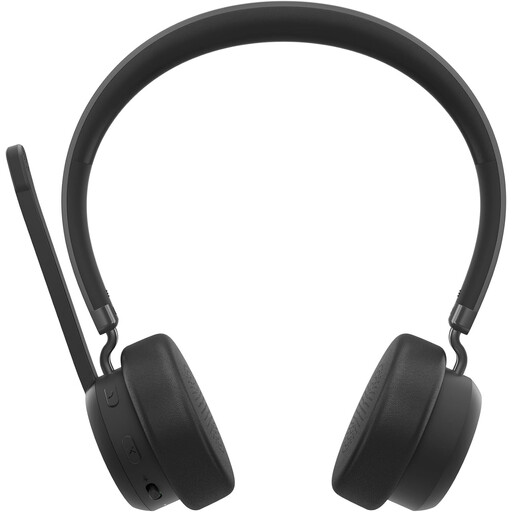 Image unavailable
Lenovo 4XD1Q30302 wireless headset
A personal wireless headset for a meeting leader who speaks online themselves and wants freedom of movement. Check that the connection works with your computer and meeting app.
View at Joybuy
 Image unavailable
Trust Ayda wired headset, USB Type-A, black
A personal wired headset for a meeting leader who speaks online themselves. Check that the connection and model you choose work with your equipment.
View at Joybuy
Frequently asked questions
How can you stop Teams from using the wrong microphone?
Before joining, select the intended microphone and speaker in the meeting settings. Microsoft Support explains how to choose the meeting room’s audio when using Teams with room devices.
Does a headset need to be Teams-certified?
Not for every meeting. If you specifically need Teams certification, check the exact model: Microsoft gives this designation to devices that have completed its certification programme.
What should you check on a wireless model before a meeting?
Check that the headset is sufficiently charged and that you have the required adapter. Jabra gives the Speak2 55 a maximum talk time of 12 hours. This is a manufacturer’s figure for this model, not a guaranteed operating time.
Can you record a planning meeting without further consideration?
Buying a headset doesn’t in itself give you permission to process personal data from a recording. The Dutch Data Protection Authority explains that an organisation needs an appropriate legal basis for processing and must tell participants what will happen to their data and why.


