Which setup is right for you?

Host with people at the table

At a hybrid book group, you may also need the voices of people sitting beside you to come through online. In that case, compare a personal headset with a centrally placed speakerphone. Microsoft Support explains how to connect external room audio for meetings.

Remote host

If everyone is joining individually, you’ll mainly need a microphone for your own voice, clear audio from the other participants and an easy-to-reach mute control. Logitech highlights features of the H390, including a positionable microphone and in-line controls.

Organising a long discussion

For a longer discussion, comfort and connectivity may also matter. Check the headband and ear cushions, and make sure the plug fits your device. Logitech lists an adjustable headband for the H390; HP describes mono and stereo versions in the Blackwire series.

What should you look for when choosing?

Wired headset with boom microphone

Choose this if: you’re hosting the discussion from your own device and the other participants are joining from elsewhere.

Keep in mind: the microphone is for your voice, and the cable limits how freely you can move.

Tabletop speakerphone

Choose this if: several people are sitting at your table and need to speak online.

Keep in mind: positioning matters. Jabra recommends placing the Speak2 55 in the middle of the table, 0.5 to 2.3 m from each participant. Check that this works for your table and setup.

What to consider What should you check? Who should consider this?
Hearing everyone’s voice Decide whether only you will be speaking or whether people at the table will too. Test the setup from every seat. If people are sitting beside me, I want their voices to come through online. That’s why around 33% of consumers prioritise hearing everyone who is meant to speak.
Your own voice Check the position of the boom microphone and test your voice in the meeting app. If I’m speaking from my own device, I want remote participants to hear me clearly. Around 27% of consumers give top priority to making their own voice easy to understand.
Connection and controls Check that the USB-A or USB-C connection fits your device, then select the correct microphone and speaker in the app. If I mainly need a compatible connection and easy-to-use controls, I want to know before the discussion that my device and app are using the right audio. Around 20% of consumers say this is their biggest concern when buying.
Wearing comfort Check the adjustability and ear cushions, and choose between mono and stereo. Fit is a personal matter. For a long discussion, I want a comfortable headset that suits how I like my ears to be covered. Around 20% of consumers put wearing comfort first.

Common buying mistakes

  • Assuming a headset microphone will work for everyone at the table

    A personal headset picks up the voice of the person wearing it. That’s different from letting several people at the table speak online.

    Beforehand, work out where each speaker will be sitting and test how clearly they can be heard from every seat they’ll be using.

  • Assuming every USB connection will fit

    USB-A and USB-C are different connections. Your meeting app may also use a different microphone or speaker from the one you expect.

    Check the connection on the exact version you’re considering, then select the intended audio input and output in the app.

  • Confusing paid-for cover with your statutory rights

    An additional warranty product does not replace your statutory rights against the seller. According to the Dutch government, there is no fixed statutory warranty period in the Netherlands.

    Read exactly what additional cover includes and compare it with your existing rights if a product is faulty.

Brands to consider for this choice

Logitech

The H390 is a wired headset for personal use with a computer.

  • Logitech lists a positionable microphone, in-line controls and an adjustable headband.
  • The H390 version described has USB-A. A personal headset is not a tabletop microphone for several speakers.

Jabra

The Evolve2 40 SE is a personal headset; the Speak2 55 is a speakerphone for shared audio at the table.

  • Jabra describes the Evolve2 40 SE as having passive noise isolation and a boom microphone. The Speak2 55 has four omnidirectional microphones, according to Jabra.
  • These are different types of product. The specifications alone don’t show how clearly everyone will be heard in your room.

HP Poly

The Blackwire 3300 series consists of wired personal headsets. Check the connections on the version you choose.

  • HP lists a flexible boom microphone and rotating ear cups.
  • The 8X220AA version is described as coming with a USB-C/A adapter. Check that the version you choose works with your device.

EPOS

The IMPACT SC 60 USB ML is a double-sided wired headset for personal calls on a computer.

  • EPOS’s specification sheet lists a noise-cancelling microphone, in-line controls and a weight of 66 g for this version.
  • These are manufacturer specifications, not an independent assessment of comfort or microphone performance.

Joybuy products

This selection includes both speakerphones for shared audio at the table and personal headsets for the host.

Insta360 Wave AI Conference Speakerphone with Bluetooth, white

Insta360 Wave AI Conference Speakerphone with Bluetooth, white

A speakerphone option for a discussion where several people at the table need to speak online. Test how clearly they can be heard from every seat.

Bluetooth is listed in the product name.

Joybuy

Jabra Evolve2 75 USB-A MS Teams, black

Jabra Evolve2 75 USB-A MS Teams, black

A personal headset option for a host speaking from their own device. Check the connection and audio settings in your meeting app.

USB-A and MS Teams are listed in the product name.

Joybuy

Jabra SPEAK 510 MS Conference Room Loudspeaker with Bluetooth and USB-A, black

Jabra SPEAK 510 MS Conference Room Loudspeaker, Bluetooth and USB-A (USB 2.0), black

A speakerphone option to consider when several people are taking part from around the table. Test whether voices come through clearly from every seat.

Bluetooth and USB-A (USB 2.0) are listed in the product name.

Joybuy

Jabra Speak2 55 MS Teams, dark grey

Jabra Speak2 55 MS Teams, dark grey

A speakerphone for a table setup with several participants. Jabra recommends placing the Speak2 55 in the middle of the table, 0.5 to 2.3 m from each participant.

MS Teams is listed in the product name. Follow Jabra’s positioning advice when setting it up.

Joybuy
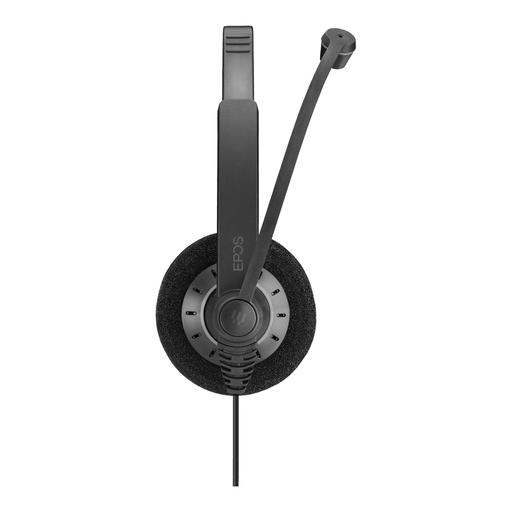
EPOS IMPACT 200 SC 30

EPOS IMPACT 200 SC 30

A personal option to consider if you’ll be speaking from your own device. Check the exact version and connection before buying.

Joybuy

Frequently asked questions

Can I use one headset to let everyone at my table speak online?

Don’t count on it without testing your setup. A personal headset has a microphone by the wearer; a speakerphone is a different solution for several voices around the table. For the Speak2 55, Jabra recommends placing it in the middle of the table, 0.5 to 2.3 m from each participant.

What should I check in my meeting app before the book group?

Select the intended microphone and speaker, then make a test call. Microsoft Support explains how to select connected room audio in Teams. The controls available depend on your setup.

What should I know about an extended warranty for a headset?

A paid-for warranty product does not replace your statutory rights in the Netherlands if a product is faulty. According to the Dutch government, there is no fixed statutory warranty period in the Netherlands. Check what additional cover offers before choosing it.

Can I return a headset bought online?

For many online purchases from a business, the Dutch government says you have a 14-day cooling-off period. Exceptions and the terms of the specific purchase still matter; this is separate from your rights if the product is faulty.

Can I record and share the book group discussion?

This depends, among other things, on how you use the recording and who you share it with. The Dutch Data Protection Authority does not give general permission for every recording. It describes an exception for using images strictly for personal or household purposes. If the GDPR applies to your processing of personal data, consider the legal basis and your duty to provide information beforehand, and make it clear that you intend to record.
