If you’re the only person speaking in the room, choose a headset with a connector that suits your device and a microphone you can easily mute. If several family members want to join in around the table, a speakerphone is better suited to a shared conversation; bear in mind that everyone in the room will be able to hear the call. Test the microphone and speaker before the call, and avoid having several devices playing audio at the same time, as this can cause echo.
Which setup is right for you?
Family calling together around the table
Wants several people in the room to be able to speak and hear the family member on the other end. Jabra describes the Speak2 40 as a speakerphone; Zoom Support notes that several devices with active audio in the same room can cause echo.
Only speaker in the room
Wants to speak through a personal headset and listen to the call privately. Logitech and Jabra describe microphone features for headset users; check that they suit the way you plan to use the headset.
Caller who wants to connect quickly
Wants a connection that suits their device and the option to select the right microphone and speaker in the calling app before joining. EPOS and HP Poly describe connection options for specific versions; Microsoft Support explains how to choose audio devices in Teams.
What should you look for when choosing?
First decide how many people in the room want to speak. Then check the connection and audio selection in your calling app.
| What to consider |
What to check before buying |
Who is this important to? |
| Several voices |
Choose between a personal headset and a shared speakerphone; check that speaking through a speaker is suitable for the room. |
When I’m sitting around the table with my family, I want everyone to be able to join in. Around 40% of consumers prioritise participation from everyone at the table. |
| Your own voice |
Check the microphone and mute controls on the exact version; test the microphone in your calling app. |
When I’m the only person speaking, I want my voice to be picked up by my headset and I want to be able to mute it quickly. Around 30% of consumers prioritise making their own voice easy to hear. |
| Connection and audio selection |
Compare the port with the exact version and check which microphone and speaker are selected in your calling app. |
When I want to connect without any hassle, I check that the version is compatible with my device and that the right audio devices are selected. Around 20% of consumers prioritise being able to connect straight away. |
| Wearing style and fit |
Compare mono and stereo versions, adjustability and ear cushions across the full model range. |
If I wear my headset for a long time during a call, I want a wearing style and fit that feel comfortable to me. Around 10% of consumers prioritise wearing comfort. |
Avoid common buying mistakes
-
Choosing a headset when everyone around the table wants to join in
A personal headset is designed for the person wearing it; it doesn’t automatically provide a shared microphone setup for everyone around the table.
Before comparing models, decide how many people in the room want to speak. If there are several, consider a speakerphone for the room.
-
Assuming every version has the same connections
Connections can vary between versions. For example, HP lists a 3.5mm connection for the Blackwire 3225 version; this doesn’t automatically apply to every Blackwire 3200.
Compare the full model name and the connections on that version with the ports on your device.
-
Using several devices with active audio side by side
According to Zoom Support, several computers with active audio in the same meeting room can cause echo.
Check which microphone and speaker your calling app is using. In a shared setup, avoid having several devices play audio at the same time unnecessarily.
Brands to consider
These brands offer relevant examples of personal headsets or shared speakerphones; features apply only to the product lines and versions specified.
Jabra
The Evolve2 30 SE is a personal wired headset; the Speak2 40 is a separate speakerphone for shared conversations.
- Jabra lists two microphones with noise reduction for the Evolve2 30 and full-duplex audio for the Speak2 40.
- These are product specifications and manufacturer claims, not the results of an independent performance test in a small meeting room. For a headset, check the exact USB version.
Logitech
The Zone Wired is a wired USB headset for one speaker, with mute controls close at hand.
- Logitech lists two microphones, in-line controls and a flip-to-mute microphone boom.
- The suppression of nearby sounds described by Logitech may be less suitable if you want the headset to pick up other voices around the table.
EPOS
The IMPACT 100 range includes personal wired headsets for USB-C users, as well as versions with a USB-A adapter.
- EPOS lists a directional microphone, mono and stereo versions, and a USB-A adapter.
- These product specifications don’t indicate how other people around the table will sound through the microphone.
HP Poly
The Blackwire 3200 range includes wired mono and stereo headsets; the Blackwire 3225 is a specific version with several connection options.
- HP lists USB-C, a USB-A adapter and a 3.5mm connection for the Blackwire 3225.
- The 3.5mm connection isn’t automatically included with every Blackwire 3200 version; check the full model name.
Joybuy products for this setup
This selection includes speakerphones for shared conversations and personal headsets for one speaker. Choose according to who wants to join in from the room.
 No image available
Insta360 Wave AI Conference Speakerphone, Bluetooth, White
A speakerphone for shared conversations when several people want to join in from the same room.
The product name lists Bluetooth.
View at Joybuy
 No image available
Jabra Evolve2 75 USB-A MS Teams Black
A personal headset for one speaker who wants to take the call through a headset.
The product name lists USB-A and MS Teams.
View at Joybuy
 No image available
Jabra Evolve2 65 USB-A Black MS Mono
A personal mono headset for one participant speaking from the room.
The product name lists USB-A and the mono version.
View at Joybuy
 No image available
Jabra SPEAK 510 MS, Bluetooth, USB A (USB 2.0), Black
A speakerphone for shared conversations when several people want to take part together.
The product name lists Bluetooth and USB A (USB 2.0).
View at Joybuy
 No image available
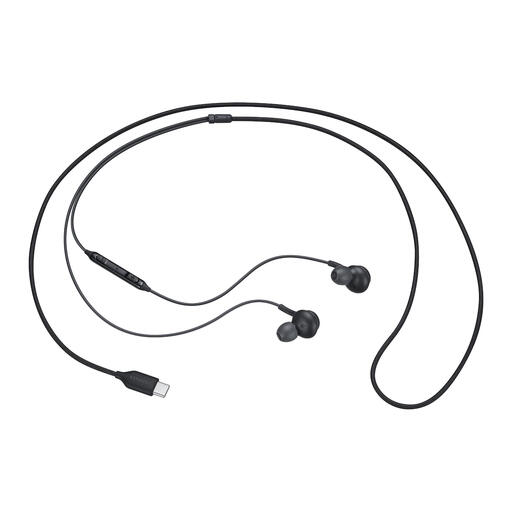
Samsung EO-IC100 wired in-ear headset, USB Type-C, Black
A personal wired headset for one participant who prefers an in-ear design for calls.
The product name lists USB Type-C.
View at Joybuy
Frequently asked questions
How can I prevent echo when several people are in the same room?
For a shared conversation, use just one active audio setup if possible, and check which microphone and speaker your calling app is using. Zoom Support identifies several computers with active audio in the same meeting room as a possible cause of echo.
What should I check before my first call?
Check that the version you’ve chosen connects to your device, and see which audio input and output your calling app is using before you join. Microsoft Support explains how to select audio devices in Teams.
What can I do if my headset isn’t working properly?
When you buy as a consumer in the Netherlands, you’re covered by statutory warranty as well as any manufacturer’s warranty. ACM ConsuWijzer and the Dutch government point out that the seller is your point of contact for a faulty product; the appropriate solution depends on the fault and the circumstances.
Are headsets required to have CE marking in the Netherlands?
CE marking is compulsory for product groups covered by the relevant EU rules. The Netherlands Enterprise Agency explains that this applies to some electrical products; which rules apply to a particular wired or wireless headset depends on the product.


