What should you look for?
Zoom explains that daylight can affect what the camera sees if a room isn’t adequately shielded. So test your voice and camera image separately.
| What to consider |
What should you check? |
Who is this important for? |
| Clear speech |
Position the microphone and test the mute control during a practice call. Microphone noise reduction is not the same as muting sound for your own ears. |
If I’m presenting a research summary online, I want my voice to come across clearly despite background noise. Around 34% of consumers prioritise clear speech. |
| The right connection |
Check your computer’s port or the input on the room’s sound system. You can’t automatically connect a USB headset to a mixing desk. |
For anyone presenting from a computer or using an existing room sound system, a working connection is essential. Around 22% of consumers give system compatibility top priority. |
| Freedom of movement |
Check that the cable is long enough for where you’ll be standing. For wireless use, also check the receiver and the applicable frequency requirements. |
If I move by the window or around the room while speaking, I don’t want to be restricted by a short cable. Around 22% of consumers prioritise freedom of movement. |
| Comfort and controls |
Check the fit, adjustability and position of the mute and volume controls. If possible, try the headset on. |
If you wear a headset for a long time during a presentation, you’ll want a comfortable fit and easy-to-use controls. Around 11% of consumers give comfort and controls top priority. |
| Camera image in bright window light |
Test the camera where you’ll be presenting. If needed, change your position or adjust the window covering. |
If I’m presenting beside a bright window, I want to check that my face remains clearly visible. Around 11% of consumers prioritise camera lighting over the other considerations. |
Headsets for online presentations
These products are wired and wireless headsets for online calls on a computer. Before buying, check that the specific version has the correct CE marking and applicable conformity information; a product listing alone doesn’t confirm this.
 No image available
Logitech PC 960 USB headset
A wired computer headset for online presentations, with an adjustable and muteable microphone.
The product description lists a USB connection, in-line volume and mute controls, and an adjustable microphone boom. Check that this version has the correct CE marking and conformity information.
Joybuy
 No image available
Logitech H650e Stereo
A wired headset for online calls, with handy in-line controls.
The product description lists USB plug-and-play, in-line volume controls and a noise-isolating microphone. Check the correct CE marking and conformity information for this version.
Joybuy
 No image available
Logitech H340 USB headset, black, wired
A wired USB headset for online calls from a computer.
The product description lists USB plug-and-play and an adjustable microphone boom that reduces background noise. Check the correct CE marking and conformity information for this version.
Joybuy
 No image available
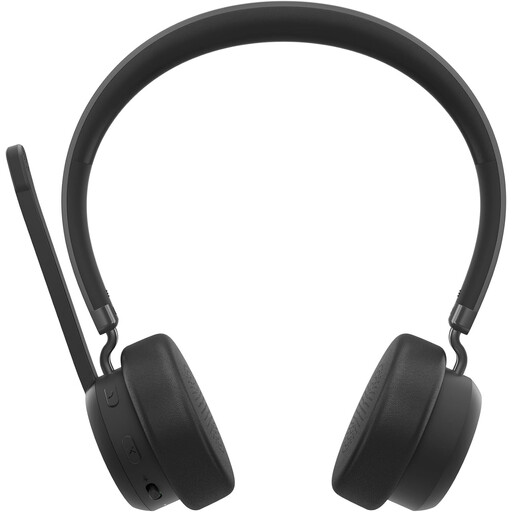
Lenovo 4XD1Q30302 wireless headset
A wireless headset for calls when you don’t want to be tethered by a cable.
The product description lists Bluetooth 5.3, a foldable microphone and mute and volume controls. Check the correct CE marking and conformity information for this version.
Joybuy
 No image available
Logitech H150 white, 981-000350
A wired headset for calls on a device with a compatible 3.5 mm connection.
The product description lists in-line controls and an adjustable microphone boom. If your device has separate headphone and microphone ports, you may need a splitter; the description says one isn’t included. Check the correct CE marking and conformity information for this version.
Joybuy
Frequently asked questions
Will a headset solve the problem of bright window light during a video presentation?
No. A headset won’t change the lighting in your camera image. Zoom explains that daylight can affect the camera view, so test your camera beforehand and adjust your position or the window covering if needed.
How do I set up a headset for an online presentation?
Select the right microphone and speaker in your meeting app, then test them in a practice call. In Microsoft Teams, you can adjust the background noise setting; check that it works well with your voice and surroundings.
Can I connect a USB headset directly to the room’s sound system?
Don’t assume so: first check which input the sound system has. A wireless head-worn system may require a compatible microphone, transmitter and receiver. Also check how the receiver connects to the sound system.
Do I need a licence for a wireless presentation microphone in the Netherlands?
That depends on the frequency band and how you use it. The RDI lists both licence-exempt bands and bands that require a licence for events. So check the frequency of the specific set and where you’ll be using it.
What should I check about CE marking and the guarantee?
Check that the specific headset has the correct CE marking and that the applicable conformity information matches the version. The RDI says electrical and electronic equipment must have the correct CE marking. Consumer purchases are also covered by the statutory guarantee in the Netherlands: if a product doesn’t perform as you could reasonably expect under normal use, the seller is responsible for providing an appropriate solution, according to ACM ConsuWijzer.


