Who is a headset for recording words suitable for?

Pronunciation example creator

Records short Dutch words and example sentences, and wants to listen back to sounds and differences between attempts. A test recording and checking the recording level can help. Claims about use for calls aren’t a pronunciation test.

Laptop user with limited desk space

Wants to record without a separate microphone and stand. The main thing to check is whether the headset plug fits the available port and works as a microphone input.

Recording in a shared space

Records where background noise may be audible and wants to combine careful microphone positioning with a quiet recording spot and playback checks.

What should you look for in a headset microphone?

Wired USB headset

Suitable for: recording on a PC or laptop if the USB plug fits and you want a headset without a separate microphone stand.

Bear in mind: the cable limits your freedom of movement, and a USB connection won’t necessarily work with every device.

Headset with a 3.5 mm plug

Suitable for: a device with a compatible headset socket. HP lists USB connectivity and a 3.5 mm plug for the specific Poly Blackwire 3225 version 8X229AA.

Bear in mind: a headphone output isn’t automatically a microphone input. Also check whether you need an adapter.

Wireless Bluetooth headset

Suitable for: when freedom of movement matters and your computer and headset support the recording and playback features you need.

Bear in mind: pairing and charging add extra steps. Microsoft lists specific requirements for LE Audio, the version, hardware and drivers to support stereo sound while using a microphone on Windows 11.

What to consider What should you check? Who is this important for?
Voice and pronunciation Check whether you can position the microphone boom, record different words and listen back. Set the recording level so peaks don’t clip. If I want to compare sounds and repeated attempts, I need to be able to listen back to my own voice clearly. Around 36% of consumers prioritise checking pronunciation above all else.
Connection Compare the plug with your device’s port and check that it also supports microphone input. Then select the headset as the input device in your recording software. If I record on my laptop or computer, I want to know that the microphone works as an input once connected. Around 29% of consumers focus mainly on the connection.
Background noise Make a test recording in your usual workspace and switch off any avoidable sources of noise. Assess the recording itself, not just a noise-cancellation claim. If I record in a shared or noticeably noisy space, I want to know how much background noise comes through in my words. Around 21% of consumers prioritise background noise.
Comfort and space Check the fit, ear cushions and cable clearance. Try on the headset and listen back to a recording session. If I record and listen back for extended periods at a small desk, I want a headset that feels comfortable to wear without adding speakers to my workspace. Around 14% of consumers prioritise fit and a compact workspace above all else.

Common buying mistakes when choosing a headset for recording

  • Assuming a noise-cancelling microphone guarantees accurate pronunciation recordings

    A microphone claim for calls doesn’t tell you how clearly Dutch sounds will come through in your recording. If a test recording is unclear, you may have to record the words again.

    Record some words and example sentences yourself, then listen back before starting a long recording session.

  • Assuming every version in a headset range is identical

    Connections and included accessories can vary between versions. For example, the combination of USB and 3.5 mm applies to the specific Poly Blackwire 3225 variant 8X229AA, not necessarily to every Blackwire 3200.

    Check the full model or part number, the plug and your device’s microphone input.

  • Taking a two-year manufacturer’s warranty to mean you have full statutory cover for two years

    A commercial warranty doesn’t replace your statutory rights against the retailer. ACM ConsuWijzer explains that your statutory guarantee depends on what you could reasonably expect from the product.

    Keep your proof of purchase and contact the retailer about your statutory rights if the product develops a fault.

Relevant brands and product ranges to compare

Logitech

The H390 is a wired USB computer headset for anyone who wants to use a microphone and headphones in one device.

  • For the H390, Logitech lists an adjustable microphone position, volume and mute controls, and a 1.9 m cable.
  • The claim about reducing background noise relates to calls and doesn’t prove how accurately differences in Dutch pronunciation will be recorded. Also check whether the version has USB-A or USB-C.

Trust

The Ayda USB-ENC is an on-ear PC headset for anyone looking for a microphone and headphones in one.

  • For the Ayda, Trust lists a fold-up mute microphone, adjustable headband and USB or USB-C connection.
  • Trust’s claim about reducing background noise isn’t an independent measurement of word recordings. Check the exact version and connection.

HP Poly

The Poly Blackwire 3225 Stereo with part number 8X229AA is a specific option to consider if you’re looking for USB and 3.5 mm connectivity.

  • For this version, HP lists a USB-C cable with a USB-A adapter, a 3.5 mm plug, stereo earcups and a noise-cancelling microphone.
  • These connections and accessories don’t necessarily apply to other Blackwire versions. A noise-cancellation claim isn’t a pronunciation test.

EPOS

According to EPOS, the PC 8 USB, product number 1000432, is a wired USB stereo headset for PC and Mac.

  • EPOS lists a unidirectional microphone, volume control and mute on the cable, and a cable length of 2 m.
  • The specifications describe use for calls, not tested recordings of Dutch pronunciation.

Jabra

The Evolve2 30 SE range is designed for calls and working on the move; fit and version are worth considering when making your choice.

  • Jabra describes sound-isolating ear cushions and a two-microphone system as product features.
  • These descriptions don’t prove that it delivers better pronunciation recordings. Check the exact mono or stereo version, connection and any platform-specific version.

Headsets at Joybuy for a compact recording setup

These headsets are options to consider for a compact recording setup. Check that the connection fits your device and test the microphone with your own words.

Jabra Evolve2 30 SE headset

Jabra Evolve2 30 SE headset

A headset option for a compact recording setup. Check the connection and test the microphone with your own Dutch words.

View at Joybuy

Logitech USB Headset H540 Wired

Logitech USB Headset H540 Wired

A wired USB headset to consider for computer recordings. Check that the USB connection is compatible with your device and make a test recording.

View at Joybuy
Logitech PC 960 USB wired headset

Logitech PC 960 USB headset

A USB headset option for a compact computer setup. Check the connection and listen back to a test recording before recording lots of words.

View at Joybuy

Logitech H340 USB headset, black, wired

Logitech H340 USB headset, black, wired

This wired USB headset is an option for computer recordings. Check that your device supports the connection and test the microphone in your recording software.

View at Joybuy
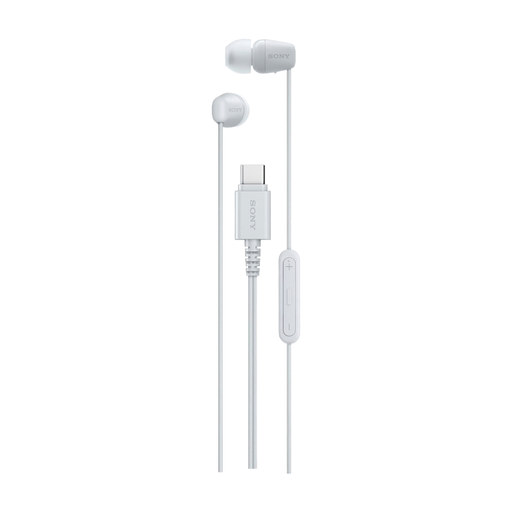
Sony IER-EX15C wired in-ear headset, USB Type-C, white

Sony IER-EX15C wired in-ear headset, USB Type-C, white

A wired in-ear option for a compact setup. Check that your device supports audio input via USB-C and select the headset as the microphone.

View at Joybuy

Frequently asked questions about headsets for recording words

How do you set up a headset for a test recording?

Select the headset microphone as the input and the headphones as the output in your recording software. Say a few words at a normal volume, check the level meter and listen back to the recording. Audacity warns that clipping can’t be fixed afterwards.

Can I use a 3.5 mm headset with any headphone socket to record?

No, the socket must also support microphone input. Check whether your device has a combined headset socket and whether you need an adapter. A headphone output alone isn’t enough.

What should I check with a Bluetooth headset?

Check the pairing and whether your devices support the recording and playback features you need at the same time. Microsoft says that stereo sound while using a microphone on Windows 11 depends on specific LE Audio support, the Windows version, hardware and drivers.

What are your rights when buying a headset online in the Netherlands?

For an online consumer purchase, you generally have a 14-day cooling-off period after delivery, subject to statutory exceptions. You also have a statutory guarantee if the product doesn’t perform as you could reasonably expect under normal use. ACM ConsuWijzer explains that there is no fixed statutory guarantee period of exactly two years.

Can you publish a recording of someone else’s voice as a word example?

Consider this separately from your choice of headset. According to the Dutch Data Protection Authority, you need a legal basis under the GDPR to collect and use personal data. In most cases, you also need consent to publish other people’s personal data online. Whether a voice recording contains personal data and which legal basis applies depends on the recording and how it is used. The regulator describes a limited exception for purely personal or household use.
