
Presenting in a busy household
You want colleagues to hear you clearly when there’s noise at or around the kitchen table. Check the microphone controls and test the recording in your meeting app beforehand.


If you mainly present while sitting at a laptop, start with a wired headset whose connector and mute function suit your device and the way you hold meetings. Bluetooth is more convenient if you want to get up during the update or switch between devices, but you’ll need to keep an eye on pairing and charging. Before the meeting, test how your voice and the sounds around your kitchen table come across to others.
You want colleagues to hear you clearly when there’s noise at or around the kitchen table. Check the microphone controls and test the recording in your meeting app beforehand.
You want to connect your headset without managing a battery or Bluetooth pairing. The port on your laptop and an easy-to-reach mute function are important things to consider.
You want room to move or need to switch between your computer and phone. If so, check the Bluetooth pairing and remember that you’ll need to charge it.
A good fit if: you present from one spot and don’t want to manage a battery or wireless connection.
Bear in mind: the cable limits how far you can move from your laptop. Also check that the plug fits your laptop’s port.
A good fit if: you want to get up during the update or switch between your computer and phone.
Bear in mind: you’ll need to pair the headset beforehand and make sure it’s sufficiently charged.
When you’re presenting from the kitchen table, your choice mainly depends on clear speech, a suitable connection, wearing comfort and how much freedom to move you need.
| Consideration | What to look for when buying | Who is this important for? |
|---|---|---|
| Clear speech amid kitchen noise | Check the microphone boom and mute function for the exact version, then test it in your meeting app before presenting. | When I present at the kitchen table, I want my voice to remain clear despite the noise around me. Around 36% of consumers put speech clarity first. |
| Suitable connection and easy start-up | Compare the plug on the version you’ve chosen with your laptop’s port, and check which microphone and speaker are selected in your meeting app. | If I want to connect without any fuss and get straight into my update, I also check the app settings. Around 29% of consumers give top priority to a suitable connection and reliable start-up. |
| Comfort and hearing your surroundings | Check whether the model is mono or stereo, and look at the fit and adjustability. | For a longer update, I want a comfortable fit. Sometimes I also want to keep one ear free so I can hear what’s happening in the kitchen. Around 21% of consumers prioritise wearing comfort. |
| Freedom to move | Check Bluetooth support, the devices you want to switch between and the battery charge before the meeting. | If I want to get up while presenting or switch between my computer and phone, freedom to move is my main concern. Around 14% of consumers prioritise this need. |
A microphone feature and the noise reduction in a meeting app are two different things. A product description alone won’t tell you how your voice will sound to others in your kitchen.
Check which feature the description refers to, then test your voice in the app you’ll use for the update.
With the Jabra Evolve2 40 SE, the USB connection depends on the version. The fit and connection can also vary within the Poly Blackwire 3200 series.
Before buying, compare the full model name, plug and port on your device.
A Bluetooth headset needs to be paired and sufficiently charged before you can use it while presenting.
Pair it with the device you’ll present on and make a test call beforehand.
Worth considering if you’re comparing a simple wired presentation set-up with the freedom to move wirelessly.
The Ayda USB-ENC is a wired on-ear option for calls from a regular laptop spot.
The wired Blackwire 3200 series is worth considering if you want to choose between mono and stereo.
The Evolve2 40 SE is a wired business option if you want to choose the microphone boom, style and connection carefully.
This selection at Joybuy includes wired USB headsets, a Bluetooth model and wired options with different connections. Check that the connection and controls on each version suit your laptop and meeting app.
 No image available
A wired option for a regular laptop spot, with an adjustable microphone boom and in-line controls.
The product description lists USB, volume control and an in-line mute function.
The description mentions a noise-cancelling microphone; test the results in your own meeting app.
 No image available
A wireless option if you want room to move during the update; remember that you’ll need to pair and charge it.
The product description lists Bluetooth and a USB-A Bluetooth adapter. This mono version has memory foam ear cushions.
Check the pairing and battery charge before the meeting.
 No image available
A wired stereo headset for calls; check which connection suits your set-up.
The description lists a 3.5 mm connection and an included USB controller.
The cable described is 0.95 m long, so bear in mind the distance between the headset and your device.
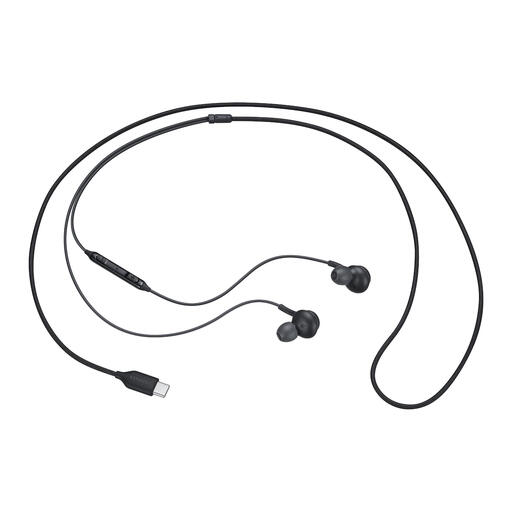 No image available
A wired in-ear option for calls if your device has a USB Type-C port.
The product description lists an integrated microphone and an in-line microphone mute control.
The description mentions several ear tip sizes; check which fit feels comfortable for you.
 No image available
A wired option for a regular laptop spot, with no battery to manage.
The description lists USB-A with a USB-C adapter cable and on-ear volume controls.
According to the product description, you can flip up the microphone to mute it. Test for yourself how your voice sounds in your meeting app.
In Microsoft Teams for work or school, select your preferred microphone and speaker in the device settings and make a test call; Teams will play back your recorded message. In Zoom, you can test the microphone and speaker separately. Try this with the usual kitchen-table background noise, too.
Yes. Teams has its own adjustable noise reduction. Check the setting and listen to a test recording: the app feature and a headset description aren’t the same thing.
First, check the exact version of the headset and whether your phone and app support audio through that connection. Jabra states that not all USB-C devices or apps support an audio connection with the Evolve2 40 SE.
According to the Dutch government, you generally have a 14-day cooling-off period for eligible distance purchases, with some exceptions. The stated distance-selling rules don’t apply to purchases from a private individual. If a product is faulty, statutory protection may apply in addition to any manufacturer’s warranty. Check who the seller is and which terms apply to your purchase.
The Dutch government states that electronic devices in the EU must carry a CE mark. Check the marking and the information about the seller and manufacturer, especially if you’re buying from a seller outside the EU. A CE mark is not, by itself, a sound test.