For a project update where you’ll be doing most of the talking, choose a personal headset with a boom microphone. Go wired if you’ll be staying by your laptop, or wireless if you’ll be moving around. If colleagues at the table also need to be heard online, consider the room audio setup: a headset worn by the presenter won’t automatically pick up their voices. Microsoft Support recommends having only one microphone and speaker active in a room at a time to prevent echo.
Who is this headset choice relevant to?
Presenter with online attendees
If you’ll be doing most of the talking, consider the microphone, connection and audio settings that will help remote attendees hear you clearly. Microsoft Support recommends testing your audio settings before the meeting.
Presenter with colleagues at the table
If colleagues in the room will also be joining the online conversation, decide whether personal headset audio will be enough or whether the room setup needs to pick up their voices. Microsoft Learn describes the supported operating distance for shared devices.
Presenter who moves around
If you’ll be moving away from your laptop while speaking, weigh the freedom to move against the need to manage the connection and battery of a wireless headset.
What should you look for when choosing?
First decide whether only your voice, or your colleagues’ voices too, need to be heard online. Then choose the connection, software version and freedom of movement that suit your presentation.
| What to consider |
What should you look for? |
Who is this important for? |
| Presenter clarity |
Check the microphone and test your voice in the meeting app; listening ANC and microphone features serve different purposes. |
If I’m doing most of the presenting, I want online attendees to hear me clearly; around 33% of consumers prioritise presenter clarity. |
| Colleagues being heard |
Decide who needs to be able to join in online and check whether the existing room audio setup is suitable. |
If colleagues at the table are also taking part, I want to know whether their voices will come through online; around 27% of consumers give the audibility of other people in the room top priority. |
| Connection and meeting software |
Check your laptop port and the exact UC or Teams version; then test the microphone and speaker in the app. |
If I want to get started without connection or control issues, I check the port and version in advance; around 20% of consumers prioritise connection and meeting software. |
| Freedom to move |
Decide whether you’ll be moving away from your laptop; for wireless use, check the exact version, receiver and battery. |
If I want to move around during the presentation, I weigh that freedom against the connection and battery; around 13% of consumers give freedom of movement top priority. |
| Style and awareness of the room |
Choose mono or stereo to suit your needs and try the headset on; its stated weight won’t tell you how it will feel to wear. |
If I want to stay aware of the room while speaking, I consider the style and fit; around 7% of consumers prioritise wearing comfort and awareness of the room. |
Common buying mistakes
-
Buying a personal headset to make everyone at the table audible
A headset is designed for the person wearing it and won’t automatically pick up voices from elsewhere in the room.
Before buying, decide who needs to be able to join in online and, if necessary, assess the existing room audio setup.
If several colleagues need to take part, you may also need a suitable room audio setup.
-
Confusing listening ANC with microphone noise cancellation
These features serve different purposes: listening ANC affects what you hear, while the microphone determines what sound is sent to the person you’re speaking to.
Check the microphone specifications and listening feature separately, then test the microphone in your meeting app.
-
Leaving two audio setups active at the same time
Microsoft Support warns that multiple active microphones and speakers in the same room can cause echo.
If you’re also using a room device, switch off your laptop audio where needed so that both setups aren’t active at the same time.
-
Confusing a product family with the version you want
Connections, UC or Teams versions and included accessories can vary between models.
Compare the full model name and product number with your laptop port and the meeting app you use.
Brands to consider
Jabra
The Evolve2 30 SE is a wired headset for personal use. Compare the mono or stereo version, USB connection and UC or Teams version separately.
- Jabra lists two microphones and noise-isolating ear cushions for the Evolve2 30 SE.
- These are manufacturer specifications, not independent measurements in a small meeting room; the headset won’t automatically pick up the voices of other people in the room.
EPOS
The IMPACT 100 series includes wired mono and stereo versions for personal use. The UC Stereo USB-C+A version reviewed has a USB-C connection with a USB-A adapter.
- For this stereo version, EPOS specifies a weight of 76 g, a directional microphone and a 2 m cable.
- The cable limits how far you can move; the stated weight doesn’t tell you how the headset will feel on you.
HP Poly
The Blackwire 3300 series includes wired headsets, while the Voyager 4300 series has wireless versions for anyone who moves away from their laptop while speaking.
- HP lists a 3.5 mm option for the Blackwire 3325. For the Voyager 4320 version reviewed, HP specifies a BT700 adapter and a wired USB mode.
- Connections and features depend on the specific version; check the full model name and included accessories.
Logitech
The Zone Wired 2 for Business is a wired personal headset for anyone who also wants listening ANC; compare the Dutch Teams and UC product numbers.
- Logitech specifies two noise-cancelling microphones, USB-C or USB-A and a 1.9 m cable.
- Adaptive ANC is designed to affect what the wearer hears; it doesn’t show that colleagues elsewhere in the room will be picked up clearly.
Headsets for presenters
This selection includes personal headsets for presenters, with wired and wireless options. A personal headset won’t replace room audio when colleagues at the table need to be heard online.
 Image unavailable
Jabra Evolve2 30 SE
A wired personal headset for presenters who spend most of their time by their laptop. The cable limits how far you can move from the connected device.
View at Joybuy
 Image unavailable
Jabra Evolve2 65 USB-A Black MS Mono
A wireless mono option for presenters who want freedom to move; remember to manage and charge the battery.
View at Joybuy
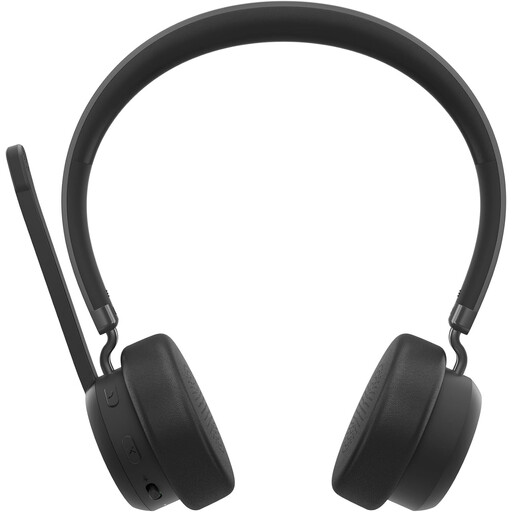 Image unavailable
Lenovo 4XD1Q30302 wireless headset
A wireless headset option for presenters who don’t want to stay beside their laptop; remember to charge it before use.
View at Joybuy
 Image unavailable
Trust GXT 490 FAYZO Over-Ear 7.1 USB gaming headset
A wired USB headset with microphone for presenters who stay at their computer; the USB cable limits how far you can move.
View at Joybuy
 Image unavailable
EPOS | SENNHEISER IMPACT SC 230 USB MS II, black
A wired headset for presenters looking for a USB connection and boom microphone; the 2.9 m cable limits how far you can move.
View at Joybuy
Frequently asked questions
When is a headset not enough for a hybrid meeting?
If several colleagues in the room need to be heard online, assess whether a shared audio setup is suitable for the room and supported operating distance. A personal headset isn’t necessarily a microphone for the whole table.
How can you check the audio before your project update?
Select the intended microphone and speaker in Teams, then make a test call. For a room device, Microsoft Support recommends having only one microphone and speaker active in the room to avoid echo.
What does a Teams-certified version mean?
Microsoft describes certification as a tested level of Teams integration and control. Check the exact headset version if you want to use these features.
What product rules apply to a headset sold in the Netherlands?
Electronic equipment is subject to the applicable European product safety and conformity requirements; the exact requirements depend on the version. Business.gov.nl states that, where required, the manufacturer applies a CE mark and draws up an EU declaration of conformity. For a headset with Bluetooth or another radio connection, radio equipment rules are also relevant.


