If you’re speaking during an online writing workshop from a shared home, choose a headset with a microphone you can position close to your mouth and a connection that works with your device. Zoom and Microsoft recommend testing your microphone and meeting app settings. Microphone noise reduction is different from blocking sound from reaching your own ears. A wired headset doesn’t need charging, while a wireless model needs to be paired and charged.
Who is this buying guide for?
Workshop participant with chatty housemates
You want the other participants to hear you clearly. Check the microphone position and test it in your meeting app while people are talking in the background; Zoom and Microsoft describe audio isolation and noise reduction features for meetings.
Participant in long workshops
You’ll wear your headset throughout the session and want to hear the group clearly. Compare the fit and mono or stereo options; Jabra and HP Poly list different versions in their product specifications.
Participant who switches between devices
For example, you might switch between a laptop and a phone. Check the connection on the exact version and, if it’s wireless, how it connects to your devices.
What should you look for when choosing?
| What to consider |
What should you look for? |
Who should consider this most? |
| Being heard clearly over background voices |
Check whether the microphone is adjustable and make a test recording with housemates talking in the background. |
If you’re speaking from a shared space, you want your voice to come across clearly. Around 36% of consumers say clarity is their top buying priority. |
| Comfort during the workshop |
Check whether it’s a mono or stereo model, whether it’s adjustable and what type of ear cushions it has; try the fit for yourself. |
If you wear the headset for a long time, you’ll want to keep following the workshop without the fit becoming uncomfortable. Around 29% of consumers put long-term comfort first. |
| Connection to your device |
Compare USB-A, USB-C or 3.5 mm with the ports on your device. If your device has two separate audio ports, you may need an adapter for the Logitech H151. |
If you mainly want to avoid finding that the headset won’t connect to your laptop, tablet or phone, check the exact version. Around 21% of consumers give device compatibility top priority. |
| Freedom to move around |
Check the wireless connection supported and the battery details for the exact version; playback time isn’t necessarily the same as talk time. |
If you want to move around during the workshop, a cable could get in the way. Around 14% of consumers say freedom to move is their top priority. |
Common buying mistakes
-
Confusing ‘noise cancelling’ with protection for both sides of the conversation
Ear cushions that block sound for you and microphone audio processing serve different purposes. A microphone feature doesn’t guarantee that other participants won’t hear your housemates talking.
Check what the feature applies to and make a test recording with background speech.
-
Assuming every version has the same connection
USB-A, USB-C, combined 3.5 mm connections and separate audio ports aren’t interchangeable. According to the Logitech manual, you may need an adapter for the H151 if your computer has separate ports.
Before ordering, compare the full version name and connection with the ports on your device.
You may need a suitable adapter for your setup.
-
Assuming the advertised wireless playback time is the talk time
The playback time stated by JLab for the original GO Work isn’t a verified talk time and doesn’t automatically apply to other generations.
Check the battery details for the exact version if you want to take part in a long workshop without charging.
Brands to compare
Logitech
The H390 is a wired USB headset with a microphone boom; the H151 is a model with a 3.5 mm connection.
- Logitech lists a noise-cancelling microphone and on-cable controls for the H390.
- Check whether the USB-A or USB-C version of the H390 is right for you. According to the Logitech manual, the H151 may need an adapter if your computer has two separate audio ports.
Jabra
The Evolve2 40 SE is available in various USB-A and USB-C versions, as well as mono, stereo and specific communications platform variants.
- Jabra lists three microphones, a sound-isolating design and a busylight in its product specifications.
- These specifications aren’t an independent measure of how clearly you’ll be heard in a shared home; check the full version details too.
HP Poly
The Blackwire 3200 and 3300 series include wired headsets with different wearing styles and connection options.
- HP lists mono and stereo as options.
- According to HP, a 3.5 mm option is available specifically for the 3315 and 3325 in the Blackwire 3300 series, not every model.
JLab
The original GO Work is an on-ear headset that lets you compare wireless and wired use.
- For the version described, JLab lists Bluetooth multipoint and a USB-C-to-3.5 mm cable in the box.
- JLab’s stated playback time of over 45 hours isn’t talk time and doesn’t automatically apply to other generations.
Headsets and headphones at Joybuy
This selection includes wired and wireless models to compare for joining an online workshop. For each version, check the fit, connection and how the microphone works with your device and meeting app.
 No image available
Sennheiser MOMENTUM 4 Wireless, over-ear
For anyone considering wireless over-ear headphones for a workshop; test how clearly you can be heard with housemates talking in the background.
Wireless, over-ear; the product name lists a 60-hour battery life and 4 microphones. The product information says they need to be paired and charged for wireless use, and also offers a wired option.
View at Joybuy
 No image available
Samsung Galaxy Buds4 Pro, True Wireless in-ear
For anyone considering wireless in-ear earbuds; before the workshop, check the microphone and audio selection on your device and in your meeting app.
True Wireless in-ear earbuds with Active Noise Cancelling, according to the product name. The product information mentions charging and a charging case.
View at Joybuy
 No image available
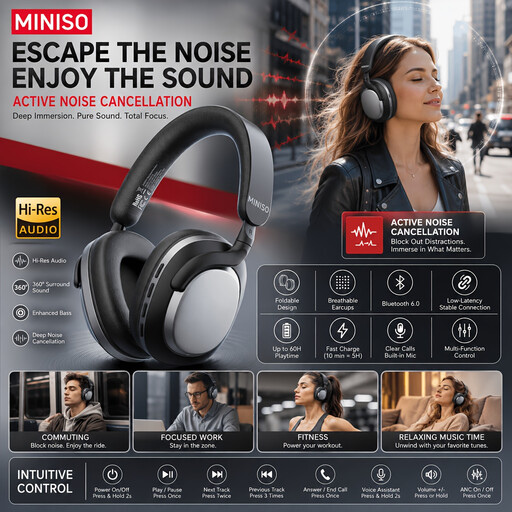
MINISO MG210, wireless over-ear headphones
For anyone looking for wireless over-ear headphones; make a test recording to check how your voice sounds with background speech.
Wireless, over-ear and black; the product name mentions noise cancelling.
View at Joybuy
 No image available
Turtle Beach Airlite Fit, wired 3.5 mm headset
For anyone considering a wired setup; check that the connection works with your device and test the microphone in your meeting app.
Wired gaming headset with a 3.5 mm connection and flip-to-mute microphone, according to the product name. The stated compatibility includes Nintendo Switch, Switch Lite and Switch OLED.
View at Joybuy
 No image available
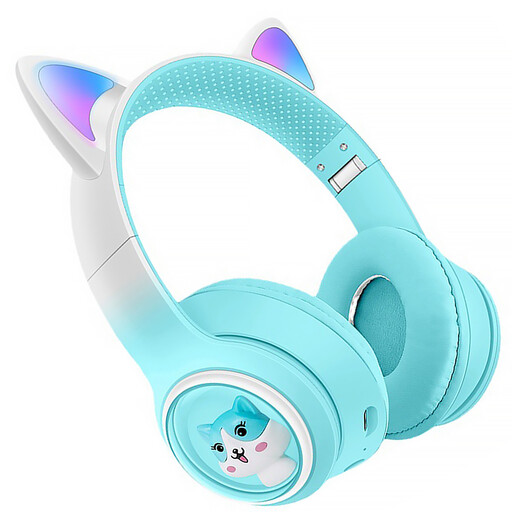
KINSI Bluetooth Headphones with cat ears and microphone
For anyone considering wireless headphones; check the fit and, before the workshop, test that the microphone and audio are selected correctly.
Bluetooth, microphone, RGB lighting and USB-C are listed in the product name.
View at Joybuy
Frequently asked questions
How can you check that other people can hear you clearly before the workshop?
Select the right microphone and audio output in your meeting app and make a test recording. If you can hear your housemates, try the app’s available noise reduction and test again; results depend on the situation.
Do you need to install or maintain a headset?
It depends on the version. Logitech describes the H390 as a USB headset with a plug-and-play connection; you should also check your device and app’s audio and microphone settings. A wireless headset needs to be paired and charged.
What costs and warranty details should you check before buying?
Check whether you need an adapter for your connection and whether the seller charges for delivery. The Dutch government explains that you’re entitled to a product that’s fit for purpose; there’s no fixed statutory warranty period for all products in the Netherlands.
Do you have a cooling-off period when buying online in the Netherlands?
According to the Dutch government, many distance purchases from a business come with a 14-day cooling-off period. This doesn’t apply to every seller or purchase, so check the terms and conditions that apply to your order.


