
Someone who often asks questions
You want to be heard clearly when answering questions at a shared kitchen table. Check the microphone’s position and mute function, and test the audio in your training app.


If you usually stay seated at the table, a wired headset with a connection that suits your computer is a practical choice. If you want to walk around during training, consider Bluetooth and check the connection and talk time. At a shared kitchen table, pay attention to the microphone’s position and mute function, but don’t confuse microphone noise reduction with blocking out sound for yourself. Before your training session, test both your microphone and speakers in the app you’ll be using.
You want to be heard clearly when answering questions at a shared kitchen table. Check the microphone’s position and mute function, and test the audio in your training app.
You want to listen comfortably for longer, so consider whether you’d prefer stereo, which covers both ears, or mono, which leaves one ear free. HP Poly describes both wearing options in the Blackwire 3200 series.
You want to move around without a cable, so check in advance that Bluetooth works with your device, how pairing works and how long the headset supports calls.
First, consider whether your main priorities are speaking clearly, finding a suitable connection, listening comfortably for longer or having the freedom to move around. Your main need will determine which features to check first.
A good fit if: you stay at the table and your computer has the connection required by your chosen headset version.
Bear in mind: the cable limits how far you can move, so check that it reaches your seat.
A good fit if: your device has a suitable audio connection for both headphones and a microphone.
Bear in mind: check the headset plug type and your device’s input. A product range name doesn’t tell you which connection a particular version has.
A good fit if: you want to move around during training and your device supports Bluetooth audio with the training app.
Bear in mind: you’ll need to charge it and test the connection beforehand. Logitech lists up to 16 hours of talk time per full charge for the Zone 300.
| Point to consider | What to check before buying | Who is this important for? |
|---|---|---|
| Speaking clearly | Check whether the microphone is adjustable, how to mute it and whether you can test it in your training app. | If I want to ask questions at a shared table, I want to know that my voice will come through clearly. Around 36% of consumers say being heard clearly when actively participating is their top priority. |
| Suitable connection | Check the exact version and your device’s ports, then select the right microphone and speaker in the app. | I want to be sure in advance that I can listen and speak through my device. Around 29% of consumers say a working connection and correct audio selection are most important. |
| Comfort during long sessions | Check whether the headset is mono or stereo, and look at the design of the headband and ear cushions. | For a longer session, I want a style that suits me and to decide whether I’d like to keep one ear free. Around 21% of consumers prioritise wearing comfort and style. |
| Moving around or staying connected | Decide whether you want to walk around during training or keep one ear free. If you choose Bluetooth, check the talk time and test the connection. | If I want to get up or keep hearing sounds around the house, freedom to move or staying aware of my surroundings matters to me. Around 14% of consumers say this is their top priority. |
A range may include USB, mono, stereo, UC or Teams versions. Connections and features can vary between versions.
Before buying, compare the full model number and connection with your device and training app.
Microphone noise reduction affects the sound you transmit. It doesn’t tell you how much sound you’ll hear through the ear cups.
Consider the microphone features and wearing style separately, and test the microphone in the room where you’ll be training.
Your meeting app needs to use the microphone and speaker you intend to use. If you haven’t selected the right ones, the audio may not work as expected.
Connect or pair the headset in advance, select both audio devices in the app and run a test. Zoom offers a speaker and microphone test.
The H390 is a wired USB-A option, while the Zone 300 is a Bluetooth headset for anyone who wants to move around during training.
The Ayda range includes, among other options, a PC headset and a separate USB version for calls and online meetings.
The wired Blackwire 3200 series offers versions for anyone choosing between mono and stereo.
The wired Evolve2 30 SE range has separate mono, stereo, UC and Teams versions.
The wired IMPACT 100 range is worth considering if low weight and call controls are important to you.
This selection includes wired headsets with microphones, including USB versions, for calls and online training.
 Image unavailable
A wired USB headset to consider if you train at your computer and have a USB port available.
USB connection; check that your computer has a suitable USB port.
 Image unavailable
A wired USB headset for taking part in online calls from a computer with a suitable port.
USB connection; check that your computer has a suitable USB port.
 Image unavailable
A wired headset for anyone who wants to speak actively during online training. Check which connection suits your computer.
USB-A connection with USB-C adapter cable. The headset is wired.
 Image unavailable
A headset for calls. Check in advance that its connection is suitable for your device.
Check which connection it requires and whether your device has a suitable port.
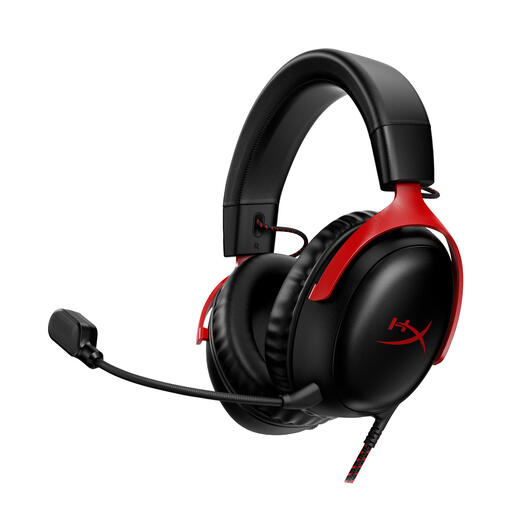 Image unavailable
A headset to consider if you want a detachable microphone. Check which connections are compatible with your device.
The product description lists 3.5 mm, USB-A and USB-C connections. The microphone is detachable.
Select the headset as both the microphone and speaker in your meeting app, then run an audio test. Zoom offers a speaker and microphone test, although the steps may vary between apps.
No. A microphone feature affects the sound you transmit. For your own listening experience, check the wearing style and ear cups separately. HP describes both mono and stereo options in the Blackwire 3200 series.
Follow the product-specific instructions for cleaning and replacing the ear cushions. EPOS provides separate care instructions for the IMPACT 100; don’t assume these apply to other models.
For most distance purchases by consumers, you have 14 days from delivery to change your mind; check whether an exception applies. You’re also entitled to a statutory warranty if, under normal use, the product doesn’t meet what you could reasonably expect. According to the ACM’s ConsuWijzer, the statutory warranty isn’t simply a fixed period of two years.