
Active participant in a noisy home
If you ask questions during exercises while your housemates are talking, pay attention to the microphone position and how quickly you can mute it. Logitech and Trust describe these features on various models.


For a fixed workspace, a wired headset with a suitable connection and easy-to-reach mute control is a practical starting point; if your housemates are talking, the microphone matters too. Choose more passive noise isolation if you struggle to hear the trainer, but bear in mind that you may then hear your housemates less clearly. Wireless is most useful if you want to move around during training and can check the connection and battery charge beforehand.
If you ask questions during exercises while your housemates are talking, pay attention to the microphone position and how quickly you can mute it. Logitech and Trust describe these features on various models.
If conversations around you make it difficult to follow the explanations, compare the fit and passive noise isolation. Jabra describes noise-isolating ear cushions, while HP Poly also offers mono versions that leave one ear free.
If you use different devices or want to move around during the session, check the connection and whether your chosen model is wired or wireless. Logitech and HP Poly describe models with different connection options.
First decide whether you mainly want others to hear you more clearly or to hear the trainer better. Then check that the headset connects to your device and suits the way you want to take part.
| What to consider | What should you check? | Who is this important for? |
|---|---|---|
| Speaking clearly | Check the microphone position and mute control; if possible, make a test recording in your training app. | If you ask questions while your housemates are talking, you want your voice to come through clearly and to be able to mute quickly. Around 36% of consumers prioritise being heard clearly. |
| Hearing the trainer clearly | Compare the fit and passive noise isolation; don’t confuse this with noise reduction on the microphone. | If voices at home distract you from the explanations, consider how the ear cups affect your listening experience. Around 29% of consumers prioritise listening without interruptions. |
| Connection | Check the USB type or 3.5mm port, and whether your device supports both headphones and a microphone. | If you’re not sure which port your device uses, check before buying that it recognises the headset and that your training app supports the connection. Around 21% of consumers prioritise device connectivity. |
| Comfort | Check how adjustable it is and the type of ear cushion; make sure you know which wearing style the model has. | If you’re attending a longer session, you’ll want a headset that’s easy to adjust and doesn’t put unnecessary pressure on your ears. Around 14% of consumers put comfort first. |
Reducing noise for your ears and limiting noise in the microphone signal are different functions. One won’t automatically solve the problem addressed by the other.
First work out whether you can’t hear the trainer clearly or other people can’t hear you clearly. Then check which function the model actually offers.
A range may include versions with different USB connections or mono and stereo wearing styles. A version that doesn’t suit your device or preferences may require a different connection or headset.
Before buying, check the full model name, connection and wearing style.
A name that looks very similar to another headset’s doesn’t confirm that it’s the same model or version.
Compare the full model name and version before treating a product as a replacement.
The Zone Wired is a wired USB option; the H151 has a 3.5mm connection that needs to match your device’s port.
The wired Evolve2 40 SE may be worth considering if you’re looking for ear cushions with passive noise isolation and a microphone boom.
Within the wired Blackwire 3200 series, HP offers mono and stereo wearing styles to suit different listening preferences.
The Ayda USB-ENC is designed for calls on a PC; the Primo Chat Headset is also aimed at video calls.
This selection includes wired and wireless headsets with microphones. Choose one that suits your device’s connection, the freedom of movement you want and the microphone controls.
 No image available
An option for a fixed workspace with USB-A; the product information also mentions compatibility with a USB-C adapter.
The product information lists memory foam ear cushions with noise isolation. This alone doesn’t tell you how much you’ll hear your housemates’ voices.
 No image available
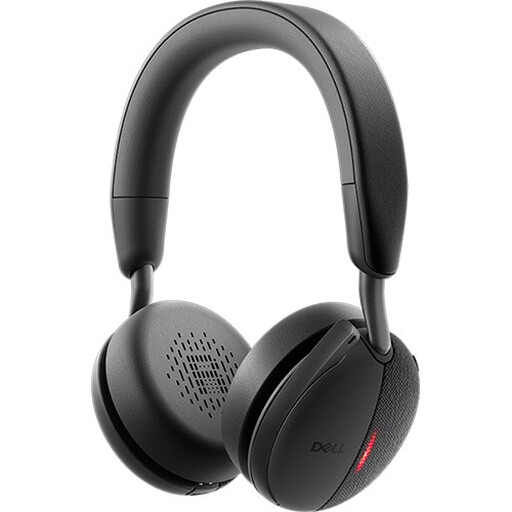
A wireless option if you want to move around during training. Check that the Bluetooth connection and USB-A Teams version suit your device and training app.
 No image available
For a fixed computer setup: the product information lists USB connectivity and an adjustable microphone for internet calls.
 No image available
A wireless option for more freedom to move around. Check that your device supports a Bluetooth connection or the available USB connection.
The product information lists controls for muting calls; check that the connection with your training app meets your needs.
 No image available
The product information describes this version as single-sided. It may suit you if you want to keep one ear free during training.
Check that the USB connection and call controls are compatible with your computer and training app.
First check that the connection is compatible with your device. Then select the headset as both the speaker and microphone in your training app, and make a short test recording beforehand. Jabra recommends positioning the Evolve2 40’s microphone boom close to your mouth.
Follow the care instructions for your specific model and position the cable so no one can trip over it. Joybuy’s product information for the Logitech H151 recommends using a dry or slightly damp cloth and keeping the 3.5mm connector clean; this advice doesn’t necessarily apply to every headset.
According to ACM ConsuWijzer, online purchases generally come with a cooling-off period of up to 14 days after delivery, subject to exceptions. You’re also covered by the legal guarantee if, under normal use, a product doesn’t do what you could reasonably expect; the seller must then offer a solution in line with the applicable conditions. Before opening the packaging, check the relevant exceptions and returns instructions.
Don’t assume you can record a training session just because you’re using a headset. The Dutch Data Protection Authority lists agreements about making and storing recordings, and informing people about them, as considerations for policies on online video calls in education. Follow the organiser’s rules and check in advance what applies to your session.